UCEPROTECT Level 1, 2 and 3: What a Listing Means and What to Do
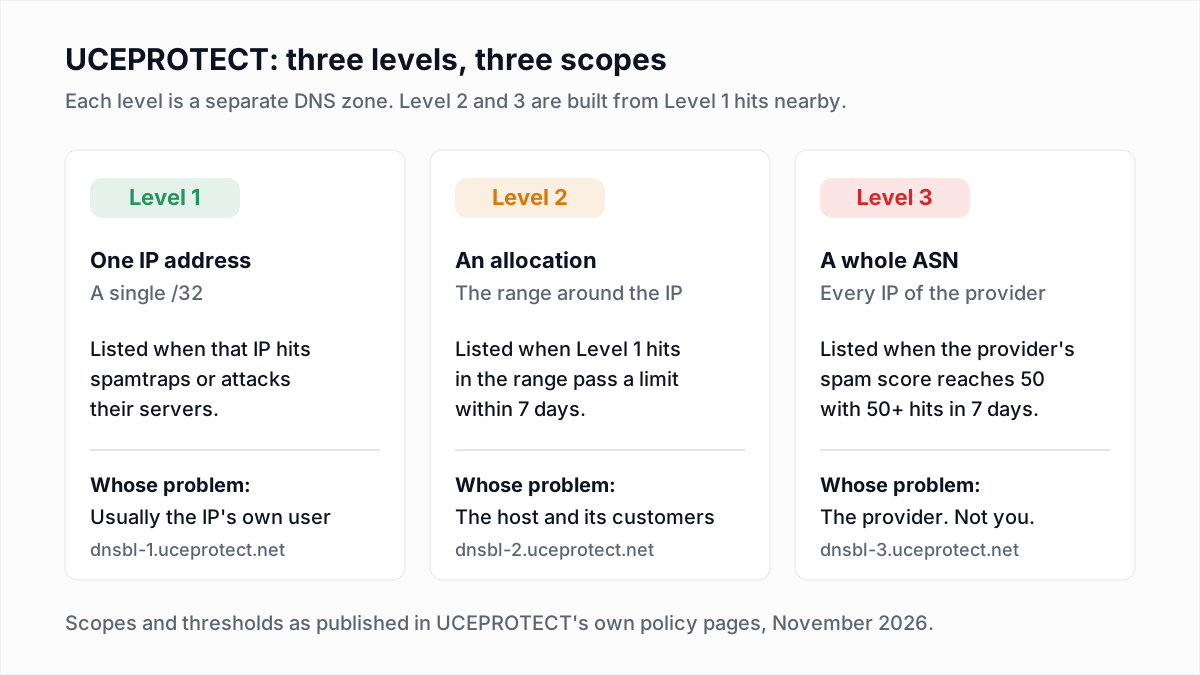
UCEPROTECT is a DNS blocklist with three levels. Level 1 lists a single IP address that hit its spamtraps. Level 2 (UCEPROTECTL2) lists the whole allocation around that IP. Level 3 (UCEPROTECTL3) lists every IP address that belongs to a hosting provider's network. A Level 1 listing is usually about your own server. A Level 2 or Level 3 listing is almost always about your provider's other customers, and there is nothing you can fix yourself. All three levels clear automatically and free of charge once the spam stops. UCEPROTECT also sells an optional paid express removal, which you are not obliged to buy.
What UCEPROTECT is
UCEPROTECT-Network publishes three blocklists that mail servers can query over DNS. Its usage page names the zones: dnsbl-1.uceprotect.net for Level 1, dnsbl-2.uceprotect.net for Level 2 and dnsbl-3.uceprotect.net for Level 3. Multi-list checkers show them as UCEPROTECTL1, UCEPROTECTL2 and UCEPROTECTL3.
Each receiving mail server chooses which zones to query, and whether a match rejects the message or only adds to a spam score. That choice decides whether a listing affects you.
UCEPROTECT Level 1: a single IP address
The Level 1 policy says the list "only contains single IP addresses [ /32], which were used by spammers / abusers". According to that page, an IP is listed automatically if it tries to deliver mail to UCEPROTECT spamtraps, forwards mail in a way that breaks the sender's SPF record, or is involved in port scans or attacks against UCEPROTECT servers.
The number of incidents needed is not fixed. The policy says an IP with missing, wrong or generic reverse DNS "is at highest risk to get listed in Level 1 because of a single incident", one more reason to set up reverse DNS properly.
Removal is automatic. The Level 1 removal page states: "Every IP address temporary listed as Level 1 expires automatically 7 days after the last spam email from it hits our SPAMTRAPS." It adds that there is no need to request removal if you do not want to pay.
UCEPROTECTL2: the allocation around the IP
Level 2 is derived from Level 1. The Level 2 policy says it "escalates dynamically and lists the relevant allocation if the number of impacts of the IPs listed in level 1 exceeds certain limit values within 7 days". The limits scale with the size of the range: per that page, a /25 is listed after 3 impacts and a /24, which holds 256 addresses, after 4.
The Level 2 removal page says listings "are removed automatically and free of charge as soon as they no longer meet the listing criteria", and that to get a netblock out sooner the Level 1 entries inside it have to be cleared: "Normally, only your service provider can request for this."
UCEPROTECTL3: the provider's whole network
Level 3 lists by ASN, the autonomous system number that identifies a provider's network on the internet. The Level 3 policy says it "automatically lists all IPs assigned to an AS number as soon as its SPAMSCORE is 50 or higher", provided at least 50 impacts from that ASN were listed in Level 1 in the last 7 days. The score is Level 1 impacts divided by the total IPs in the ASN, multiplied by 100,000.
UCEPROTECT is open about the side effects. The same page says: "By using Level 3 for blocking, be prepared to occasionally lose some required mails too." It recommends that receivers use Level 3 inside a scoring system and not for outright blocking.
The Level 3 removal page is blunt about who can act: "Removal requests from end customers at LEVEL 3 are futile" and "Only your service provider can change your situation." The provider is removed automatically once it no longer matches the listing criteria.
The three levels side by side
| Level | Scope | How you get listed | How you get off | Real impact |
|---|---|---|---|---|
| Level 1 | One IP (/32) | That IP hit spamtraps, broke SPF when forwarding, or attacked their servers | Stop the cause. Expires 7 days after the last spamtrap hit | Rejections at receivers that block on Level 1. Worth fixing either way |
| Level 2 | An allocation (IP range) | Level 1 impacts inside the range passed the limit for its size within 7 days | Automatic once the range drops below the limit. Only the provider can speed it up | Depends on which receivers query Level 2. Check your bounces |
| Level 3 | Every IP in an ASN | The provider's score reached 50 with at least 50 Level 1 impacts in 7 days | Automatic once the provider no longer meets the criteria. Customers cannot request it | Usually the smallest. UCEPROTECT itself recommends scoring, not blocking, on Level 3 |
Why Level 2 and Level 3 list senders who did nothing wrong
Levels 2 and 3 list address space, not behaviour. If you rent a server or a shared sending IP from a provider whose other customers hit UCEPROTECT's traps often enough, your IP is listed because of where it sits. Your own volume, authentication and complaint rate do not come into it.
UCEPROTECT says as much. Its removal policy calls a Level 2 or 3 listing of space you do not own "a good indicator that you are an innocent user", and recommends a complaint to your service provider.
How to check which UCEPROTECT level you are on
- Find your sending IP. It is in the bounce message or in the
Received:headers of a message you sent (the email header analyzer lists them from a pasted header). - Look it up on UCEPROTECT's own page. The query page takes an IP address (or an AS number, for providers) and reports the status at each level. It allows manual queries only. Our blacklist check includes the three UCEPROTECT zones in a one-time lookup.
- Or query the DNS zones directly. Reverse the four parts of the IP and look it up in each zone. For the IP
192.0.2.10:
dig +short 10.2.0.192.dnsbl-1.uceprotect.net
dig +short 10.2.0.192.dnsbl-2.uceprotect.net
dig +short 10.2.0.192.dnsbl-3.uceprotect.net
An answer means the IP is listed in that zone; no answer means it is not. Level 1 on its own points at your server. Level 2 or 3 without Level 1 points at your neighbours.
Does a UCEPROTECT listing actually matter?
It matters exactly as much as the number of your recipients whose mail servers reject on it, and that number is often zero.
There is no public list of receivers that use UCEPROTECT. Its removal pages say listings are generated by its own servers, "Bavarian municipals and district authorities, and others that use our professional UCEPROTECT products". We found no statement from Google, Microsoft or Yahoo that they use it, and we are not going to guess. Suped, an email monitoring vendor, reaches the same conclusion in its write-up: "There is no authoritative public list of receivers that currently use UCEProtect."
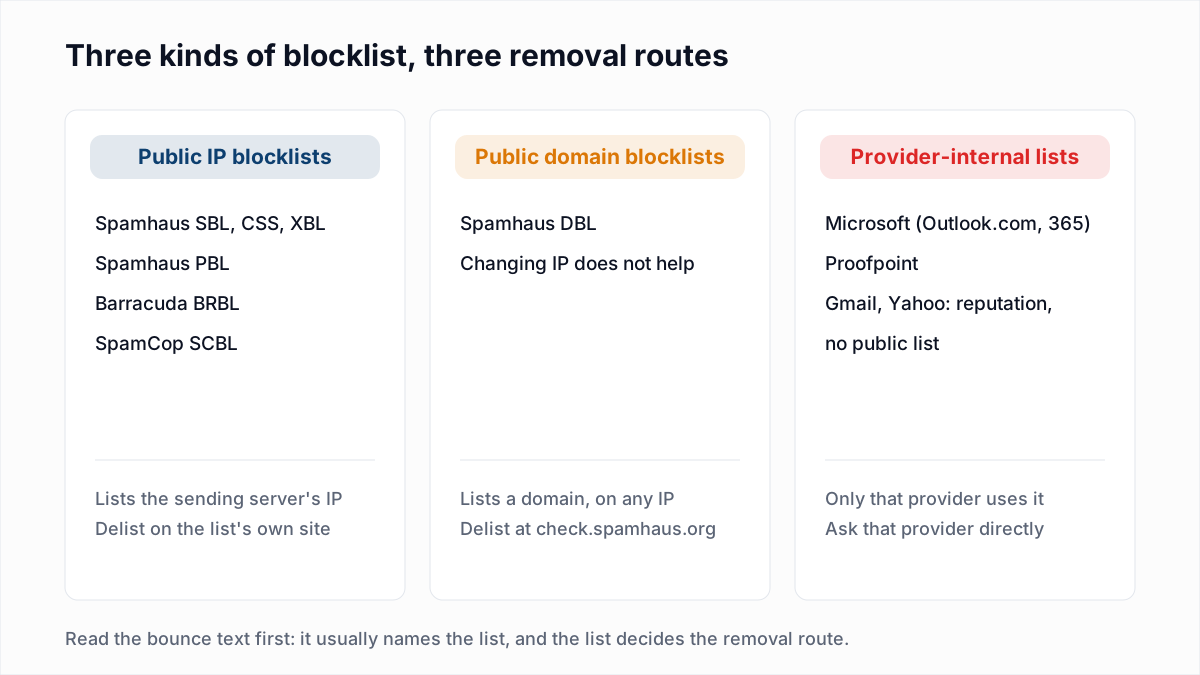
You do not need one. Your own bounce logs answer the question for your own recipients. A server that rejects on a DNS blocklist normally names the zone in its reply. Postfix, for example, uses this wording by default:
554 5.7.1 Service unavailable; Client host [192.0.2.10] blocked using dnsbl-1.uceprotect.netThe exact text varies by receiver (see 554 5.7.1 explained), but the zone name is the constant. Search your bounces for it:
grep -i "uceprotect" /var/log/mail.logIf you send through an email platform, search the reason column of its bounce report for the same word. Bounces that name a different list, or none, have another cause: see the bounce code reference.
| What you find | What it means | What to do |
|---|---|---|
| No bounce mentions uceprotect | None of your recipients' servers is rejecting on it | Note the listing, fix any Level 1 cause, and move on |
Bounces name dnsbl-1 | A receiver blocks on Level 1, and your IP has hit spamtraps | Find and fix the cause now. This one is about your sending |
Bounces name dnsbl-2 or dnsbl-3 | A receiver blocks on a range or provider listing | Count the affected recipients, tell your host, consider a different IP or provider |
A checker showing red next to UCEPROTECTL3 is not evidence of a delivery problem. A bounce that names it is.
What to do at each level
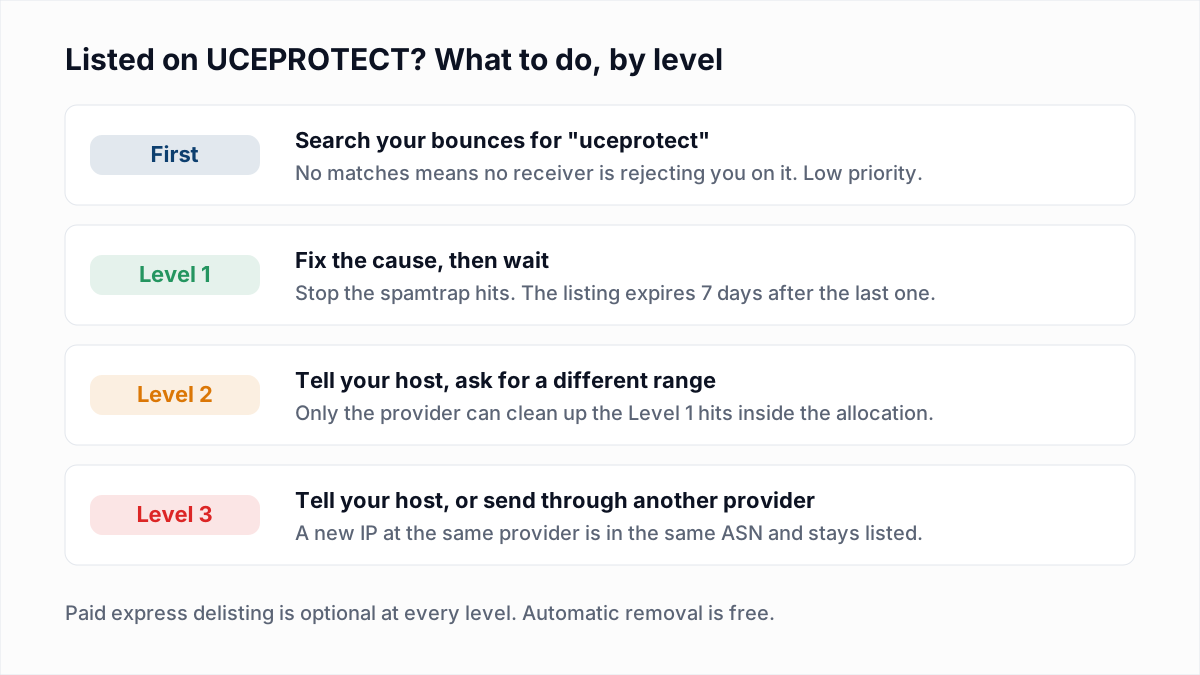
Level 1: fix the cause, then wait
- Check the server for a compromised account, a hacked contact form or malware sending mail you did not write.
- Look at what you mailed in the week before the listing. Spamtrap hits come from old, purchased or scraped addresses, as our guide to spam traps explains.
- If the server forwards mail, check how. The policy names forwarding that breaks SPF as a trigger. See why email forwarding breaks SPF and DMARC.
- Then wait. The listing expires 7 days after the last hit. If it does not, the hits have not stopped.
Level 2: talk to your host
Send your provider the lookup result and ask them to deal with the Level 1 sources in the range. If rejections are costing you real mail, ask for an IP in a different allocation, and look it up before you accept it.
Level 3: talk to your host, or route around it
Report it to the provider, but do not ask for a new IP: it would be in the same ASN and listed too. If specific recipients reject you, relay outbound mail through a provider or email platform on a different network, which changes the IP receivers see. If no bounce names the list, staying put is a reasonable decision. The listing is recalculated from the provider's last 7 days, so it can lift without any action from you.
Is UCEPROTECT legit, and should you pay for express delisting?
UCEPROTECT is a real blocklist with published criteria, and some mail servers do query it. What makes it controversial is that it charges for faster removal, on top of listing whole ranges and providers.
The facts from its own pages: each removal page offers paid immediate removal as an alternative to waiting, under the words "PLEASE NOTE THAT THIS IS AN OPTIONAL OFFER ONLY." The fee is shown as an image, so we are not quoting a current price. The pages warn that a removed IP or range "may get re-listed if new abuse becomes known".
The criticism comes from people who run networks. UCEPROTECT rejects it on its removal pages, in strong language, and points out that free automatic removal is always available.
- The security company Sucuri published "UCEPROTECT Scam: When RBLs Go Bad" in February 2021. It reported a Level 1 express delisting fee of 89 CHF at the time, and a Level 3 listing that covered more than 2.4 million addresses of one host.
- On the RIPE anti-abuse working group mailing list in March 2021, a network operator wrote: "You cannot be neutral if you charge for a delisting."
Our practical view: paying does not remove the cause. At Level 1 you are at most 7 days from free removal once the trap hits stop, and if they continue you will be listed again. At Level 2 and 3 the listing is not yours to remove. Do not feel obliged to pay.
UCEPROTECT vs Spamhaus
Both appear in blacklist checkers, but they work differently. Spamhaus keeps separate lists by cause, removes listings on request once the cause is fixed, and is used widely enough that a listing needs immediate action. UCEPROTECT escalates from IPs to ranges to providers, removes by expiry, and offers paid express removal. On payment Spamhaus is categorical: "There is never any charge or fee associated with removing any Spamhaus listing."
That quote is from its blocklist FAQ, which also says any offer to remove a Spamhaus listing for a fee is a scam. That statement is about Spamhaus listings only. For the Spamhaus lists, Barracuda, Microsoft and Proofpoint, and the removal route for each, see our guide to checking and getting removed from email blacklists.
Keeping off Level 1
Level 1 is the only level your own behaviour controls, and it feeds the other two. The policy names spamtrap hits first among its triggers, so the defence is list hygiene: collect addresses with consent, never buy lists, and stop mailing addresses that have not engaged for a long time. A sunset policy handles the last part.
If an old or imported list is the likely cause of a Level 1 listing, check it before you send to it again. The InboxSure bulk email verifier removes addresses that no longer exist, without sending anything. It cannot identify a spamtrap, because a trap is a working mailbox that accepts mail. The Free plan covers lists up to 50 addresses with no card; Pro is a flat $49 a month for lists up to 10,000 addresses.
Frequently asked questions
Related reading
Ready to clean your email list?
Upload a CSV or XLSX and get every address marked deliverable, risky, undeliverable or unknown, with the reason. Free for lists of up to 50, no card. Nothing is sent to your contacts.