554 5.7.1 Error: What It Means and How to Fix It
554 5.7.1 is a permanent SMTP rejection that means "delivery not authorized, message refused". The number alone does not tell you why. At least five unrelated problems share it, and the fix for one does nothing for the others.
The words after the code are what separate them. Example replies that we could not confirm on the provider's own page are labelled "typical wording".
What does 554 5.7.1 mean?
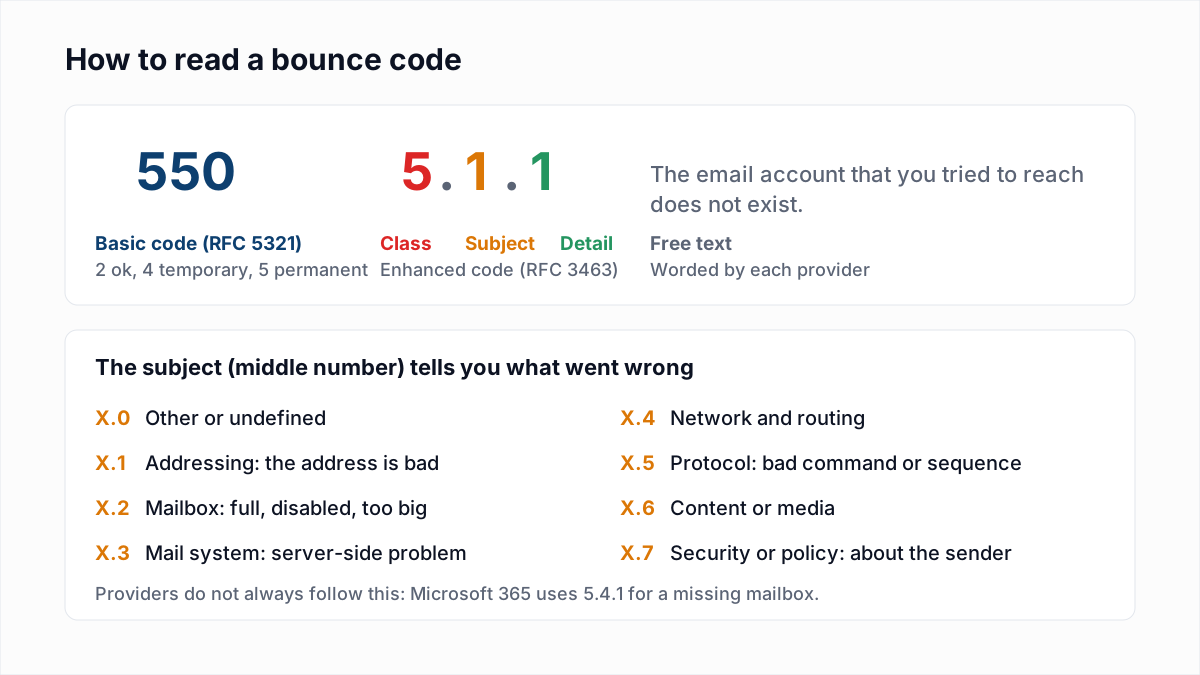
554 5.7.1 means the receiving mail server permanently refused the message because the sender was not authorized to deliver it. The basic code 554 is "Transaction failed" in RFC 5321, and the enhanced code 5.7.1 is "Delivery not authorized, message refused" in RFC 3463.
RFC 3463 adds that 5.7.1 "can be the result of per-host or per-recipient filtering". A filter said no; which filter, and why, is left to the free text. The full code system is laid out in our guide to email bounce codes.
Which 554 5.7.1 error did you get?
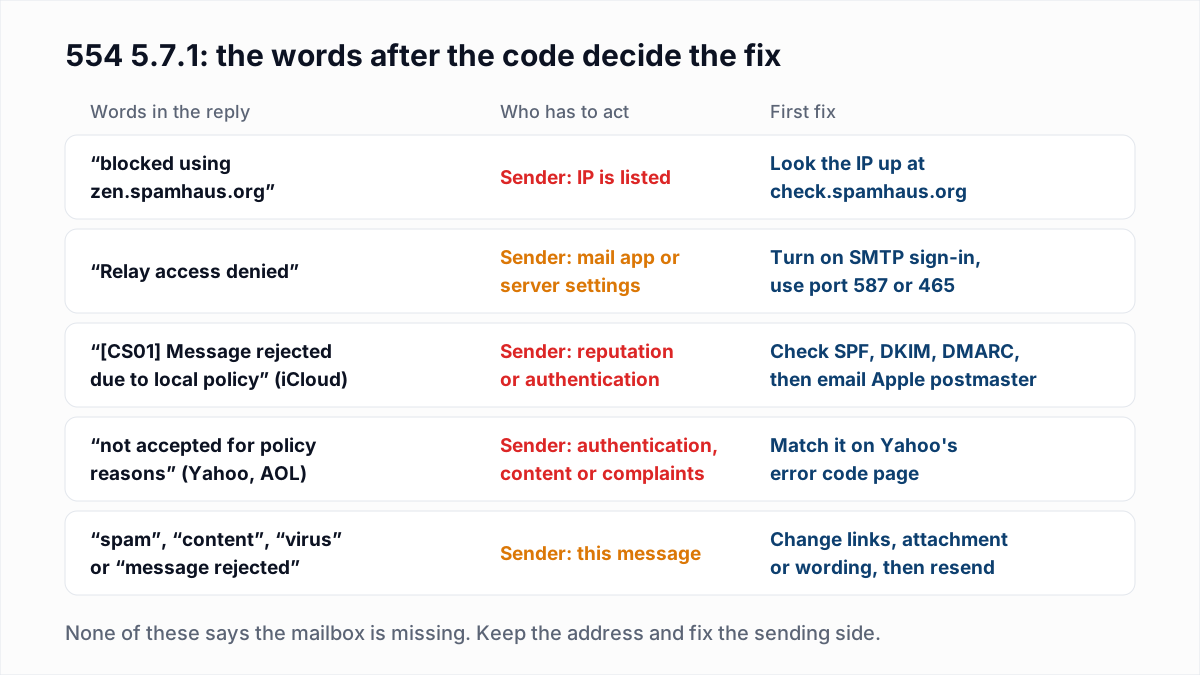
The 554 5.7.1 variant is identified by the text that follows the code, so find your bounce in the first column of this table. The original reply is in the bounce email from MAILER-DAEMON or in your sending platform's bounce log.
| Wording in the reply | Who is at fault | Fix |
|---|---|---|
Service unavailable; Client host [IP] blocked using zen.spamhaus.org | The sender. The sending IP is on a Spamhaus list. | Look up the IP at check.spamhaus.org, fix the cause, then request removal. |
blocked using zen.spamhaus.org; Error: open resolver (typical wording) | The recipient's server. Its blocklist lookups are misconfigured. | Nothing on your side is listed. Tell the recipient's mail admin. |
Relay access denied | Usually the sender's mail app or server settings. Sometimes the recipient's DNS. | Turn on SMTP authentication for outgoing mail, or check the recipient's MX. |
[CS01] Message rejected due to local policy from iCloud (typical wording) | The sender. iCloud's filter refused the message or its source. | Check SPF, DKIM and DMARC, then write to Apple's postmaster team. See iCloud Mail bounce errors. |
Message not accepted for policy reasons from Yahoo or AOL (typical wording) | The sender. Authentication, content or complaints. | Match the reply to Yahoo's error code page and fix that item. |
554 delivery error: dd This user doesn't have a yahoo.com account | Nobody. The mailbox does not exist. | Remove the address. This is the one 554 that is about the recipient. |
| Mentions spam, content, a virus or an attachment | The sender. This particular message was refused. | Change the link, attachment or wording and send again. |
What does "554 5.7.1 Service unavailable; Client host blocked using zen.spamhaus.org" mean?
"554 5.7.1 Service unavailable; Client host [IP] blocked using zen.spamhaus.org" means the receiving server looked up the sending IP address on the Spamhaus ZEN blocklist, found it listed, and refused the connection. The message content was never read.
554 5.7.1 Service unavailable; Client host [203.0.113.10] blocked using zen.spamhaus.org; https://check.spamhaus.org/query/ip/203.0.113.10The sentence is not written by Spamhaus. It is the default reply template of the Postfix mail server, which fills in the list name and, after the last semicolon, whatever reason text the list returns (the link above is an illustration). The Postfix documentation gives 554 as the default code for blocklist rejections. Other lists appear in the same sentence, such as b.barracudacentral.org or bl.spamcop.net. For the first of those, see Barracuda blacklist removal.
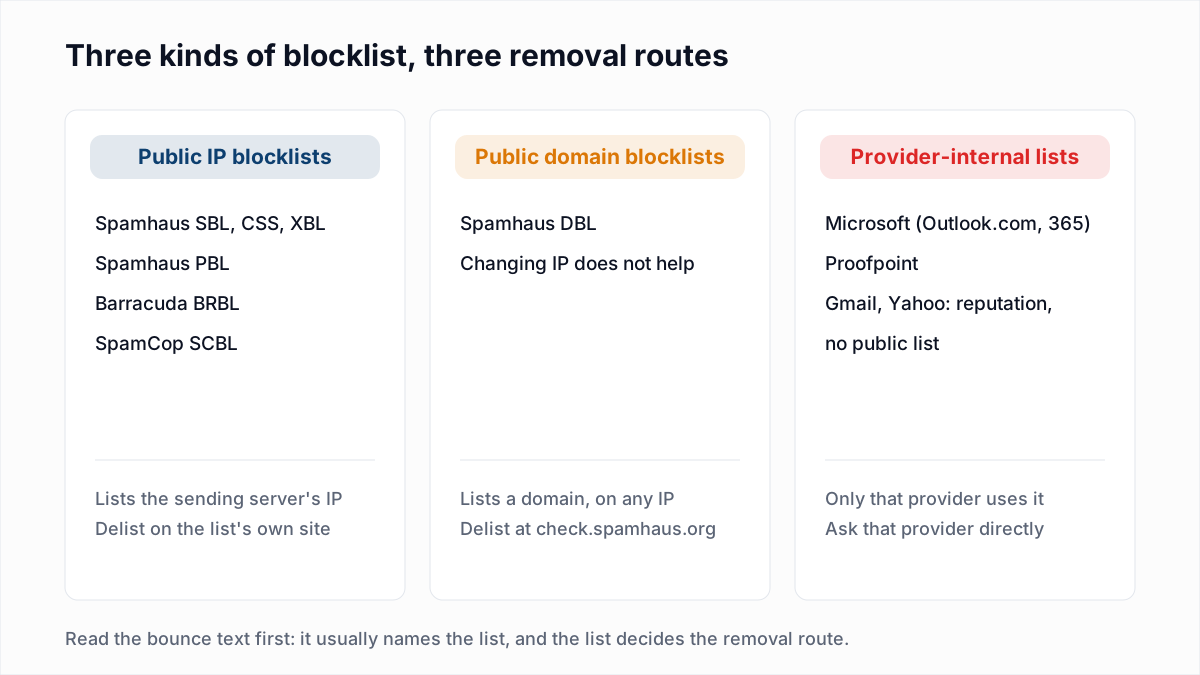
Spamhaus says ZEN "contains the SBL, CSS, XBL, and PBL blocklists". Which one you are on changes the meaning:
- PBL is not an accusation. Spamhaus describes it as end-user IP ranges "from which email should never be sent directly to the final destination", such as home broadband. Send through your provider's outgoing server with a username and password instead.
- SBL, CSS and XBL are about behaviour: spam sources, or machines that look infected or hijacked. Something on that IP sent mail it should not have.
Look the IP up on check.spamhaus.org, which names the list and the removal route. If you send through an email platform, the IP is theirs and the listing is theirs to clear. The full process, list by list, is in how to check an email blacklist and get removed, and shared-IP trade-offs are in dedicated vs shared IP.
The "open resolver" exception
One version of this bounce is not your fault. Spamhaus refuses blocklist queries that arrive through public DNS services, and its guidance for public mirror users says it answers them with a special return code, 127.255.255.254. A receiving server that is not set up to recognise that code treats every sender as listed. The typical wording ends with Error: open resolver. If you see it, your IP is probably clean, and the recipient's mail administrator has to fix their DNS setup.
What does "554 5.7.1 Relay access denied" mean?
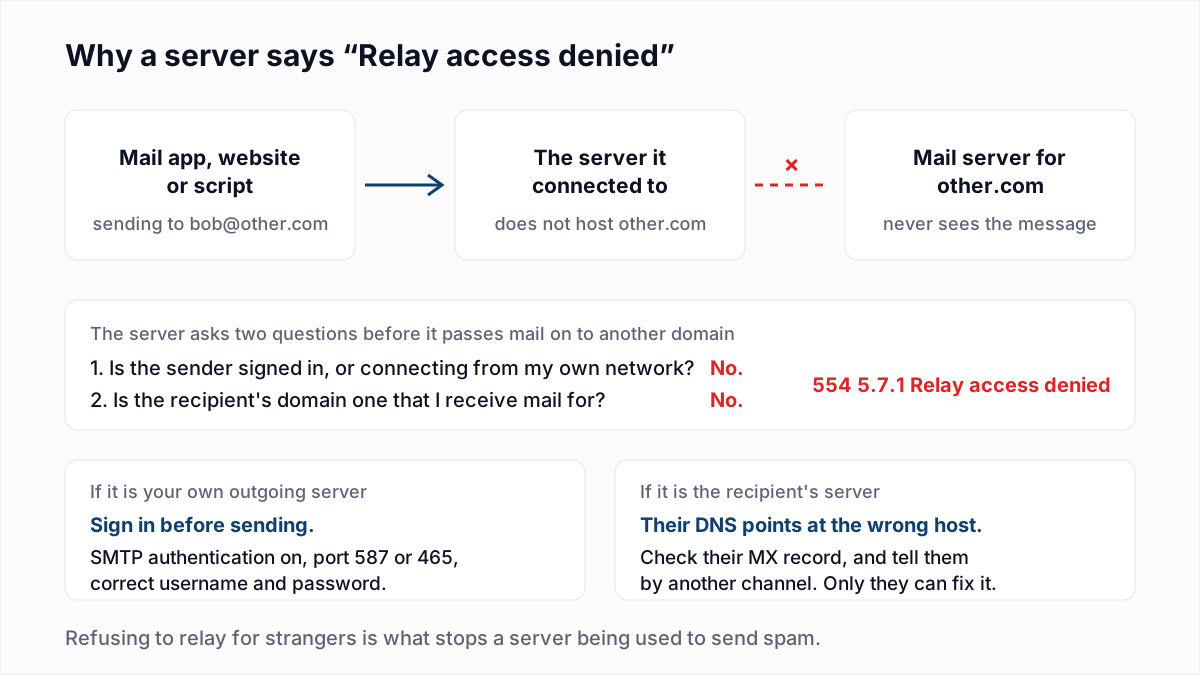
"554 5.7.1 Relay access denied" means the mail server you connected to refused to pass your message on to another domain, because you were not signed in and the recipient's domain is not one that server receives mail for.
554 5.7.1 <bob@example.org>: Relay access deniedThis wording comes from Postfix, whose documentation lists 554 as the default code for relay rejections. A relay is a server that forwards mail for a domain it does not host. Servers only do that for people they know. Blocklists and reputation play no part.
There are three usual causes, in order of likelihood:
- Your mail app or script is not authenticating. Outgoing mail is set to port 25 with no username, or the saved password is wrong. Turn on SMTP authentication and use port 587 or 465 with the full mailbox credentials. If the sign-in itself is refused, see SMTP error 535 authentication failed.
- You are connecting from a network the server no longer trusts. An office server that relays for the office IP range will refuse the same laptop at home.
- The recipient's DNS points at the wrong server. If their MX record names a host that does not handle their domain, that host refuses the mail as a relay attempt. Check it with the MX lookup tool and tell the recipient by another channel. Background is in what an MX record is.
Newer Postfix versions can answer the same situation with a temporary 454 4.7.1 Relay access denied. The cause and the fix are identical.
What does iCloud's 554 5.7.1 [CS01] or [HM08] error mean?
iCloud's 554 5.7.1 [CS01] error means Apple's mail filter refused the message under its own policy rules. Apple does not publish what CS01, HM08 or its other bracketed tags stand for, as of 13 November 2026.
554 5.7.1 [CS01] Message rejected due to local policy. Please visit https://support.apple.com/en-us/HT204137That is typical wording, as quoted by senders in Apple's community forum. HM08 is reported with the same sentence, often under 550 instead of 554. The link in the bounce now redirects to Apple's Postmaster information for iCloud Mail, and that page does not mention either tag. What Apple's postmaster page does say is that iCloud tracks reputation "using various mechanisms, such as IP and domain reputations, content checks, and user feedback", offers no allow list and no feedback loop, and rejects bulk mail that misses any of its requirements.
Work through what Apple does publish:
- Confirm SPF and DKIM pass and that the domain publishes a DMARC policy. Apple's page requires all three for bulk mail. Use the SPF checker and DMARC checker.
- Check that the sending IP has reverse DNS under your domain, which Apple also lists.
- If the mail was forwarded to iCloud from another mailbox, the forwarder is the sender Apple sees. Apple asks forwarders to add ARC headers.
- Send a plain-text test with no links from the same server. If that is accepted, the block is on content, not on the IP or domain.
- If it persists, email
icloudadmin@apple.com. Apple's page asks for your company name, email domain, the affected server IPs, the SMTP errors and a description of the issue with its start date.
What do Yahoo's 554 errors mean?
Yahoo's 554 errors are permanent rejections that Yahoo and AOL issue for five stated reasons: an invalid address, a DMARC or DKIM failure, content Yahoo will not accept, suspicious sending behaviour, or a Spamhaus listing.
That list is from the SMTP error codes page on Yahoo's Sender Hub, which covers 553 and 554 together. Yahoo does not publish a table of exact reply strings, only categories, so match by keyword:
- "This user doesn't have a yahoo.com account" is quoted on Yahoo's page in the form
554 delivery error: dd This user doesn't have a yahoo.com account. The mailbox is gone. Remove it. - A tag starting with PH is what Yahoo calls a content-based block: viruses, phishing, malware or links to them. A typical wording is
554 Message not allowed - [PH01] Email not accepted for policy reasons. - "Not accepted for policy reasons" with no tag, typically
554 5.7.9 Message not accepted for policy reasons, is commonly reported alongside a DMARC or DKIM failure. Yahoo says it rejects mail that fails DKIM when the signing domain publishes a policy requiring it. - A mention of Spamhaus is the blocklist case above, worded by Yahoo.
Yahoo also uses codes outside this family for sender problems. In InboxSure's own test on 4 November 2026, Yahoo and AOL answered at MAIL FROM with 550 5.7.25 Forward-confirmed reverse DNS failed, which is covered in the 550 5.7.25 reverse DNS guide.
Can 554 5.7.1 be caused by the message content?
Yes, 554 5.7.1 can be a content rejection: the receiving server accepted the connection and the recipient, read the message, and refused it because of a link, an attachment or a spam score.
Content rejections arrive after the DATA command, at the end of the conversation, while blocklist and relay rejections arrive at the start. Look for "spam", "content", "virus" or "attachment" in the text. To test, send the same recipient a short plain-text message. If it is delivered, the original content was the problem: check links and attachments first. Single words matter far less, as our piece on spam trigger words explains.
How do you fix a 554 5.7.1 error?
To fix a 554 5.7.1 error, read the full reply, identify the variant from its wording, and fix that one cause before sending again.
- Get the complete reply. Copy the whole line from the bounce, including any link or bracketed tag. Our guide on reading email headers shows where to find the server names involved.
- Note which server said it. If the rejecting host is your own outgoing server, it is a relay or authentication problem. If it is the recipient's, it is a block or a content rejection.
- Match the wording to the table above, and count the recipients affected. One address at one domain points to that domain's filter. Every address at many domains points to your IP or your settings.
- Fix, then test with one message. Do not resend the whole campaign to find out. Resending into a block only produces more rejections.
Should you remove addresses that bounce with 554 5.7.1?
No, do not remove addresses that bounce with 554 5.7.1, because the rejection is about the sender, the server settings or the message, and the mailbox is usually fine. The exception is a reply that says the user or account does not exist.
Many sending platforms classify every 5xx as a hard bounce and suppress the contact. After a block is lifted, check your suppression list for contacts added during the incident. The difference between the two kinds of bounce is covered in soft bounce vs hard bounce.
Email verification will not lift a 554 5.7.1 block. InboxSure meets the same blocks itself: when a provider refuses our check before the recipient is named, the address comes back Unknown, not Undeliverable.
Where verification does help is one step earlier. Old lists full of dead addresses are a common route onto blocklists, and InboxSure finds the addresses that no longer exist without sending anything. The Free plan takes lists of up to 50 addresses with no card; Pro is a flat $49 a month for lists of up to 10,000. Upload a CSV to the bulk email verifier before your next campaign.
Frequently asked questions
Related reading
Ready to clean your email list?
Upload a CSV or XLSX and get every address marked deliverable, risky, undeliverable or unknown, with the reason. Free for lists of up to 50, no card. Nothing is sent to your contacts.