iCloud Mail Bounce Errors: What Apple's Replies Mean
Apple publishes very little about iCloud Mail errors. Its Postmaster information for iCloud Mail page (published 25 February 2025, read on 13 November 2026) lists what bulk senders must do and how to reach the postmaster team, but it contains no table of SMTP replies. It says only that Apple's servers "generate SMTP errors with information about why your connection or message was rejected" and that "Most of the errors will also include a URL that provides more information."
An iCloud Mail bounce is a refusal from Apple's mail servers, sent as an SMTP reply that your mail server or sending platform passes back to you. Because Apple documents no exact strings, every reply quoted below is typical wording from sender logs unless a source is named.
Which domains does iCloud Mail cover?
iCloud Mail covers three Apple domains: icloud.com, me.com and mac.com. Apple's postmaster page names them together as "All iCloud Mail domains (mac.com, me.com, and icloud.com)" and describes one set of rules for all three.
Two more kinds of address land on Apple's servers without looking like it: Hide My Email relay addresses and custom domains hosted through iCloud+. Both have their own sections below.
What do iCloud bounce replies mean?
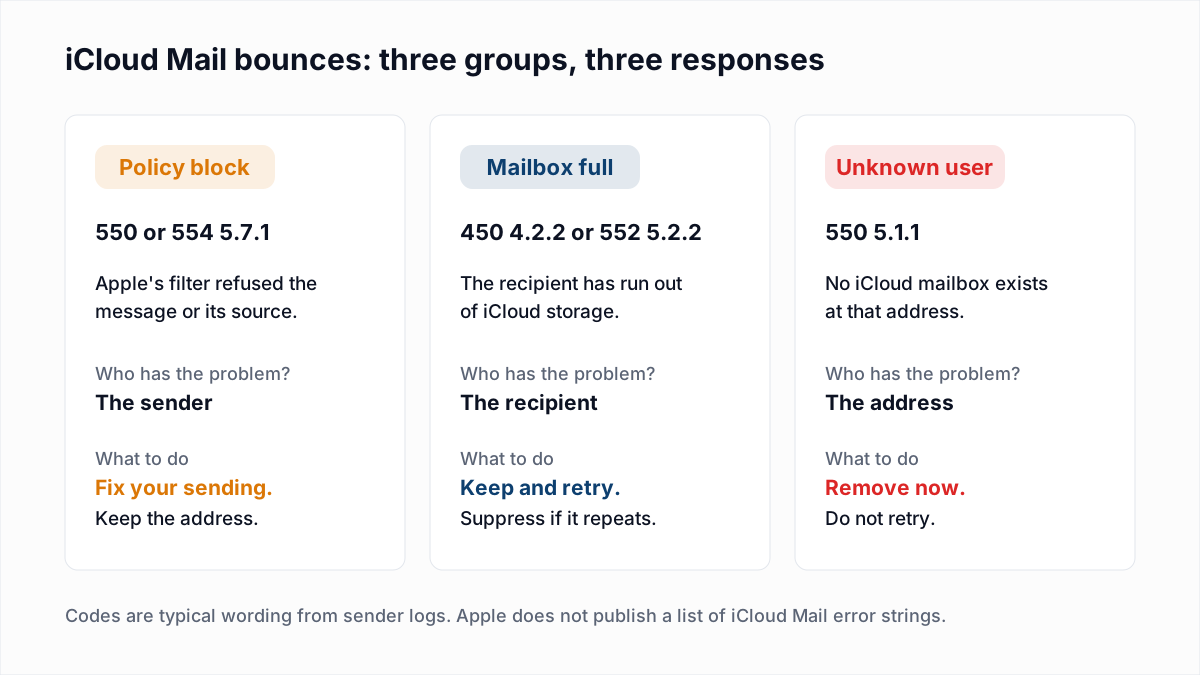
iCloud bounce replies mean one of three things: Apple's filter refused the sender, the recipient's storage is full, or the address does not exist. Match on the enhanced status code and the words, because Apple's bracketed tags are undocumented.
| Reply | Meaning | Action |
|---|---|---|
550 5.7.1 [CS01] Message rejected due to local policy (typical wording) | A policy block. Apple's filter refused the message or the server sending it. | Keep the address. Check Apple's bulk sender requirements, then email the postmaster. |
554 5.7.1 [HM08] Message rejected due to local policy (typical wording) | The same policy block under a different basic code and tag. | Handle it exactly as CS01. Apple defines neither tag. |
450 4.2.2 <user@icloud.com>: user is over quota (typical wording) | The recipient's iCloud storage is full. The 4 makes this a temporary reply. | Let your server retry. Keep the address. |
552 5.2.2 <user@icloud.com>: user is over quota (typical wording) | The same full mailbox, reported as a permanent failure for this message. | Keep the address and try the next send. Suppress after repeated failures. |
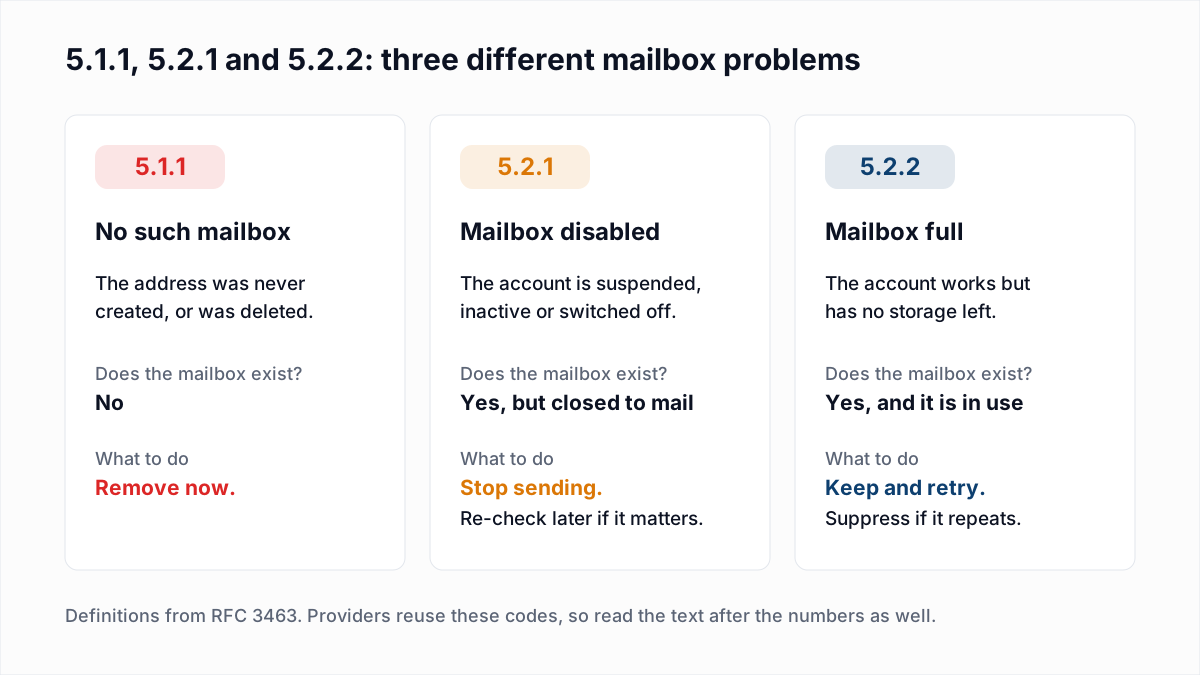
550 5.1.1 <user@icloud.com>: user does not exist (InboxSure test, 4 November 2026) | No iCloud mailbox exists at that address. | Remove the address now and do not retry. |
550 5.1.1 unauthorized sender, from privaterelay.appleid.com (typical wording) | The Hide My Email relay did not accept your domain or address as a registered source. | Register the sending domain with Apple and pass SPF or DKIM. Keep the address. |
| Any other 4xx reply | A temporary refusal. Apple asks senders to track temporary and permanent errors. | Let the queue retry. If it lasts for days, treat it as a policy block. |
The general rules for reading the numbers are in email bounce codes and soft bounce vs hard bounce.
What does Apple require from bulk senders?
Apple requires bulk senders to iCloud Mail to meet every item on a published list, and says mail that misses any of them is refused: "All requirements must be met in order to send a bulk email. If not, the email will be rejected." As of November 2026 the list on Apple's postmaster page is:
- Send only to recipients who explicitly subscribed, "not list purchases, list rentals, or email appends".
- Offer an unsubscribe link that works immediately.
- Add ARC headers to forwarded emails.
- Comply with RFC 5321 and RFC 5322.
- Publish reverse DNS that identifies your sending IP addresses with your domain.
- Use consistent sending IPs and domains, but separate marketing and transactional streams.
- Use a consistent From name and address.
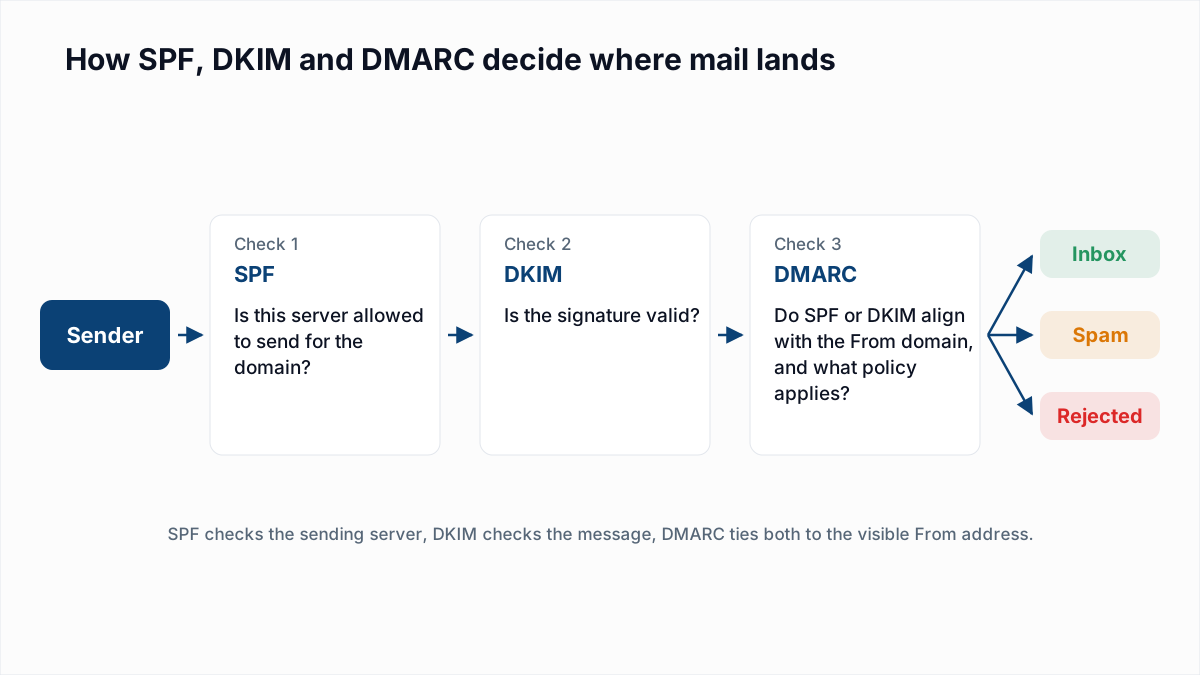
- Authenticate with SPF and DKIM.
- Publish a DMARC policy for the sending domain.
- Track temporary and permanent SMTP errors and act on them.
- Have a standard policy for handling bouncing addresses.
- Periodically remove inactive subscribers.
- Do not reactivate addresses on your unsubscribe or suppression list.
Apple gives no volume that makes a sender "bulk" and no complaint-rate number. It also offers no shortcut: the page says iCloud Mail has no allow list and no feedback loop, and that filtering uses "IP and domain reputations, content checks, and user feedback". The Gmail, Yahoo and Outlook equivalents are compared in Gmail, Yahoo and Outlook sender requirements, and the loops other providers run are in email feedback loops.
What does 550 5.7.1 or 554 5.7.1 [CS01] from iCloud mean?
A 550 5.7.1 or 554 5.7.1 [CS01] reply from iCloud means Apple's filter rejected the message under its own policy. The recipient's address is fine. Apple does not publish what CS01, HM08 or any other tag stands for.
Our guide to 554 5.7.1 covers this reply in detail, including the forwarding case. The short checklist:
- Confirm SPF and DKIM pass and a DMARC record exists, using the SPF checker, DKIM checker and DMARC checker.
- Check that the sending IP has reverse DNS under your domain, and look it up with the blacklist check.
- Compare the list source with Apple's first requirement. Bought lists fail it.
- Pause sends to iCloud recipients who have not engaged recently.
- If the block continues, write to Apple's postmaster team as described below.
What does "user is over quota" from iCloud mean?
An iCloud "user is over quota" reply, with 450 4.2.2 or 552 5.2.2, means the recipient has no iCloud storage left for new mail. Apple's iCloud Mail limits page says: "If you run out of iCloud storage, you won't be able to send or receive emails with your iCloud Mail address."
The detail that makes iCloud different is on the same page: the free 5GB is shared between "backups, Mail, iCloud Photos, iCloud Drive, and more". A full iCloud mailbox can belong to someone who reads email every day and has a phone full of photos. Do not treat one over-quota bounce as an abandoned address. Retry on later sends and suppress only when it keeps repeating, using the policy in 552 5.2.2 mailbox full.
What does 550 5.1.1 "user does not exist" from iCloud mean?
A 550 5.1.1 "user does not exist" reply from iCloud means there is no mailbox at that address, and no retry will change it. Remove the address from every list.
We have seen this reply first hand. When InboxSure tested the major providers on 4 November 2026, iCloud answered a nonexistent address with 550 5.1.1 <address>: user does not exist (details in how Gmail, Outlook and Yahoo respond to email verification). That clear answer is why icloud.com, me.com and mac.com addresses can be checked before you send, unlike Yahoo or Outlook.com addresses, which come back Unknown. More on the code itself in 550 5.1.1.
Why do emails to @privaterelay.appleid.com bounce?
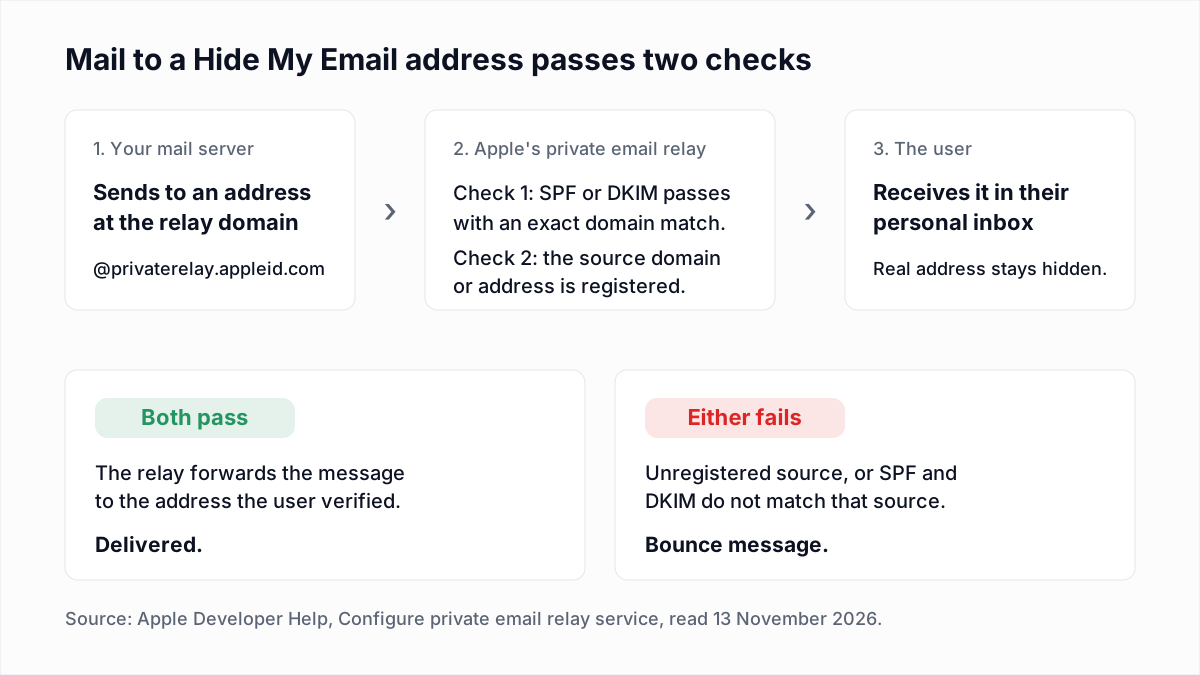
Emails to @privaterelay.appleid.com bounce when the sender is not registered with Apple for that app, or when the message fails the relay's SPF and DKIM checks. These are Hide My Email addresses created through Sign in with Apple.
Apple's Hide My Email support page says the address is created "using the address domain @private.icloud.com or @privaterelay.appleid.com" and that "only emails sent from designated email addresses by the app or website will be automatically forwarded". The developer side is in Apple Developer Help, Configure private email relay service, which states the consequence plainly: "If you don't register all the source domains or emails that you use, email sent to the private relay service will result in a bounce message."
The rules on that Apple page, as of November 2026:
- In Certificates, Identifiers & Profiles, open Services and click Configure under Sign in with Apple for Email Communication.
- Add each sending domain, subdomain or individual address as an email source. Individual enrolments can register up to 32 sources and organisations up to 100.
- Make the envelope sender (Return-Path) domain pass SPF and match the registered domain exactly.
- If your sending platform puts its own domain in the envelope sender, sign with DKIM instead. The
d=domain must match the From domain exactly. - Register every subdomain separately. Apple's example: mail from help.example.com needs its own entry even when example.com is registered.
This catches teams when they change sending platform or start marketing from a new subdomain: transactional mail still arrives and the new stream bounces. A verifier cannot settle it either. InboxSure checks from its own servers, which says nothing about whether your domain is a registered source.
Do iCloud+ custom domains bounce the same way?
Apple does not say whether iCloud+ custom domains use the same filtering as icloud.com, but the mailboxes are iCloud Mail mailboxes. Apple's Custom Email Domain page says iCloud+ subscribers can use a domain they own to send and receive email with iCloud Mail, with up to five domains per account.
An address such as jane@smithfamily.example can therefore answer like an iCloud address while looking like a company one. If a private domain returns iCloud-style replies, check where its mail is hosted with the MX lookup tool and apply the table above.
How do you contact Apple's iCloud postmaster?
You contact Apple's iCloud postmaster team by email at icloudadmin@apple.com. Apple offers this route to system administrators who have followed its best practices and checked their logs, and asks for all of the following:
- Your company name.
- Your email domain.
- The IP addresses of the affected mail servers.
- The SMTP errors you are getting from iCloud mail servers.
- A detailed description of the issue, including when it started.
Paste the full reply lines, tags included. Apple publishes no response time and promises no outcome. If you send through a platform such as Mailchimp or SendGrid, the IPs are theirs, so ask their support to raise it. People who are not administrators are told to contact Apple Support instead.
Clean the list before the next send
Unknown-user bounces are the one iCloud problem you can remove in advance. The bulk email verifier checks each address over SMTP without sending and returns Deliverable, Risky, Undeliverable or Unknown; the Free plan takes lists up to 50 addresses with no card, and Pro is a flat $49 a month for lists up to 10,000. It cannot see a full mailbox coming or lift a policy block. Those depend on the recipient's storage and on how you send.
Frequently asked questions
Related reading
Ready to clean your email list?
Upload a CSV or XLSX and get every address marked deliverable, risky, undeliverable or unknown, with the reason. Free for lists of up to 50, no card. Nothing is sent to your contacts.