Spam Trigger Words: Do They Still Matter in 2026?
Spam trigger words matter far less than the lists suggest. No major mailbox provider publishes a list of banned words, and none of Gmail, Yahoo or Outlook.com names word choice among its sender requirements. What they do name is authentication, complaint rate, sender reputation and honest headers. A message from a trusted, authenticated sender can say "free" in the subject line and reach the inbox; a message from a sender with a poor reputation goes to spam however carefully it is worded.
Content is still checked, though, and some of it does count against you: where your links point, whether the subject line is honest, whether the message is one big image. This post covers where the word lists came from, what the providers say, which content factors count, and what to fix first. Landing in Promotions is a different question from landing in spam; that one is in the Gmail Promotions tab.
Do spam trigger words still matter?
A little, and only in combination with other things. Three points summarise the evidence:
- No provider publishes a word list. The "400 spam words to avoid" articles are compiled by marketers from each other and from old filter rules. None of them links to a mailbox provider as the source, because there is no such source.
- Rule-based filters do score phrases, but each phrase is worth a fraction of the total needed to mark a message as spam, and the rules are about patterns, not vocabulary.
- Providers do not publish how their filters weigh content. What they publish is a set of requirements, and those are about who you are and how recipients react, not which words you chose.
Where the spam word lists came from
The idea has a real origin. Apache SpamAssassin, the open-source filter released in the early 2000s and still used by many hosting companies and corporate mail servers, works by running hundreds of small tests against each message. Each test that matches adds points. If the total reaches a threshold, the message is marked as spam. Its configuration documentation sets that threshold, required_score, at 5 by default, and calls 5.0 "quite aggressive", suggesting that an ISP set it to "8.0 or 10.0".
Some of those tests are phrase matches, and you can read them in the project's published rule list for version 3.3.x. These are real rules with their descriptions and default scores as listed there (the score used when both Bayes and network tests are enabled):
| Rule name | What it tests, in SpamAssassin's words | Default score |
|---|---|---|
MONEY_BACK | Money back guarantee | 1.232 |
URG_BIZ | Contains urgent matter | 0.573 |
SUBJ_ALL_CAPS | Subject is all capitals | 1.506 |
MIME_HTML_ONLY | Message only has text/html MIME parts | 0.723 |
HTML_IMAGE_ONLY_04 | HTML: images with 0-400 bytes of words | 1.172 |
URIBL_RHS_DOB | Contains an URI of a new domain (Day Old Bread) | 1.514 |
BAYES_99 | Bayes spam probability is 99 to 100% | 3.5 |
DKIM_VALID | Message has at least one valid DKIM or DK signature | -0.1 |
Two things stand out. First, the phrase rules are small. "Money back guarantee" is worth 1.232 against a threshold of 5; you would need several unrelated rules to fire before the phrase made any difference. Second, most of the list is not about words at all. It tests structure (HTML with no plain-text part, images with almost no text), the age of linked domains, and authentication. The heaviest rule in the table, BAYES_99, is a statistical classifier trained on whole messages, not a fixed phrase.
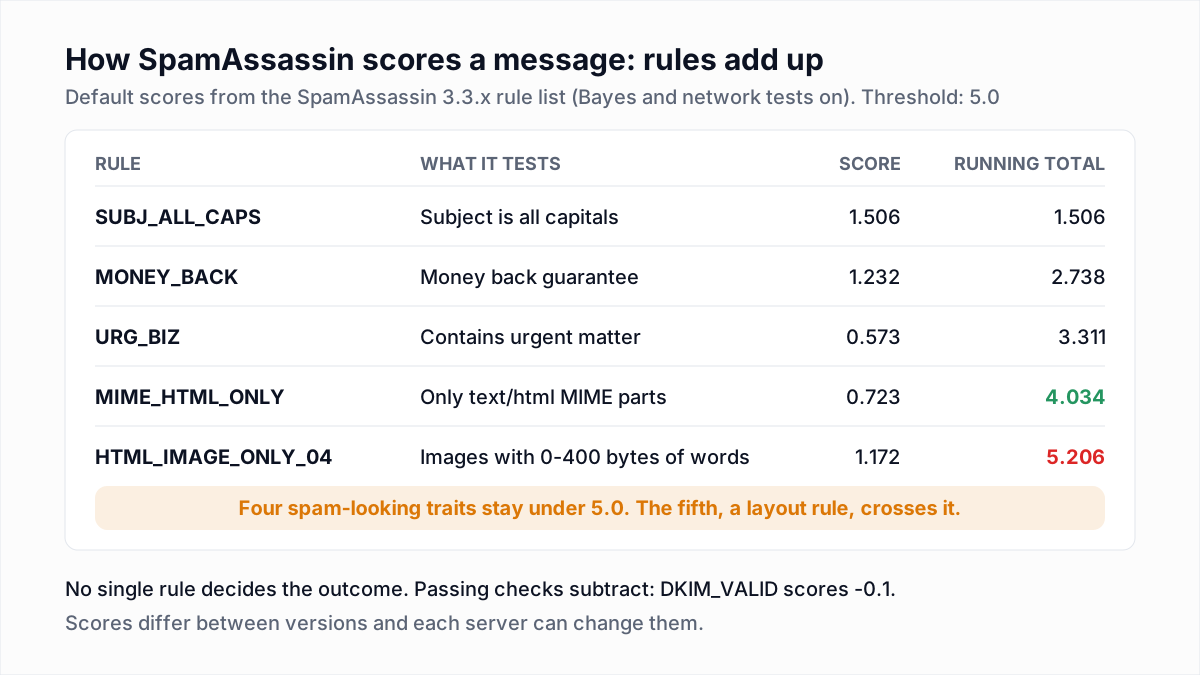
The word lists you see today are what happened when marketers read rule names like these, stripped out the scores and the context, and kept the nouns. Content rules of this kind do still run on many corporate gateways and hosting providers, which is the real reason not to write like a spammer: one of your recipients may sit behind one.
What Gmail, Yahoo and Outlook say about content
Read the providers' own pages and the content guidance is short, and none of it is a vocabulary list.
Gmail
Google's email sender guidelines spend most of their length on SPF, DKIM, DMARC, reverse DNS, TLS, one-click unsubscribe and keeping the spam rate reported in Postmaster Tools "below 0.10%" while never reaching "0.30% or higher". The message formatting section says:
- "Message headers and message content should be accurate, and not misleading or deceptive."
- Do not send "subject lines starting with Re: or Fwd: unless the messages are actual replies or forwards".
- "Don't use HTML and CSS to hide content in your messages. Hiding content might cause messages to be marked as spam."
- "Web links in the message body should be visible and easy to understand. Recipients should know what to expect when they click a link."
- "If your messages are in HTML, format them according to HTML standards."
- "Don't mix different types of content in the same message", with the example of promotions inside sales receipts.
Every item is about honesty and structure. The page does not mention any word to avoid.
Yahoo
Yahoo's sender best practices say the best way to be delivered is "to send timely and relevant email to an active and engaged audience", that "each IP and DKIM domain has a reputation", and that senders should keep their spam rate below 0.3%. On content, the page asks senders not to use "false or misleading header information or deceptive subject lines". Yahoo's sender FAQ adds that "a combination of poor reputation and high complaints can cause mail to be directed to the Spam folder", and lists "obfuscation of URL's in body of mail" among the characteristics that make it worse. Again: reputation, complaints, honest subjects, honest links.
Outlook.com
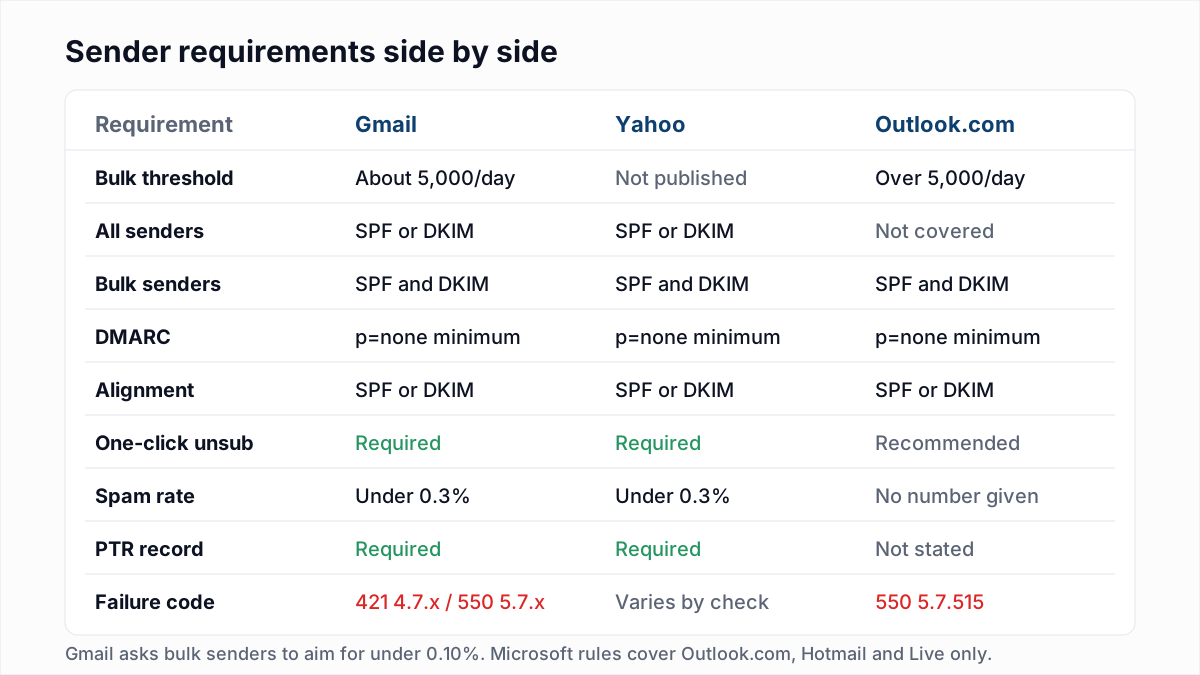
Microsoft's Outlook.com postmaster policies cover technical standards, reverse DNS, authentication for domains sending more than 5,000 messages a day, and reputation management through its SNDS and JMRP programs. The page gives no content rules. Microsoft's high-volume sender announcement recommends accurate subject lines and non-deceptive headers under transparent mailing practices, next to list hygiene and working unsubscribe links. The side-by-side version of all three sets of rules is in Gmail, Yahoo and Outlook sender requirements.
Which content factors affect spam filtering?
These are the content-side factors with something behind them: a provider statement, a published filter rule, a block list that targets them, or the law. Where the evidence is reasoning and not a published rule, the text says so.
- The reputation of the domains you link to. Filters look up the domains in the message body. SpamAssassin has a family of URI rules for this, and Spamhaus runs a Domain Blocklist of "domain names with poor reputation". A link to a listed or brand-new domain counts against an otherwise clean message.
- URL shorteners. A shortener hides the destination, which runs against Google's "visible and easy to understand" guidance, and you share the shortener's domain with everyone else who uses it. The Spamhaus list has a dedicated return code for redirector domains abused for spam. Use full links on your own domain.
- Link text that does not match the destination. Visible text showing one address while the link goes to another is the classic phishing pattern. If the anchor text is a URL, make it the real one.
- Image-only messages. A single image with a few words of text gives a filter nothing to read, and spammers use images for that reason. SpamAssassin scores the image-to-text ratio in a series of
HTML_IMAGE_ONLYrules. - Hidden content. White text on white, zero-size fonts and CSS that hides blocks. Google names this directly.
- Attachments on unsolicited mail. Providers do not publish a rule for this, so treat it as reasoning: attachments are how malware travels, and security gateways scan or quarantine them. Link to the file on your own site.
- Deceptive subject lines. This one is also illegal in the United States. The FTC's CAN-SPAM compliance guide says "The subject line must accurately reflect the content of the message", and that each separate email in violation is subject to penalties of up to $53,088. A fake "Re:" fails both the law and Gmail's guidelines.
- Heavy tracking. Every tracked link is rewritten to pass through a tracking domain, so its reputation becomes yours, and link text can stop matching the destination. Use a tracking domain on your own domain, or turn click tracking off for plain messages.
- Sudden template changes. No provider documents this. The reasoning is that filters learn what a sender's mail normally looks like, and Google asks for consistency in related ways: the same From address for the same category of message, and no mixing of content types. Change one thing at a time, on a small batch first.
Phrase types that correlate with spam, and why
This table is not a list of banned words. It groups the kinds of phrasing that show up in bulk spam, and the reason each one is risky, which is nearly always the human reaction and not a keyword match. People who feel tricked or pressured click "Report spam", and complaints are the signal providers act on.
| Phrase type | Example pattern | Why it correlates with spam |
|---|---|---|
| False urgency | A deadline that does not exist, "final notice" on a first message | Recipients feel manipulated and complain; phishing uses the same framing, and rule-based filters score it |
| Fake thread or relationship | "Re:" on a first email, "following up on our call" when there was none | Named in Gmail's guidelines; a deceptive subject under CAN-SPAM |
| Too-good-to-be-true money claims | Guaranteed income, risk-free returns, prizes | The vocabulary of fraud mail, so statistical filters have seen it in spam many times |
| Account and security alarms | "Verify your account", "unusual sign-in" from a sender who is not the service | Phishing pattern; SpamAssassin has rules for phishing phrases in subjects and bodies |
| Shouting | All-caps subjects, rows of exclamation marks or symbols | Scored as formatting by rule-based filters, and read as junk by people |
| Obfuscated spelling | Letters swapped for digits or symbols to dodge a filter | Only someone evading a filter writes this way, which makes it a stronger signal than the word it hides |
An honest sentence that happens to contain "free", "offer" or "guarantee" is in none of these groups.
What to fix first when emails land in spam
Work down this list in order and stop when you find the cause. Rewriting copy is the last step because it is the cheapest thing to try and the least likely to be the problem.
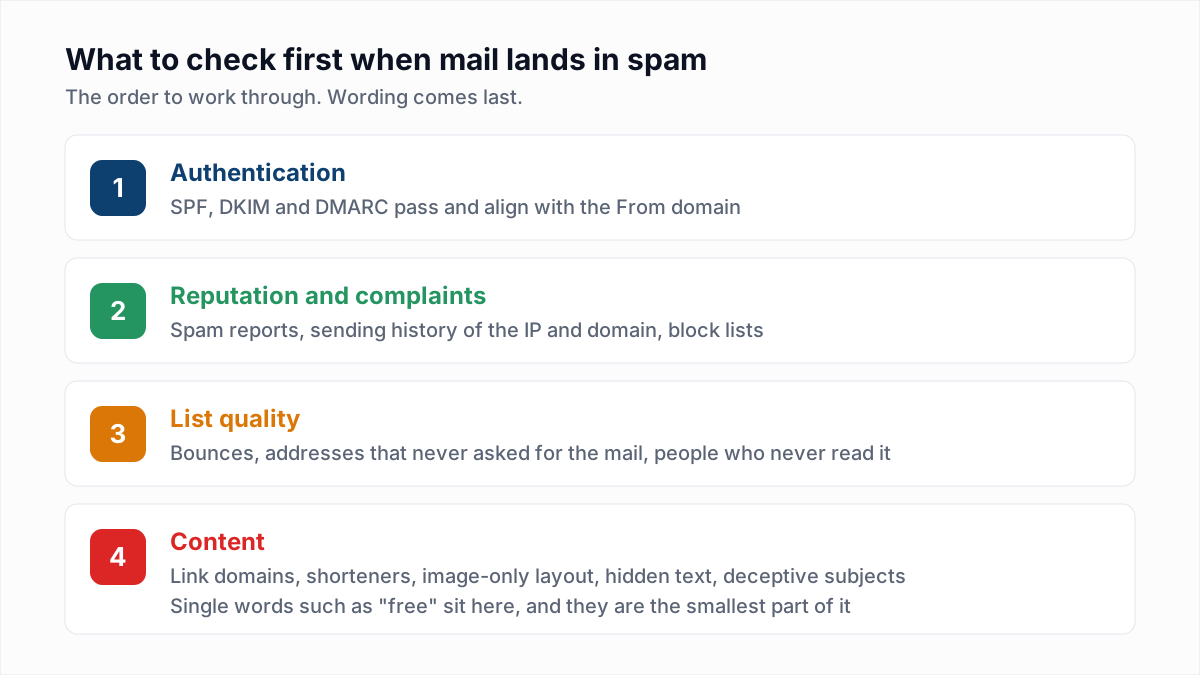
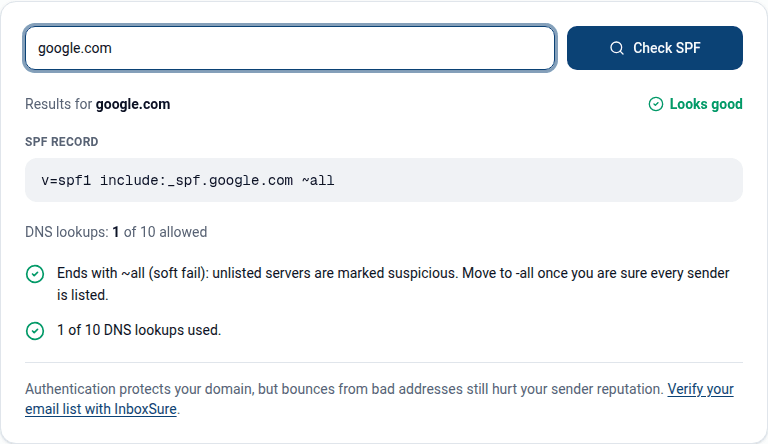
- Authentication. Send yourself a message and confirm
spf=pass,dkim=passanddmarc=passin the headers, with the signing domain aligned to your From domain. Check the DNS side with the SPF checker. If this fails, nothing below it matters yet. - Reputation and complaints. Look at the spam rate in Google Postmaster Tools and check the sending IP and domain against the main block lists. A spam rate near 0.3% explains spam placement by itself; the thresholds and how the rate is calculated are in spam complaint rate.
- List quality. Check the hard bounce rate of the last campaign and where the addresses came from. Bounces and unengaged recipients tell the provider the mail is unwanted. Remove addresses that bounced, and verify the rest before the next send.
- Content. Now look at the message: link domains, shorteners, tracking, image-to-text ratio, hidden text, subject honesty. Change one thing, send to a small batch, and compare.
For cold outreach the same order applies with warm-up and pacing added; the full walkthrough is in why cold emails go to spam.
How to write emails that do not read like spam
Describe the contents plainly in the subject line, send a plain-text part with every HTML message, link to your own domain, include a working unsubscribe link, and send to people who expect the message. No wording fixes mail nobody asked for.
List quality is where a verifier helps. InboxSure does not score content or test inbox placement; it checks whether the addresses on a list exist, so that bounces are not the signal dragging your reputation down. If step three above is your problem, run the list through the bulk email verifier before the next send, and leave the word "free" where it is.
Frequently asked questions
Related reading
Ready to clean your email list?
Upload a CSV or XLSX and get every address marked deliverable, risky, undeliverable or unknown, with the reason. Free for lists of up to 50, no card. Nothing is sent to your contacts.