How to Check Your Email Domain Reputation (Free Methods)
Every tool that promises "your domain reputation score" is showing one organisation's opinion. Gmail, Outlook.com and Yahoo each keep their own reputation for your domain and your sending IP, and none of them publishes it as a number. What you can do for free is read several partial views and see whether they agree.
The descriptions below follow each operator's own page as of 13 November 2026. Two pages would not load for us that day, Microsoft's SNDS site and the Spamhaus checker, and we say where that limits what we can state.
Is there a single email domain reputation score?
No, there is no single email domain reputation score. Each mailbox provider calculates its own reputation for a sender from the mail and the complaints it sees, and third-party scores are separate estimates built from other data.
Email domain reputation is a mailbox provider's running judgement of how trustworthy the mail signed by a domain has been. IP reputation is the same judgement about a sending address. Yahoo's sender best practices put it in one line: "Each IP and DKIM domain has a reputation, which can impact the delivery of your email." A domain can be in good standing at Gmail and poor standing at Outlook.com in the same week.
Which free tools show email domain reputation?
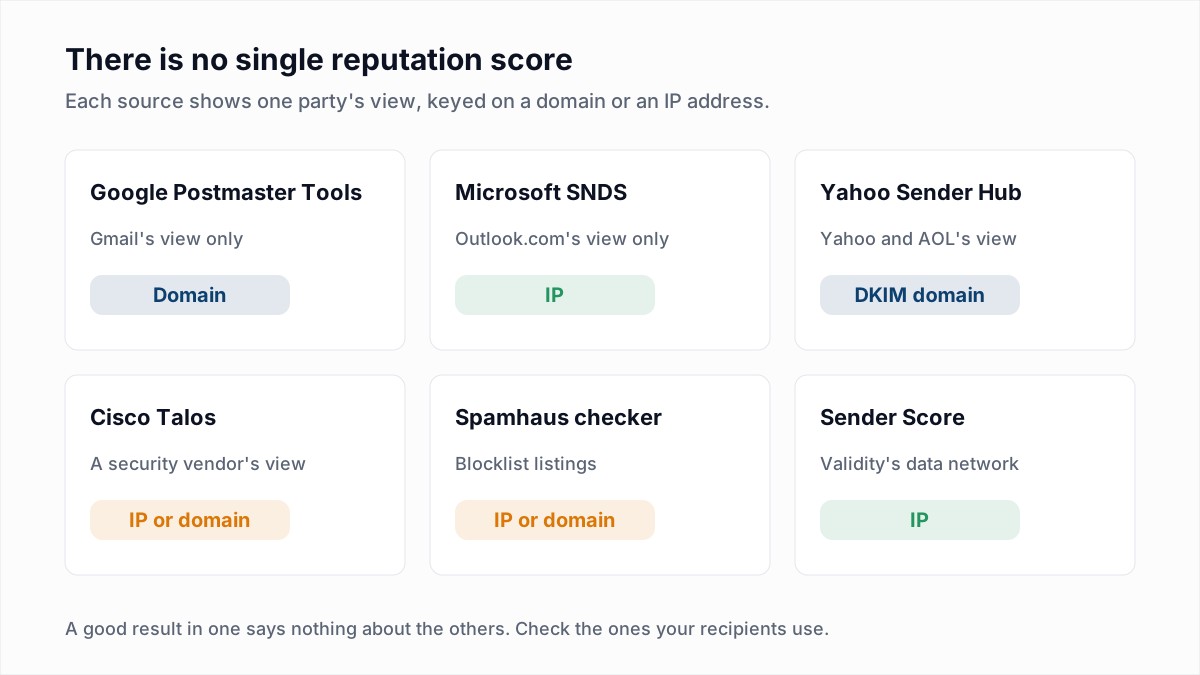
Seven free sources show part of your email reputation: three run by mailbox providers, three by third parties, and your own sending data.
| Source | What it measures | Domain or IP | Cost and limits |
|---|---|---|---|
| Google Postmaster Tools | Gmail's compliance status, spam rate, authentication and delivery errors | Domain | Free. Personal Gmail only; blank at low volume. |
| Microsoft SNDS | Outlook.com's per-IP data, including complaint rate and filter result | IP | Free. Only for IPs you can prove you control. |
| Yahoo Sender Hub | Complaints from Yahoo and AOL users, through the Complaint Feedback Loop | DKIM domain | Free. Reports complaints, not a rating. |
| Cisco Talos lookup | Talos's Good, Neutral or Poor email reputation | IP or domain | Free. Neutral at low volume. |
| Spamhaus reputation checker | Whether an IP or domain is on a Spamhaus blocklist | IP or domain | Free. Listed or not listed; no score. |
| Sender Score by Validity | A 0 to 100 score from Validity's data network | IP | Free. The form asks for contact details. |
| Your own bounce and complaint data | How receiving servers and recipients actually responded | Both | Free. Complaints exclude Gmail. |
What does Google Postmaster Tools show about domain reputation now?
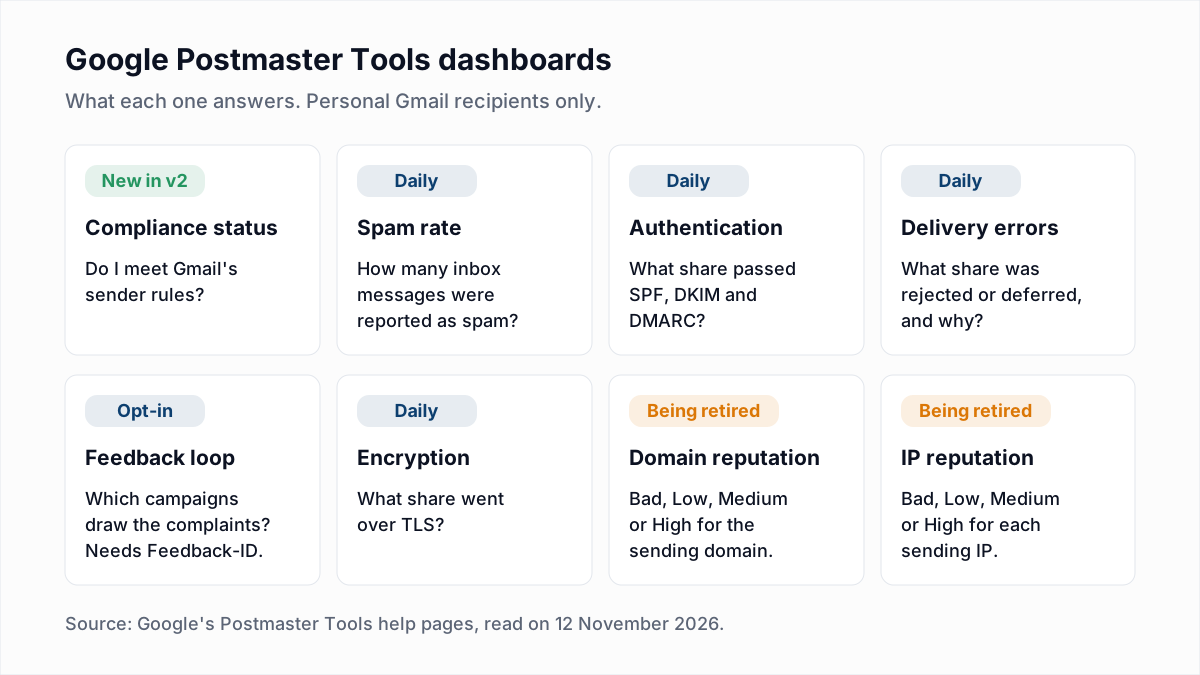
Google Postmaster Tools is moving away from a domain reputation rating: Google says the Domain and IP Reputation dashboards will be retired in v2, although its own help pages do not yet fully agree.
Google's deprecation notice says every dashboard from the old interface is available in v2 "with the exception of the Domain and IP Reputation dashboards, which will be retired." Its reasons include that "reputation data is not easily actionable for most senders" and that "reputation is only one of many factors affecting deliverability." A "new, more intuitive version" is promised, with no date. The same notice says the shutdown of the old interface is postponed, also with no date.
Meanwhile Google's dashboards help page still lists both dashboards and defines their four ratings, from Bad ("History of sending a high volume of spam regularly") to High ("History of very low spam rates, and complies with Gmail's sender guidelines"). If you can still open those charts, read them. If you cannot, the dashboards that remain say the same thing in more useful detail: Compliance status with every row Compliant, spam rate below 0.1%, and delivery errors near zero. Setup and each chart are covered in our Google Postmaster Tools guide.
How do you check IP reputation with Microsoft SNDS?
Microsoft SNDS (Smart Network Data Services) shows how Outlook.com treated mail from IP addresses you control, so it is an IP reputation check, not a domain one. You sign in at the SNDS portal and request access to your IP range. The Microsoft SNDS guide covers it in more detail.
According to Microsoft's SNDS FAQ, the data for each IP includes a complaint rate and a colour-coded filter result: green when fewer than 10% of messages received a spam verdict, yellow for 10% to 90%, and red above 90%. The FAQ adds that this result does not directly represent delivery to the inbox or the junk folder. We read those figures in search-indexed copies of the FAQ, because the site did not load for us on 13 November 2026; check them in the portal. On a shared IP the data belongs to your email platform, which is one reason to understand dedicated vs shared IPs.
What do Cisco Talos, Spamhaus and Sender Score tell you?
Cisco Talos, Spamhaus and Sender Score each give a third-party opinion of your IP or domain. A receiving server may consult them, but Gmail, Outlook.com and Yahoo make their own decisions from their own data.
Cisco Talos reputation lookup
The Talos reputation lookup accepts an IP address or a domain and returns an email reputation of Good, Neutral or Poor. Talos's documentation says these labels group a score that runs from -10 to +10. Poor means "a problematic level of threat activity has been observed" and mail is likely to be filtered or blocked. Neutral is not a warning: Talos says that without enough email reports it "cannot accurately generate a reputation for the IP", so small senders usually sit there. Talos also notes that it "does not block email" itself.
Spamhaus reputation checker
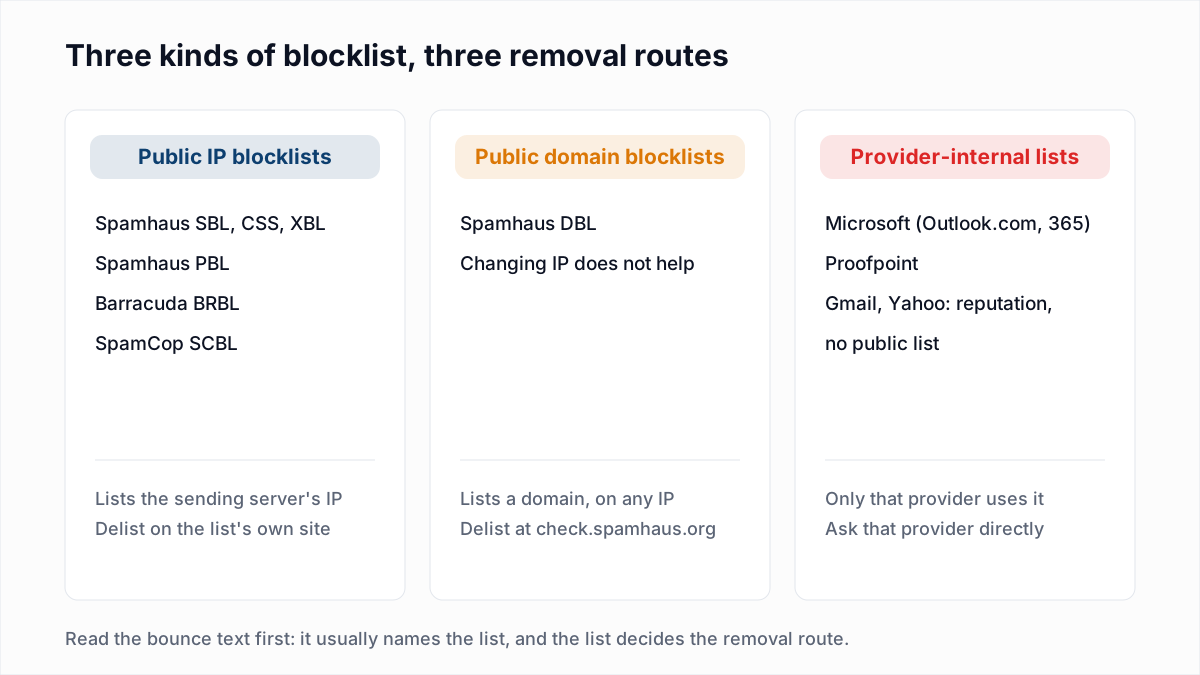
Spamhaus describes its IP and Domain Reputation Checker as "the online tool used to check if an IP or domain is listed on any of our DNS Blocklists", in the article that introduced it. The result is a listing or no listing, with the reason and the removal route, not a score. The checker refused our automated request, so this description rests on that article. What each Spamhaus list means, and how removal works, is in email blacklist check and removal and, list by list, in Spamhaus blocklist removal.
Sender Score by Validity
Sender Score describes itself as "a number between 0 and 100 that identifies the quality of your sender reputation and details how mailbox providers view your IP address." Its page labels 0 to 70 Poor, 70 to 80 Fair and 80 or more Good, and says the score is calculated from the Validity Data Network, "a collection of more than 80 mailbox and message security providers". The lookup form asks for your name, company and work email. It is an IP score, so on a shared IP it describes the pool, not you. More in Sender Score explained.
How do you check domain reputation in 15 minutes?
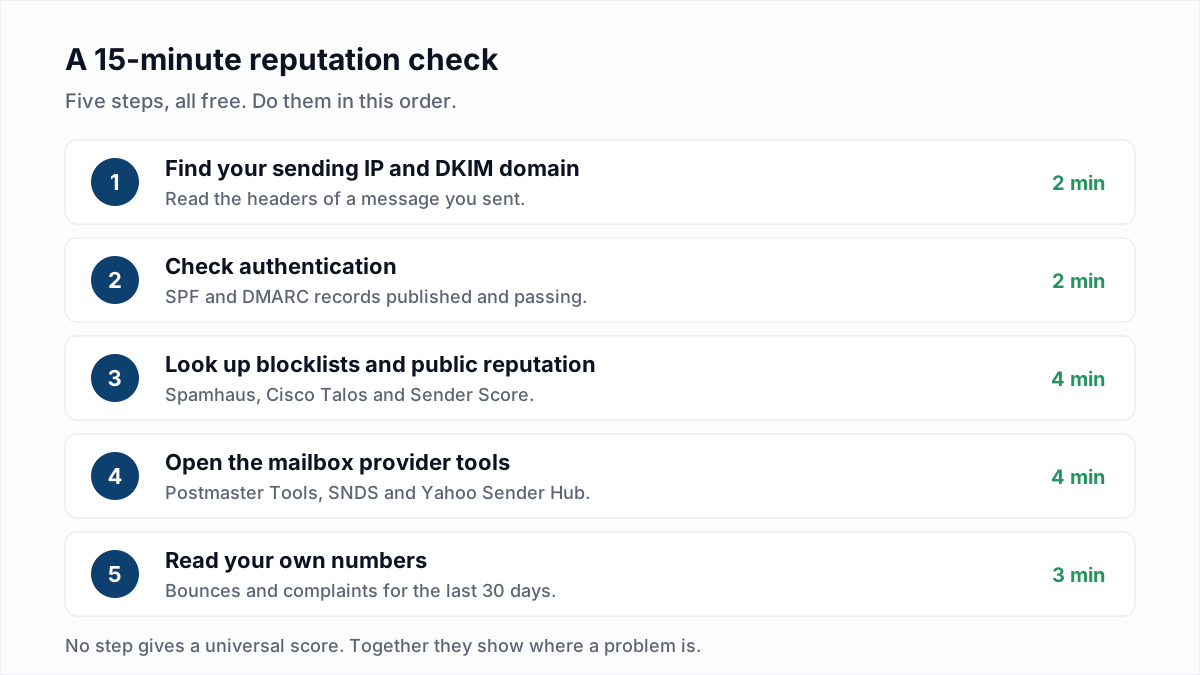
A 15-minute domain reputation check has five steps: identify what you send from, confirm authentication, run the public lookups, open the provider tools, then read your own numbers.
- Find your sending IP and DKIM domain. Open a message you sent, view the original, and note the
d=value inDKIM-Signatureand the IP in the first externalReceivedline. How to read email headers shows where. - Check authentication. Run the domain through the SPF checker and the DMARC checker. Broken authentication drags reputation down everywhere.
- Run the public lookups. Check the IP and domain at Spamhaus and Talos, and the IP at Sender Score. Our blacklist check does a one-time lookup across public blocklists. InboxSure does not monitor blocklists or reputation, so repeat it when you need a fresh answer.
- Open the provider tools. Postmaster Tools for Gmail, SNDS for Outlook.com if you control the IP, and your Yahoo complaint reports. Setting those up is covered in email feedback loops.
- Read your own numbers. Pull bounce rate and complaints for the last 30 days, split by receiving provider.
What do your own bounce and complaint numbers say about reputation?
Your own bounce and complaint data is the most direct reputation evidence you have, because a receiving server that distrusts you says so in its reply.
| If you see | It suggests | Read next |
|---|---|---|
Gmail deferrals starting 421 4.7 | Gmail is rate-limiting you on reputation or volume | 421 4.7.0 try again later |
Outlook.com 550 5.7.1 naming a block list | Your IP is on a Microsoft internal list | Outlook 550 5.7.1 bounces |
| A bounce that names a blocklist zone | A public blocklist listing | Blacklist check and removal |
| Complaints rising at one provider | Recipients there no longer want the mail | Spam complaint rate explained |
| Hard bounces rising | Old or invalid addresses on the list | Bounce rate calculator |
What moves domain reputation up or down?
Domain reputation moves mainly with spam complaints, mail to addresses that do not exist, spam trap hits, blocklist listings, authentication and sudden volume changes. Those are the factors Sender Score's page lists, and Google's rating definitions are written entirely in terms of how much spam a sender has a history of sending.
- Complaints. Google's sender guidelines set the spam rate target below 0.1%, never reaching 0.3%.
- Unknown users. Sending to mailboxes that do not exist signals a neglected or bought list.
- Volume spikes. A new domain or IP has no history; build it as described in email warm-up and sender reputation.
How long does domain reputation take to recover?
No mailbox provider publishes a recovery time for domain reputation. Google gives two related figures. Its sender guidelines FAQ says bulk senders become eligible for mitigation again "when their spam rates remain below 0.3% for 7 consecutive days", and its deprecation notice concedes that "changes in sender behavior are slow to reflect" in the reputation dashboard. Yahoo's best practices page and the Microsoft pages we could read state no timeframe. Treat any promise of recovery in a fixed number of days as a guess.
Where list quality fits in
One input to reputation is fully in your hands before you send: whether the addresses exist. InboxSure checks syntax, MX records and the mailbox over SMTP without sending an email, and flags catch-all, role and disposable addresses. It does not measure, monitor or repair reputation, it cannot tell you who will complain, and Yahoo, AOL, Outlook.com and Hotmail addresses currently come back Unknown because those providers refuse the check. Remove the dead addresses with the bulk email verifier (up to 50 addresses per list free, up to 10,000 per list on Pro at a flat $49 a month), then run the 15-minute check again after your next send.
Frequently asked questions
Related reading
Ready to clean your email list?
Upload a CSV or XLSX and get every address marked deliverable, risky, undeliverable or unknown, with the reason. Free for lists of up to 50, no card. Nothing is sent to your contacts.