Too Many Recipients Error (550 5.5.3, 452 4.5.3): Causes and Fixes
The first thing to know: nothing is wrong with the addresses. A too many recipients error counts how many people one message was sent to, or how many one sender has mailed, and it would have fired on a list of perfectly valid contacts. Do not remove anyone because of it. Find out whose limit you hit, then send the same message in smaller pieces.
A too many recipients error is an SMTP reply saying that one message, or one sender, named more recipients than the mail server is willing to accept. Every other bounce code is in the email bounce codes reference.
What does a too many recipients error mean?
A too many recipients error means a mail server stopped accepting RCPT TO commands for a message because a recipient limit was reached. It arrives in two forms.
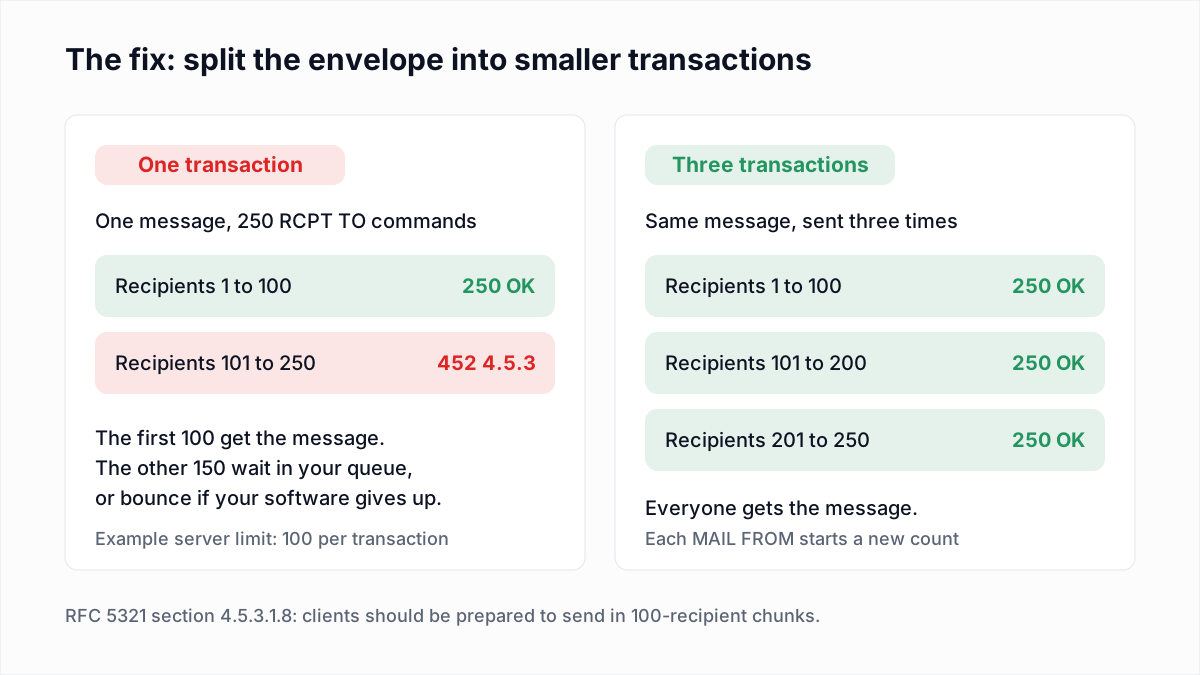
- 452 4.5.3 is temporary. The recipients already accepted can still get the message, and the sending server is expected to deliver the rest in a later attempt.
- 550 5.5.3 is permanent. Nothing is retried automatically, and a person or a program has to resend with fewer recipients.
In both, the enhanced code is subject 5 (protocol), detail 3. RFC 3463 defines X.5.3 as: "More recipients were specified for the message than could have been delivered by the protocol. This error should normally result in the segmentation of the message into two, the remainder of the recipients to be delivered on a subsequent delivery attempt." The standard expects the fix to be automatic splitting, not a bounce.
What does RFC 5321 say about recipient limits?
RFC 5321 says every SMTP server must accept at least 100 recipients per message and must answer with code 452 when its limit is reached. Two sections of RFC 5321 set the rules.
- Section 4.5.3.1.8, the floor. "The minimum total number of recipients that MUST be buffered is 100 recipients. Rejection of messages (for excessive recipients) with fewer than 100 RCPT commands is a violation of this specification." A server that has a limit must reject "additional addresses over its limit rather than silently discarding addresses previously accepted".
- The same section, for senders. A client with more than 100 recipients "SHOULD be prepared to transmit in 100-recipient 'chunks' if the server declines to accept more than 100 recipients in a single message."
- Section 4.5.3.1.10, the code. The older standard, RFC 821, "incorrectly listed" this error as 552. "The correct reply code for this condition is 452. Clients SHOULD treat a 552 code in this case as a temporary, rather than permanent, failure".
The 100 figure is a minimum for servers, not a maximum for senders. Providers are free to accept more, and most do. They are also free to apply stricter limits per sender or per day, and that is where the permanent 550 5.5.3 comes from.
What do Gmail and Microsoft say when you hit a recipient limit?
Gmail documents three replies with the 4.5.3 or 5.5.3 code, and Microsoft documents one for Exchange Online and one for Exchange Server. The wordings below are copied from each provider's own documentation, read on 13 November 2026.
| Code and wording | Whose limit | Fix |
|---|---|---|
Gmail: 452 4.5.3 Your message has too many recipients. | Google's per-message recipient limit. The text points to Google's sending limits page. | Split the recipients across several messages, or send to a group address. |
Gmail: 452 4.5.3 Domain policy size per transaction exceeded, please try this recipient in a separate transaction. | The receiving Google Workspace domain. Google's text links its policy-rule help. | Your mail server retries that recipient in a new transaction. Nothing to do unless it bounces. |
Gmail: 550 5.5.3 Too many recipients for this sender. | Google's limit on the sender. Google's reference does not say which count triggers it. | Resend to fewer recipients per message and spread the sends out. |
Exchange Online: 4.5.3 Too many recipients | Microsoft 365, receiving. Microsoft: "The message has more than 200 SMTP envelope recipients from the same domain." | Microsoft: "the sending server must break up the number of envelope recipients into smaller chunks (chunking) and resend the message." |
Exchange Server: 5.5.3 Too many recipients | The Exchange organisation, Receive connector or sender. The To, Cc and Bcc total exceeds what is allowed in a single message. | Send to fewer recipients, or ask the Exchange administrator to raise the limit. |
Postfix: 452 4.5.3 Error: too many recipients | The receiving Postfix server. The default smtpd_recipient_limit is 1,000 per message. | Your mail server delivers the remaining recipients on its next attempt. |
| Yahoo Mail | Not published. Yahoo's Sender Hub error page lists no too many recipients code. | Keep each transaction to 100 recipients or fewer, the RFC 5321 floor. |
Sources: Google's SMTP error reference, Microsoft's Exchange Online NDR reference and DSNs and NDRs in Exchange Server, the Postfix configuration reference (the reply text is from the Postfix source code) and Yahoo's SMTP error codes.
Is it a per-message, per-day or per-connection limit?
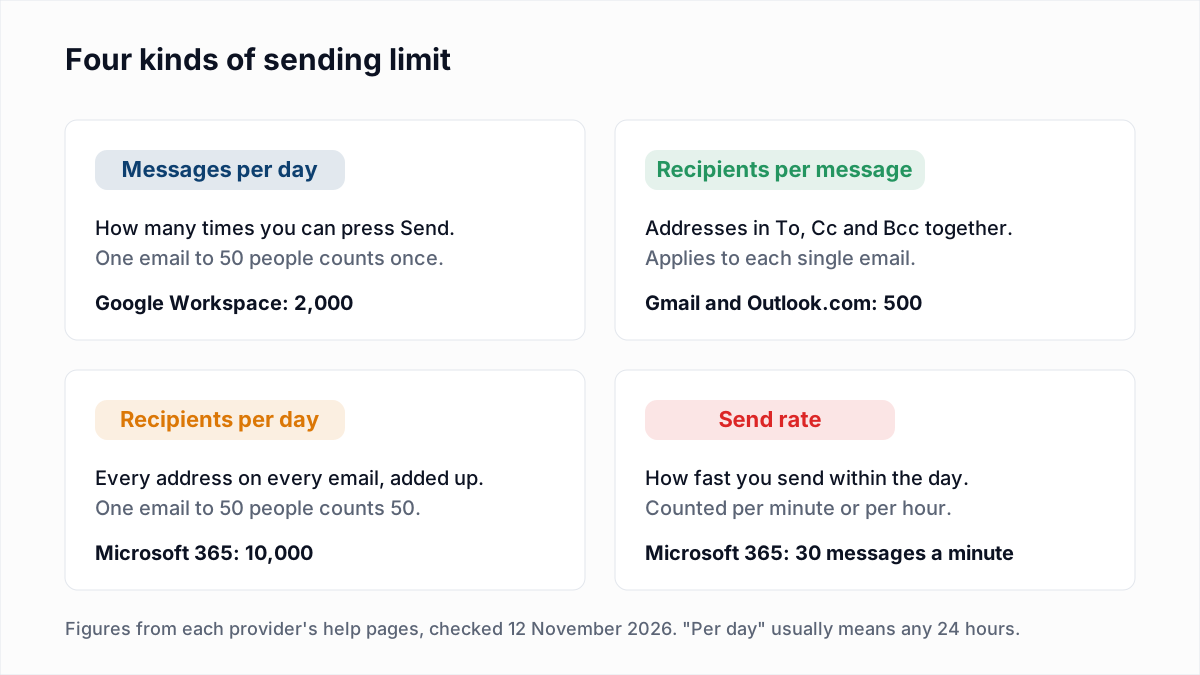
A too many recipients error with code 4.5.3 or 5.5.3 is almost always a per-message or per-transaction limit, not a daily one. Daily limits have their own errors, and the three counters work differently.
| Limit | What is counted | Published examples (November 2026) |
|---|---|---|
| Recipients per message | To, Cc and Bcc addresses on one email, set by your own provider. | Gmail: 500. Google Workspace: 2,000, of which 500 external; 100 when sent over SMTP by POP or IMAP users; 500 through the Gmail API. Exchange Online: customizable up to 1,000. |
| Recipients per SMTP transaction | RCPT TO commands after one MAIL FROM, set by the server being talked to. | Google's SMTP relay: 100. Exchange Online: 200 from the same domain. Postfix default: 1,000. |
| Recipients per day | Every recipient on every message over a rolling 24 hours. | Google Workspace: 10,000 total, 3,000 external. Exchange Online: 10,000. |
The figures come from Google's Gmail limits, Workspace sending limits and SMTP relay pages, and from Microsoft's Exchange Online limits. Microsoft calls the per-message one the "recipient limit": "the maximum number of recipients allowed in the To:, Cc:, and Bcc: fields for a single email message". A distribution group in the organisation's shared address book counts as one recipient toward it.
A per-connection limit is a different thing again: some servers also cap how many messages or recipients they take over one open connection. Google's relay page shows how the per-transaction count resets: "To send messages to additional recipients, start another transaction (new SMTP connection or RSET command)."
If you hit a daily limit instead, the error is different: Google returns 550 5.4.5 Daily user sending limit exceeded and Microsoft returns 5.1.90. Those, the rolling 24-hour window and limits for other providers are covered in email sending limits.
How do you fix a too many recipients error?
You fix a too many recipients error by sending the same message to fewer recipients at a time. The steps depend on who returned the error.
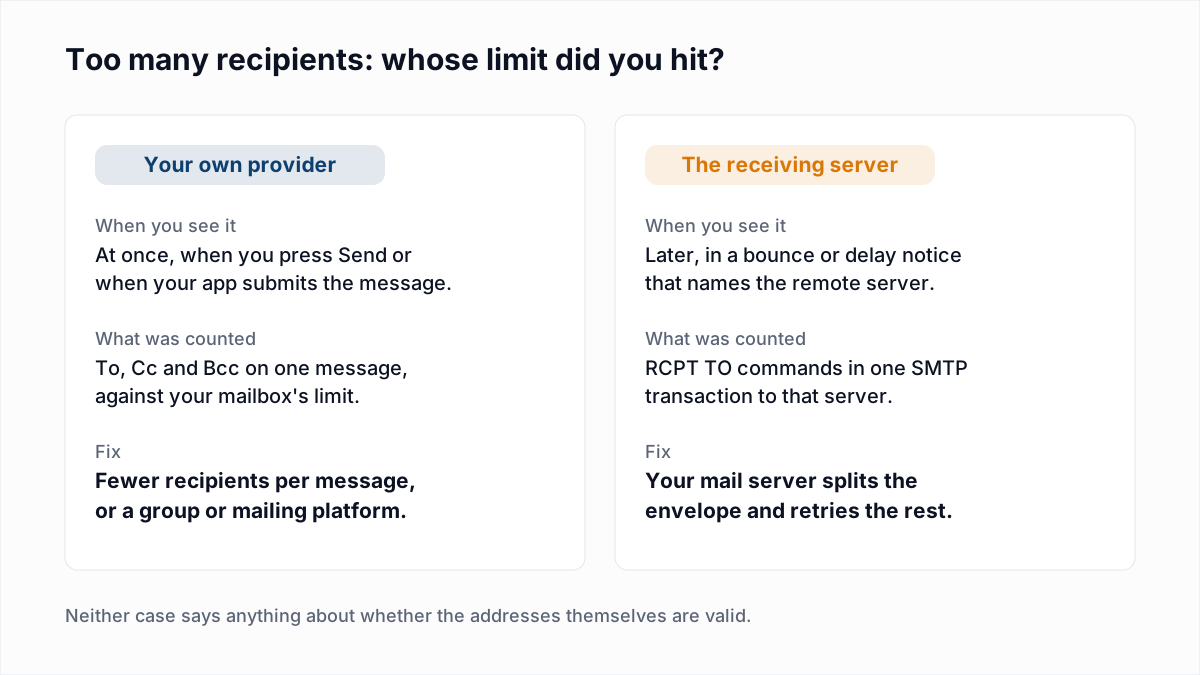
- Find out who refused. An error shown the moment you press Send comes from your own provider. An error inside a bounce or delay notice names the remote server that returned it.
- Count the envelope. Add up To, Cc and Bcc. Every address is one
RCPT TO, and a personal contact group is expanded into its members before sending. - Split the envelope. Send the message in batches below the limit. 100 per batch is safe on any standards-compliant server, because RFC 5321 obliges servers to accept that many.
- Let a 452 retry. If you run a mail server, a 452 4.5.3 from a remote host needs no action when your software requeues the refused recipients. If it bounces them instead, lower its recipients-per-delivery setting. Postfix's
default_destination_recipient_limitalready defaults to 50. - Slow down after a 550 5.5.3. A permanent refusal aimed at "this sender" will not clear by resending the same envelope immediately. Use smaller messages, spaced out.
- For a regular audience, stop using the mailbox. Use a group address or a mailing platform, which sends one message per recipient.
Google suggests the group route itself. Its Gmail limits page says that to avoid the error you can try "creating a Google Group of all your email recipients and sending the message to that group's email address." In Microsoft 365, a distribution group does the same job and counts as a single recipient.
Why is a BCC blast from a mailbox a bad idea?
A BCC blast from a personal or work mailbox is a bad idea because it runs into recipient limits by design and has none of the handling that bulk mail needs. Splitting one blast into ten smaller ones gets past the error, not the underlying problems. For the alternative, see how to send bulk email without landing in spam.
- One mistake locks the mailbox. Google says that after reaching a limit, users "can't send new messages for up to 24 hours". That includes ordinary replies to customers.
- The provider is not built for it. Microsoft's limits page says "Exchange Online isn't suited to accommodate bulk-mailing scenarios".
- There is no unsubscribe. A BCC message has no unsubscribe link and no List-Unsubscribe header, so the only way out for a recipient is the spam button, which raises your complaint rate.
- Bounces come back as loose emails. Nothing suppresses a dead address automatically, so the same ones bounce on every send.
- It looks like a compromised account. Microsoft's guidance for its daily recipient-limit errors is to check whether the account was hacked, because sudden mass sending is what that looks like.
When a mailbox stops being the right tool is covered in the sending limits guide.
Does too many recipients mean the addresses are bad?
No, a too many recipients error does not mean any address is bad. Codes 4.5.3 and 5.5.3 are in the protocol group, and the server never judged the recipients it refused: it stopped counting. Treat those contacts as unsent, not as bounced.
That has three practical consequences.
- Do not suppress on this code. If your sending tool marks 550 5.5.3 as a hard bounce and removes the recipients, restore them.
- Check who actually received the message. With a 452, the recipients named before the limit may already have been accepted and delivered. Check your sent log and resend only to the rest, or some people get the email twice.
- Verification will not fix it. A verifier such as InboxSure tells you which addresses exist. It does not change how many recipients a server takes per message, and a fully verified list of 600 people still fails as one Gmail message.
The codes that do call for removing an address, starting with 550 5.1.1, are sorted in soft bounce vs hard bounce.
Smaller envelopes first, then a clean list
Fix the envelope size and this error goes away for good. Once mail to a larger audience is going out through a group or a platform, the next thing to watch is bounces: every dead address on the list is a hard bounce against your sending reputation. InboxSure checks syntax, MX records and the mailbox over SMTP without sending an email, and returns Deliverable, Risky, Undeliverable or Unknown for each address as a CSV. The Free plan covers lists of up to 50 addresses with no card, and Pro is $49 a month for lists of up to 10,000. Run your list through the bulk email verifier before the first send from the new setup.
Frequently asked questions
Related reading
Ready to clean your email list?
Upload a CSV or XLSX and get every address marked deliverable, risky, undeliverable or unknown, with the reason. Free for lists of up to 50, no card. Nothing is sent to your contacts.