Why Did a Verified Email Still Bounce? 8 Causes and Codes
A verified email address is one whose mail server said, at the moment of the check, that it would accept mail for that mailbox. That is a narrower promise than it sounds. The check happens once, from the verifier's server, without a message. Your send happens later, from your server, with a message. Anything that differs between those two events can produce a bounce, and only some of it has to do with the address.
So the first job when a verified address bounces is not to blame the verifier or the list. It is to read the bounce code, because the code tells you which of eight quite different things happened.
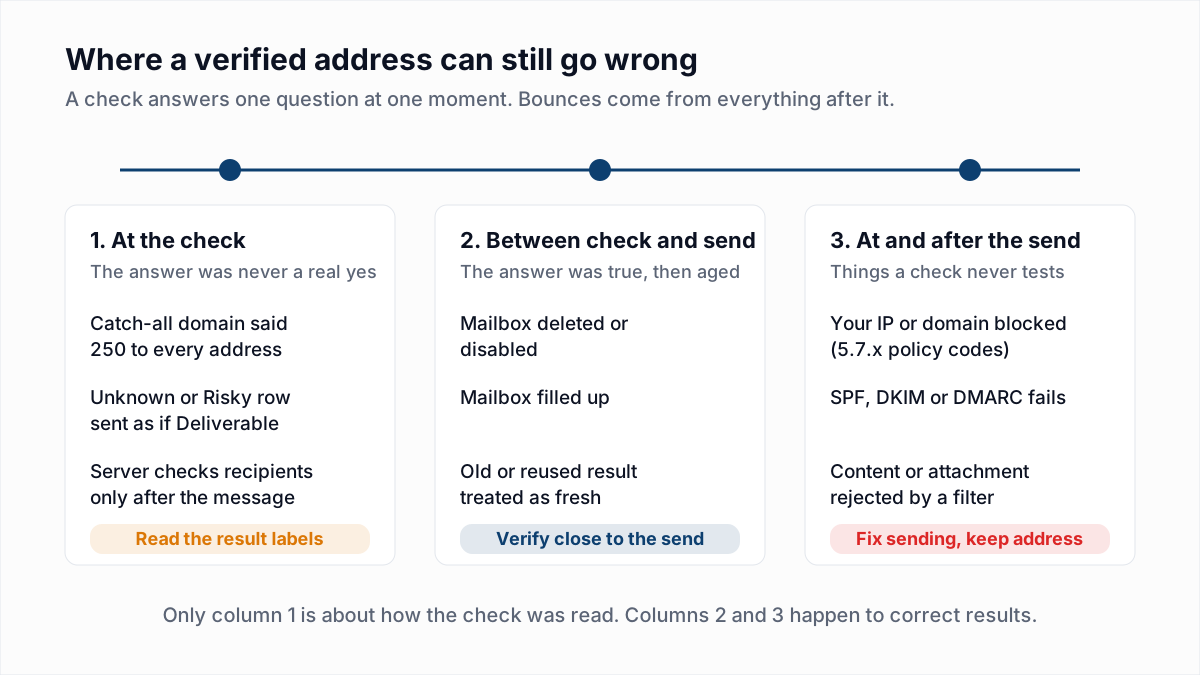
Why do verified emails bounce?
Verified emails bounce for eight main reasons: the domain was catch-all, the mailbox was removed after the check, the mailbox filled up, the receiver blocked the sender, an Unknown result was sent as if valid, a content filter refused the message, the result was old, or the server only checks recipients after accepting mail.
| Reason | Bounce you would typically see | Could verification have caught it? |
|---|---|---|
| Catch-all domain accepted the check, then rejected the mail | A bounce email some time after the send, often quoting 550 5.1.1 | Partly. A verifier can flag the domain as catch-all but cannot confirm the mailbox. |
| Mailbox deleted or disabled after the check | 550 5.1.1, or 550 5.2.1 for a disabled mailbox | No, not at the time. A fresh check before the send would have. |
| Mailbox full | 452 4.2.2 or 552 5.2.2 | Only on servers that check storage when the recipient is named. |
| Receiver blocked your IP, domain or authentication | 550 5.7.1, 550 5.7.25, 550 5.7.26 and other 5.7.x codes | No. The address is fine; the refusal is about the sender. |
| Unknown or greylisted result was treated as valid | Any of the codes in this table | The verifier did flag it. The result was not a yes. |
| Recipient server filtered the content | 554 or 550 with 5.7.x and policy or spam wording | No. Verification sends no message, so content is never tested. |
| Verification result was old or reused | 550 5.1.1 | Yes, by checking again close to the send. |
| Server accepts every recipient and bounces afterwards | A bounce email after the send, with any code | Sometimes flagged as catch-all; otherwise no. |
1. The domain is catch-all
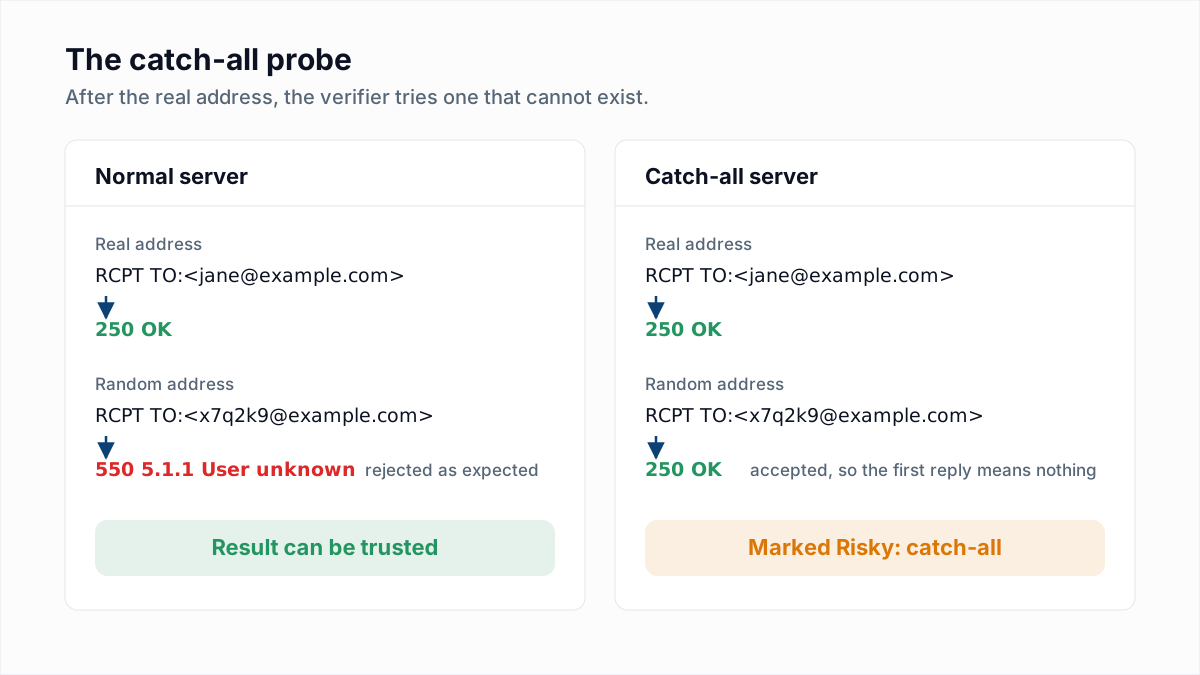
A catch-all domain answers 250 to every address, real or not, so the check proves nothing about the mailbox. Some of these servers then reject or discard mail for unknown names after accepting it. A good verifier detects this by also asking about a random address that cannot exist; if that is accepted too, the result is Risky, not Deliverable. If a tool reported a catch-all address as plain "valid", it reported the server's routing policy. The detail is in what is a catch-all email.
2. The mailbox was deleted or disabled after the check
People leave jobs and accounts get closed, so an address that was real on the day of the check can be gone on the day of the send. The bounce is the ordinary unknown-user reply, for example Gmail's 550-5.1.1 The email account that you tried to reach does not exist. A disabled mailbox usually returns 5.2.1, which RFC 3463 defines as "mailbox disabled, not accepting messages". No verifier can see the future. We have not found a primary source for how fast lists decay, so we will not quote a yearly percentage; your own bounce logs are the measure. See how often to clean an email list.
3. The mailbox is full
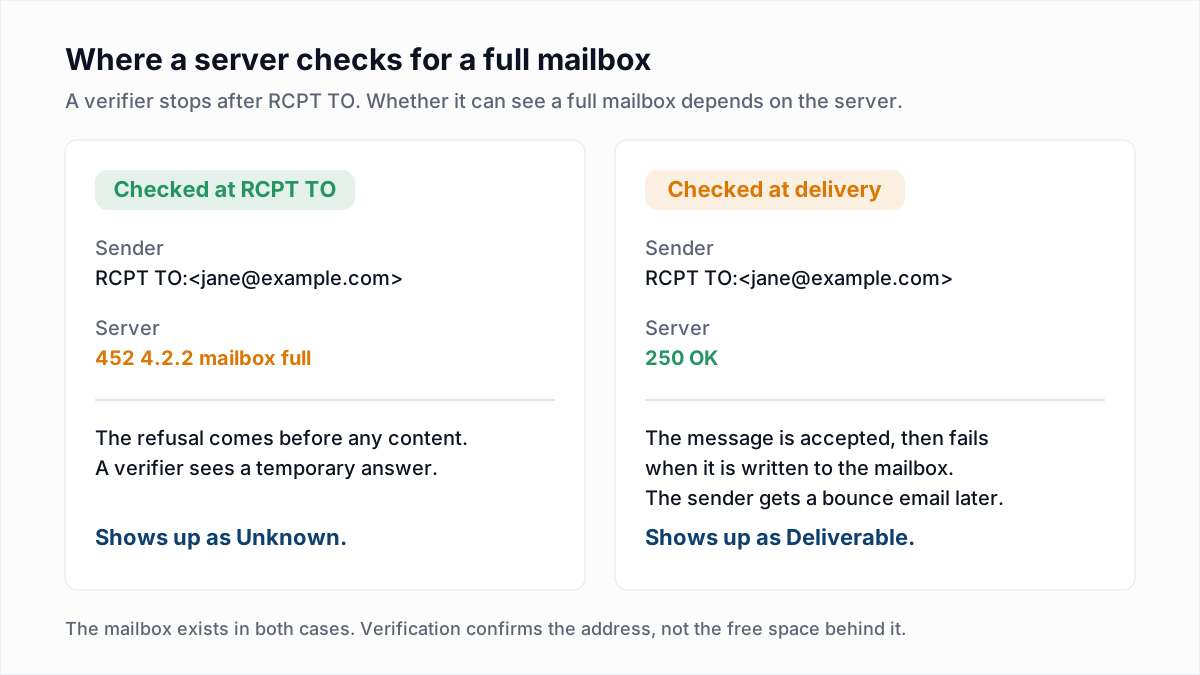
A full mailbox exists, so verification can honestly report it as Deliverable and the mail can still bounce. Gmail answers 452 4.2.2 The recipient's inbox is out of storage space while it is temporary and 552 5.2.2 with the words "and inactive" when it is permanent. Whether a verifier sees this depends on the server: some check storage when the recipient is named, others only when the message is written to the mailbox. More in 552 5.2.2 mailbox full.
4. The receiver blocked you, not the address
Codes in the 5.7.x family are security and policy refusals, and most of them are about the sender's IP, domain or authentication. InboxSure's own research on 4 November 2026 collected three, all returned before any recipient was named:
550 5.7.1 Unfortunately, messages from [IP] weren't sent. ... part of their network is on our block list (S3140)
550 5.7.25 Forward-confirmed reverse DNS failed
550 5.7.0 Blocked - see https://ipcheck.proofpoint.com/?ip=[IP]
The first is Outlook.com, the second Yahoo and AOL, the third a Proofpoint gateway. Every address behind those servers would bounce the same way, valid or not. Removing the contacts fixes nothing. The fixes are in Outlook 550 5.7.1, 550 5.7.25 reverse DNS, 550 5.7.26 and the Proofpoint 550 5.7.0 block.
5. An Unknown result was treated as valid
Unknown means the server did not answer the question, usually because of greylisting, a timeout, or a provider refusing the verifier. In the same research, Fastmail and a Mimecast gateway returned 451 replies, which say "ask later" and nothing about the mailbox. If a tool or an export step folded Unknown into the "safe" pile, unverified addresses went out labelled as verified. Greylisting explained shows how to handle them.
6. The recipient server filtered the content
A verifier disconnects before any message exists, so links, attachments and wording are never tested. Yahoo's Sender Hub error page describes content-based blocks where mail "wasn't accepted because there is something in the content that Yahoo won't accept for policy reasons". Corporate gateways do the same with 554 or 550 replies. The sibling post on 554 5.7.1 covers the common wordings.
7. The result was cached or old
A result describes the day of the check. Two things make it older than you think: a list verified weeks before the send, and a verifier that reuses a stored answer for an address it has seen before instead of asking the server again. Vendors rarely say how long they keep results, so ask yours. Either way the bounce is a plain 550 5.1.1 for a mailbox that has since gone.
8. The server accepts everything and bounces later
Some servers do not look up the recipient until the whole message has arrived. RFC 5321 says so directly: "in practice, some servers do not perform recipient verification until after the message text is received", and it tells them to send a failure message back afterwards. To a verifier, which stops at the recipient step, such a server looks like it said yes. A random-address probe catches many of these as catch-all. Some gateways answer differently for different senders, and those cannot be caught.
How do I tell from the bounce code whether the address was bad?
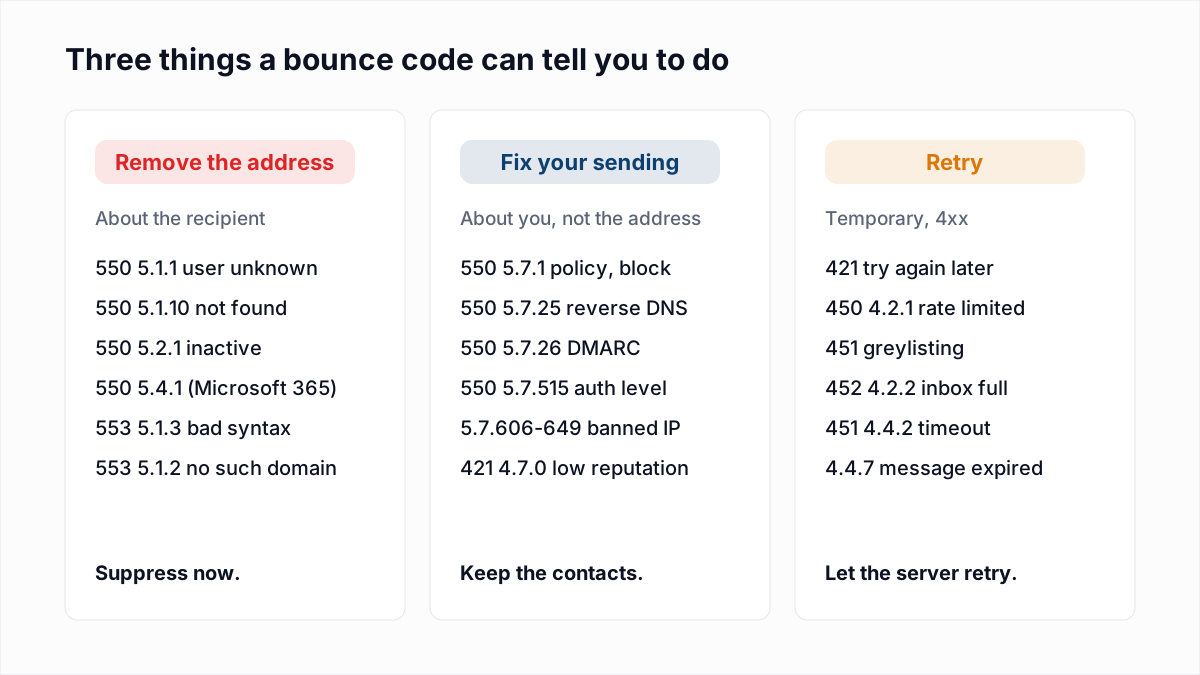
The bounce code tells you whether the address was bad through the second number of its enhanced status code: 5.1.x and 5.2.x describe the recipient address or mailbox, 5.7.x describes a security or policy decision, and any code starting with 4 asks for a retry.
| Bounce code and wording | Was it the address? | Action |
|---|---|---|
| 550 5.1.1 "user unknown" or "does not exist" | Yes. The mailbox is not there. | Suppress the address. Do not retry. |
| 550 5.4.1 "Recipient address rejected: Access denied" (Microsoft 365) | Yes. The tenant has no such recipient. | Suppress the address. |
| 554 "delivery error: dd This user doesn't have a yahoo.com account" | Yes. Yahoo says the account does not exist. | Suppress. Yahoo says not to retry. |
| 550 5.2.1 mailbox disabled or inactive | Yes, though read the text: Gmail also uses 5.2.1 for a rate limit. | Suppress if the text says disabled or inactive. |
| 452 4.2.2 mailbox full | No. The address exists and is over quota. | Let your server retry. Suppress if it repeats across several sends. |
| 552 5.2.2 mailbox full | The address exists, but nobody is emptying it. | Stop sending to it for now; treat repeated cases as abandoned. |
| 550 5.7.1 naming a block list, policy or your IP | No. The receiver refused the sender. | Keep the contact. Fix the listing or reputation problem. |
| 550 5.7.25 reverse DNS | No. Your sending IP has no matching PTR record. | Keep the contact. Fix reverse DNS. |
| 550 5.7.26 or 5.7.515 authentication | No. SPF, DKIM or DMARC did not pass. | Keep the contact. Fix authentication. |
| 554 or 550 mentioning content, spam or policy | No. The message was refused, not the mailbox. | Keep the contact. Change the message and check reputation. |
| 421 or 451 temporary deferral | Not known yet. Nothing has bounced. | Let your server retry. |
One caution: read the words as well as the number. In our research Yandex answered a missing mailbox with 550 5.7.1 No such user!, a policy code carrying an address fact. The full list of codes is in the email bounce codes guide.
What should I do when a verified address bounces?
When a verified address bounces, sort the bounces by code before removing anyone, because only address-level codes justify suppression.
- Export the bounces with their full reply text. Your sending platform keeps the code and the server's sentence. A label such as "hard bounce" is not enough.
- Split them with the table above. Address codes in one pile, sender and content codes in a second, temporary codes in a third.
- Suppress the first pile. These addresses are gone whatever the verification said.
- Look at the second pile by receiving domain. If every bounce from one provider carries the same 5.7.x code, you have one problem, not many bad addresses. Fix it and send to those contacts again.
- Go back to the verification export. Check which result each bounced address had. Bounces among Risky and Unknown rows are expected. Bounces among Deliverable rows with a 5.1.1 code are the ones worth counting.
- Compare the dates. If the check was weeks before the send, verify again before the next campaign.
Step 5 is where the result labels matter. InboxSure reports four results (Deliverable, Risky, Undeliverable, Unknown) and the CSV download keeps the reason for each row, so you can see whether a bounced address was a confirmed mailbox or a catch-all that was never confirmed.
What bounce rate is normal after verifying a list?
No bounce rate after verification is officially normal, because mailbox providers do not publish one and verification vendors make different promises. Verification removes the addresses a server will reject outright. It cannot remove the causes above that happen after the check or on the sender's side.
Some vendors advertise an accuracy figure or a deliverability guarantee. The terms differ on what counts as a bounce, which results are covered, and how soon after the check you must send, so read the conditions on the vendor's own page before relying on a number. We do not publish an accuracy percentage for InboxSure, and our own research shows why a single figure would mislead: results for Gmail and Microsoft 365 business domains are clear, while Yahoo, AOL, Outlook.com and Hotmail refused our check and came back Unknown.
A more useful measure is your own. Track hard bounces per send, split by the verification result each address had. A rising 5.1.1 rate among Deliverable rows means the list is aging or the results are being reused. The bounce rate calculator does the arithmetic, and reduce email bounce rate covers the rest.
How do I stop verified emails from bouncing?
You cannot stop every verified email from bouncing, but four habits remove most of the avoidable ones.
- Verify close to the send. The shorter the gap, the fewer mailboxes change in it.
- Send only Deliverable as your main segment. Treat Risky and Unknown as separate small batches, as described in is it safe to send to catch-all emails.
- Fix the sender side first. Reverse DNS, SPF, DKIM and DMARC failures bounce good addresses. Check them with the SPF checker and DMARC checker.
- Suppress address-level hard bounces at once. Repeated sends to dead mailboxes are what damage reputation.
If you want to recheck a list before the next send, the bulk email verifier returns each address as Deliverable, Risky, Undeliverable or Unknown with the reason, and it is honest about the last two. The Free plan takes lists of up to 50 addresses with no card; Pro is $49 a month for lists of up to 10,000.
Frequently asked questions
Related reading
Ready to clean your email list?
Upload a CSV or XLSX and get every address marked deliverable, risky, undeliverable or unknown, with the reason. Free for lists of up to 50, no card. Nothing is sent to your contacts.