What Is an SPF Record? Syntax, Examples and Setup
SPF stands for Sender Policy Framework, and the whole standard is one document: RFC 7208. The shortest useful SPF record is a single line of text:
v=spf1 include:_spf.google.com ~allThat line says: mail for this domain comes from Google's servers, and anything else is probably not ours. This guide covers the syntax term by term, real records from large domains, how to publish one, and the limits that break records in practice. How SPF fits with the other two checks is in SPF, DKIM and DMARC explained.
What does an SPF record look like?
An SPF record is a TXT record that starts with v=spf1, followed by a list of mechanisms that name allowed senders, and usually ends with an all term that covers everyone else. RFC 7208 section 3.1 says SPF must be published as a TXT record. The old dedicated SPF record type was retired.
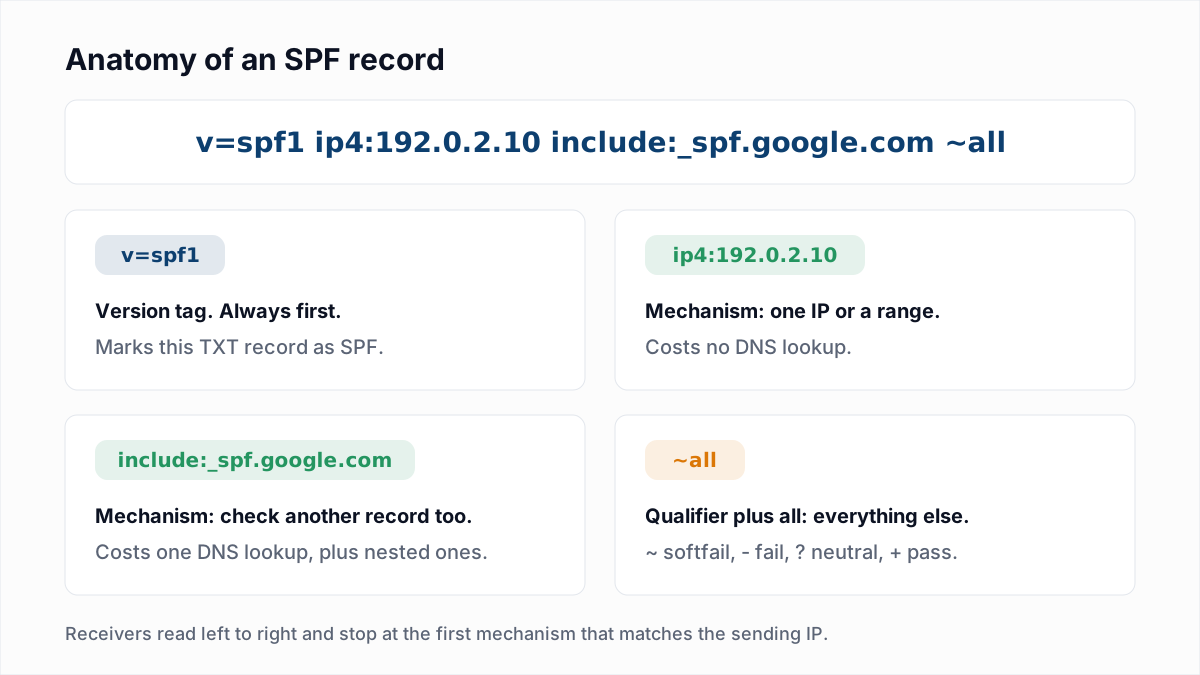
The receiving server takes the IP address of the machine that connected to it and tests each mechanism in order. The first one that matches decides the result. If nothing matches and there is no all, the result is neutral.
Which address does SPF check?
SPF checks the envelope sender, the address given in the SMTP MAIL FROM command and later stored as the Return-Path header. SPF does not check the From address that a reader sees in the mail client.
RFC 7208 sections 2.3 and 2.4 define two identities. The receiver must check MAIL FROM, and the RFC recommends that it also checks the HELO name the sending server announced. When the envelope sender is empty, as it is on bounce messages, the check falls back to postmaster@ plus the HELO name.
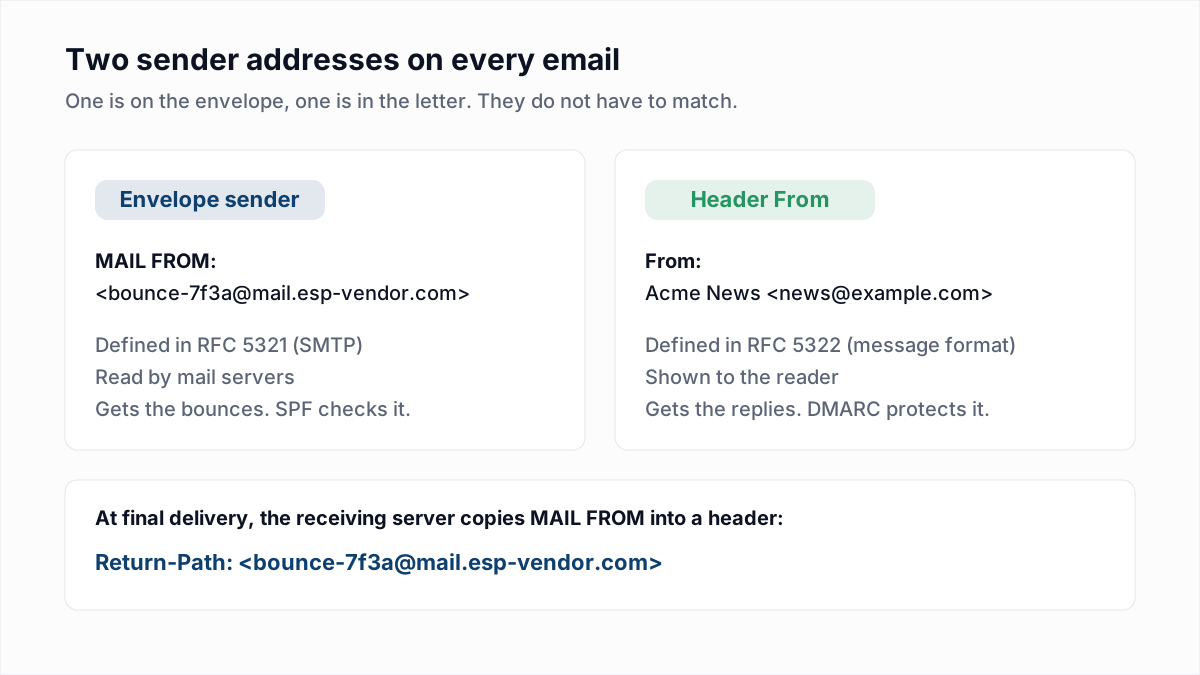
This has a practical consequence. If your email platform uses its own domain in the envelope sender, receivers look up the platform's SPF record and yours is never read for that mail. The fix, a custom Return-Path, is covered in Return-Path explained.
What do the SPF mechanisms, modifiers and qualifiers mean?
SPF mechanisms name senders, SPF qualifiers say what a match means, and SPF modifiers change how the whole record is processed. RFC 7208 defines eight mechanisms, two modifiers and four qualifiers.
| Term | Type | What it matches or does | Example |
|---|---|---|---|
ip4 | Mechanism | Matches one IPv4 address or a CIDR range. | ip4:192.0.2.0/24 |
ip6 | Mechanism | Matches one IPv6 address or a CIDR range. | ip6:2001:db8::/32 |
include | Mechanism | Evaluates another domain's SPF record and matches if that record passes. | include:sendgrid.net |
a | Mechanism | Matches if the sending IP is one of the domain's A or AAAA addresses. | a or a:mail.example.com |
mx | Mechanism | Matches if the sending IP belongs to one of the domain's MX hosts. | mx |
exists | Mechanism | Matches if an A lookup on the given name returns any address. Used with macros. | exists:%{i}._spf.example.com |
ptr | Mechanism | Matches on reverse DNS. RFC 7208 section 5.5 says it should not be published: it is slow and unreliable. | Do not use. |
all | Mechanism | Matches every sender. Goes last, because terms after it are ignored. | ~all |
redirect | Modifier | Hands evaluation to another domain's record when nothing matched. Ignored if the record contains all. | redirect=_spf.example.com |
exp | Modifier | Names a TXT record whose text explains a fail result to the sender. | exp=explain.example.com |
A qualifier is a single character in front of a mechanism. RFC 7208 section 4.6.2 makes + the default, so mx and +mx mean the same thing.
| Qualifier | Result when the mechanism matches | Typical use |
|---|---|---|
+ | Pass | The default. Rarely written out. |
- | Fail | -all: nothing else is authorised. |
~ | Softfail | ~all: anything else is probably not authorised. |
? | Neutral | ?all: no statement either way. For testing only. |
Choosing between the two common endings is its own subject: SPF ~all vs -all.
What do real SPF records look like?
Real SPF records range from one include to a dozen terms split across several strings. These three are copied verbatim from dig +short TXT on 13 November 2026. Records change, so run the command yourself for the current version.
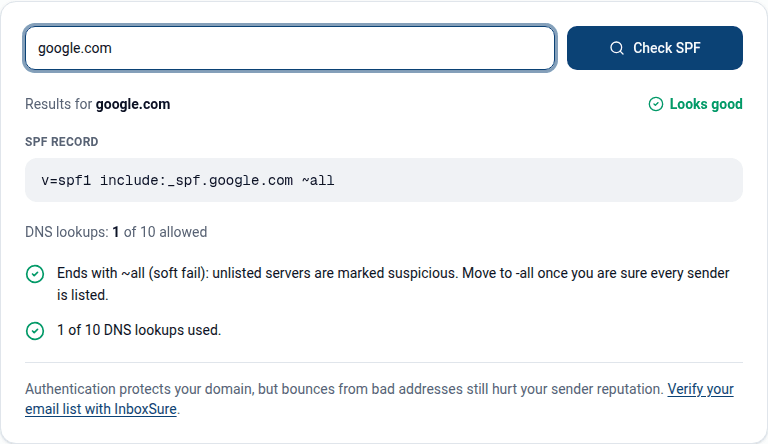
google.com delegates everything to one include and ends in softfail:
"v=spf1 include:_spf.google.com ~all"microsoft.com uses four includes and ends in a hard fail:
"v=spf1 include:_spf-a.microsoft.com include:_spf-b.microsoft.com include:_spf-ssg-a.msft.net include:_spf1-meo.microsoft.com -all"github.com mixes its own IP ranges with eight includes for outside services, and the answer comes back as two quoted strings:
"v=spf1 ip4:192.30.252.0/22 include:spf.protection.outlook.com include:_netblocks.google.com include:_netblocks2.google.com include:mail.zendesk.com include:_spf.salesforce.com include:servers.mcsv.net include:mktomail.com include:sendgrid.net ip4:62.253.2" "27.114 ip4:166.78.69.169 ip4:166.78.69.170 ip4:166.78.71.131 ~all"The break in the GitHub record falls in the middle of an IP address: ip4:62.253.2 then 27.114. That is legal. RFC 7208 section 3.3 says the strings of one TXT record are joined with no space added, so receivers read ip4:62.253.227.114.
How do you add an SPF record?
You add an SPF record by creating one TXT record at your domain's DNS host, with the domain itself as the name and the v=spf1 line as the value. The work is in getting the list of senders right.
- List every service that sends mail with your domain in the envelope sender. Mailbox provider, marketing platform, CRM, helpdesk, billing system, your own servers.
- Get each service's SPF term from its own documentation. It is usually an
include:, sometimes a list of IP ranges. For two mailbox providers, see SPF, DKIM and DMARC for Google Workspace and SPF, DKIM and DMARC for Microsoft 365. - Check whether a record already exists. Run
dig +short TXT example.comor use the SPF checker. If one exists, edit it. Do not add a second. - Write one record. Start with
v=spf1, add each term, end with~all. The SPF generator builds it from the services you pick. - Publish it as a TXT record. Name or host:
@(the root), or the subdomain. Value: the record. Microsoft's SPF setup guide recommends a TTL of at least 3600 seconds. - Verify. Run the checker again, then send a test message and look for
spf=passin the Authentication-Results header. The email header analyzer finds the line for you.
Can a domain have more than one SPF record?
No, a domain can have only one SPF record. RFC 7208 section 4.5 says that when a lookup returns more than one record starting with v=spf1, the result is permerror, which means SPF fails for all of your mail.
This usually happens when a new vendor's setup page says "add this TXT record" and someone adds it next to the old one. Merge the terms into one record instead:
Wrong:  v=spf1 include:_spf.google.com ~all
        v=spf1 include:sendgrid.net ~all

Right:  v=spf1 include:_spf.google.com include:sendgrid.net ~all
Other TXT records on the same name (site verification strings, for example) are fine. Only records beginning with v=spf1 count.
Do subdomains inherit the SPF record?
No, subdomains do not inherit the SPF record of the parent domain. A receiver looks up the TXT record at the exact domain in the envelope sender, so mail from news.example.com needs a record at news.example.com.
Microsoft's SPF guide states it plainly: the record for contoso.com does not cover marketing.contoso.com. A subdomain with no record gets the result none. This is the opposite of DMARC, where subdomains do fall back to the parent's policy. Giving each mail stream its own subdomain and record is covered in should you send email from a subdomain.
What are the possible SPF results?
An SPF check returns one of seven results: pass, fail, softfail, neutral, none, temperror or permerror. RFC 7208 section 2.6 defines them and section 8 says how receivers should handle each. Receivers set their own policy within that guidance.
| Result | What it means | What RFC 7208 tells receivers |
|---|---|---|
| pass | The sending IP is authorised by the record. | The domain can be held responsible for the message. Filtering continues. |
| fail | The record explicitly says the IP is not authorised. | Local policy decides. A rejection should use code 550 with 5.7.1. |
| softfail | The record says the IP is probably not authorised. | Should not reject on this alone, but may look more closely. |
| neutral | The record makes no statement about the IP. | Must be treated exactly like none. |
| none | No SPF record was found, or there was no domain to check. | Nothing was learned. Other signals decide. |
| temperror | A temporary DNS problem stopped the check. | Accept, or defer with a 451 code so the sender retries. |
| permerror | The record is broken: bad syntax, two records, or too many lookups. | A rejection should use code 550 with 5.5.2. The domain owner must fix DNS. |
Only pass helps you. DMARC counts every other result as an SPF failure, and Google's email sender guidelines require SPF or DKIM from every sender, and both plus DMARC from bulk senders. When SPF passes but DMARC still fails, see DMARC fail: causes and fixes.
What are the limits of an SPF record?
An SPF record is limited to 10 DNS-querying terms, 2 void lookups and 255 characters per string. Breaking the first two returns permerror. The third is a DNS rule that a correctly split record gets around.
- 10 DNS lookups. RFC 7208 section 4.6.4 caps the terms that cause lookups (
include,a,mx,ptr,exists,redirect) at 10, counting the ones nested inside includes.ip4,ip6andallare free. - 2 void lookups. The same section says receivers should stop after two lookups that return nothing, such as an include pointing at a domain with no record.
- 255 characters per string. One TXT string holds at most 255 characters. A longer record must be split into several quoted strings, as GitHub's is. Many DNS hosts split for you. Section 3.4 also advises keeping the whole answer small enough to fit in a 512-byte DNS reply.
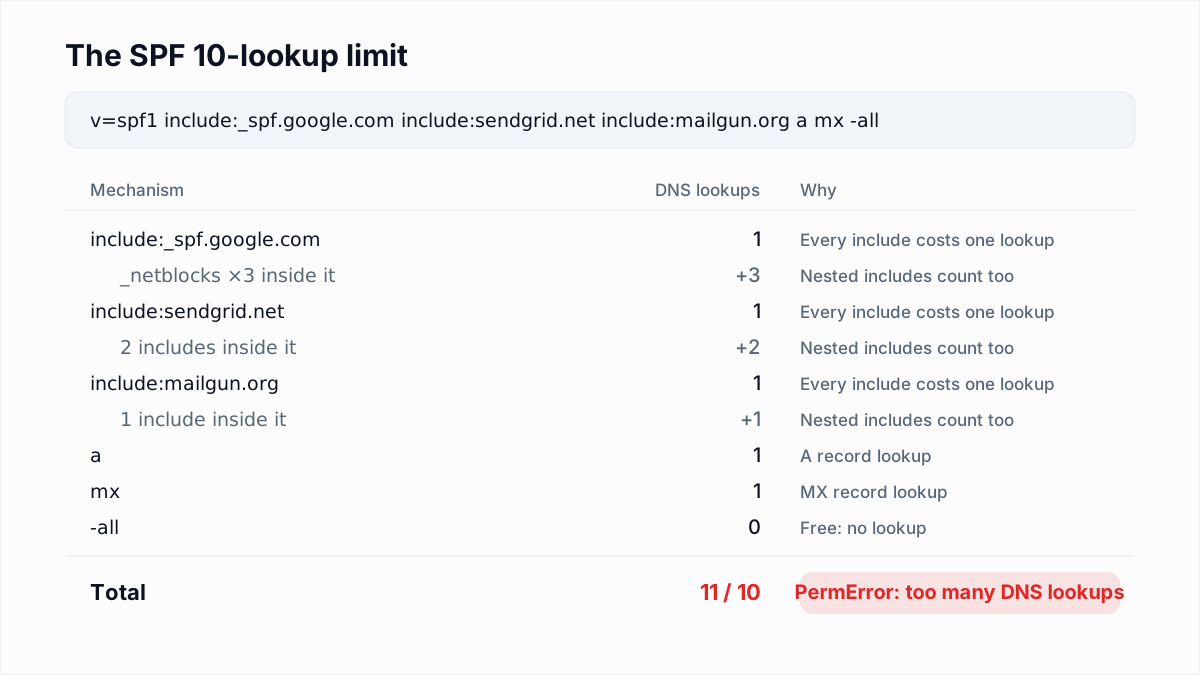
Counting lookups and the three ways to get back under 10 are in SPF PermError: too many DNS lookups.
What an SPF record does not do
An SPF record does not protect the From address people see, and it does not survive forwarding, because the forwarder's IP is not in your record (see why email forwarding breaks SPF and DMARC). That is why SPF is paired with DKIM and a DMARC policy.
SPF also says nothing about whether the addresses you send to exist. A correct record gets your mail evaluated fairly. A list full of dead mailboxes still bounces, and bounces cost reputation whatever your authentication says. InboxSure checks syntax, MX records and the mailbox itself over SMTP without sending a message, and flags catch-all domains, role accounts and known disposable providers. Some providers refuse the check, and those addresses come back Unknown, not guessed. You can test one address with the free email verifier.
Frequently asked questions
Related reading
Ready to clean your email list?
Upload a CSV or XLSX and get every address marked deliverable, risky, undeliverable or unknown, with the reason. Free for lists of up to 50, no card. Nothing is sent to your contacts.