SPF ~all vs -all: Softfail vs Hardfail Explained
The last term of an SPF record decides what happens to mail from servers you did not list. Two endings cover almost every record in use: ~all (softfail) and -all (fail, usually called hardfail). People argue about which is "stricter" or "safer". Once a DMARC policy is in place the gap is much smaller than the argument suggests, and the one real difference, rejection before DMARC is checked, cuts against -all for domains that send mail.
If the syntax is new to you, start with what an SPF record is.
What is the difference between ~all and -all?
SPF ~all returns the result softfail for any server not listed in the record, and SPF -all returns the result fail. Softfail is a weak statement that the sender is probably not authorised. Fail is an explicit statement that it is not.
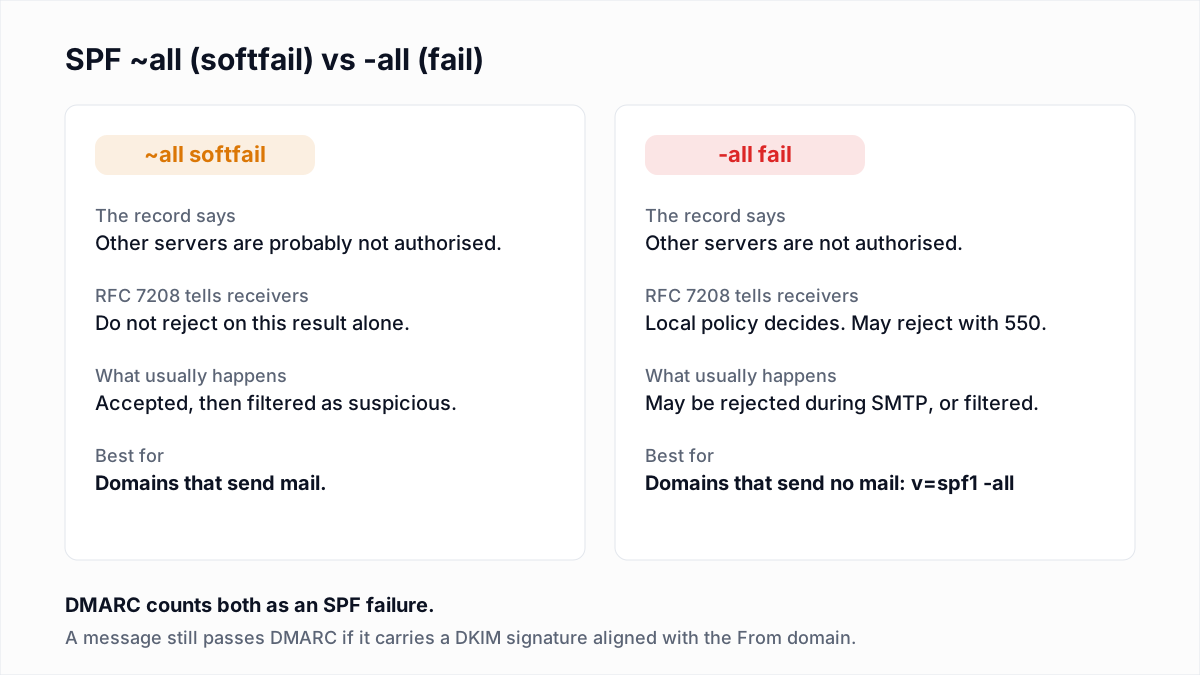
The qualifier only applies to mail that matched nothing earlier in the record. Mail from a listed server passes whichever ending you use.
What does RFC 7208 tell receivers to do with softfail and fail?
RFC 7208 tells receivers not to reject a message on softfail alone, and leaves a fail result to the receiver's local policy, which may include rejecting the message during the SMTP conversation.
The definitions are in section 2.6. A fail result "is an explicit statement that the client is not authorized to use the domain in the given identity." A softfail result "is a weak statement by the publishing ADMD that the host is probably not authorized." (ADMD means the domain owner.)
The handling advice is in section 8:
- Fail (8.4). If the receiver chooses to reject, it should use reply code 550 and enhanced code 5.7.1. If it accepts, it should record the result in a Received-SPF or Authentication-Results header.
- Softfail (8.5). The result "ought to be treated as somewhere between fail and neutral/none." Receiving software "SHOULD NOT reject the message based solely on this result, but MAY subject the message to closer scrutiny than normal."
Neither section orders a receiver to do anything with a fail. The RFC permits rejection. It does not require it.
How do Gmail and Microsoft treat ~all and -all?
Google and Microsoft both describe softfail mail as usually accepted and marked, and hardfail mail as mail that may be rejected. Neither publishes how much weight its spam filter gives to either result.
| Source | On ~all | On -all | Recommends |
|---|---|---|---|
| Google, About SPF records | Receiving servers typically accept the message but mark it as suspicious. | Receiving servers may reject messages from senders that are not in the record. A misconfigured record might send more of your mail to spam. | The example record for Google Workspace ends in ~all. With a hard fail, use DMARC reports to identify all senders first. |
| Microsoft, Set up SPF for Microsoft 365 | Messages should be accepted but marked: quarantined, sent to Junk, or delivered with an identifier added. | Messages should be rejected. What happens depends on the destination, "but the messages are typically discarded." | -all for Microsoft 365 domains, because Microsoft also recommends DKIM and DMARC. |
| M3AAWG, Email Authentication Recommended Best Practices (September 2020) | "SPF records should end in ~all." | Publish v=spf1 -all on domains that do not send mail. | ~all for sending domains, -all only for non-sending ones. |
These sources conflict. Microsoft recommends -all. M3AAWG, the messaging industry's anti-abuse working group, recommends ~all, and Google's own example uses it. All three pages were read on 13 November 2026. The M3AAWG document also speaks to receivers: an SPF fail "should not result in a message rejection until after DMARC has been evaluated," with one exception, a record that is exactly v=spf1 -all.
Why does DMARC make the difference smaller?
DMARC makes the difference smaller because DMARC only asks whether SPF passed with an aligned domain. Softfail and fail are both "not a pass", so they count the same.
A message passes DMARC when SPF or DKIM passes for a domain that matches the From header. If a forged message comes from an unlisted server, SPF does not pass under either ending, the forger has no DKIM key for your domain, DMARC fails, and your DMARC policy decides what happens. At p=reject the forgery is refused whether your SPF record ends in ~all or -all.
The protection people expect from -all comes from DMARC enforcement. DMARC also covers the From address readers see, which SPF never checks.
Why does -all cause problems with forwarding?
SPF -all causes problems with forwarding because a forwarded message arrives from the forwarder's IP address, which is not in your record, so SPF fails on mail that is entirely legitimate.
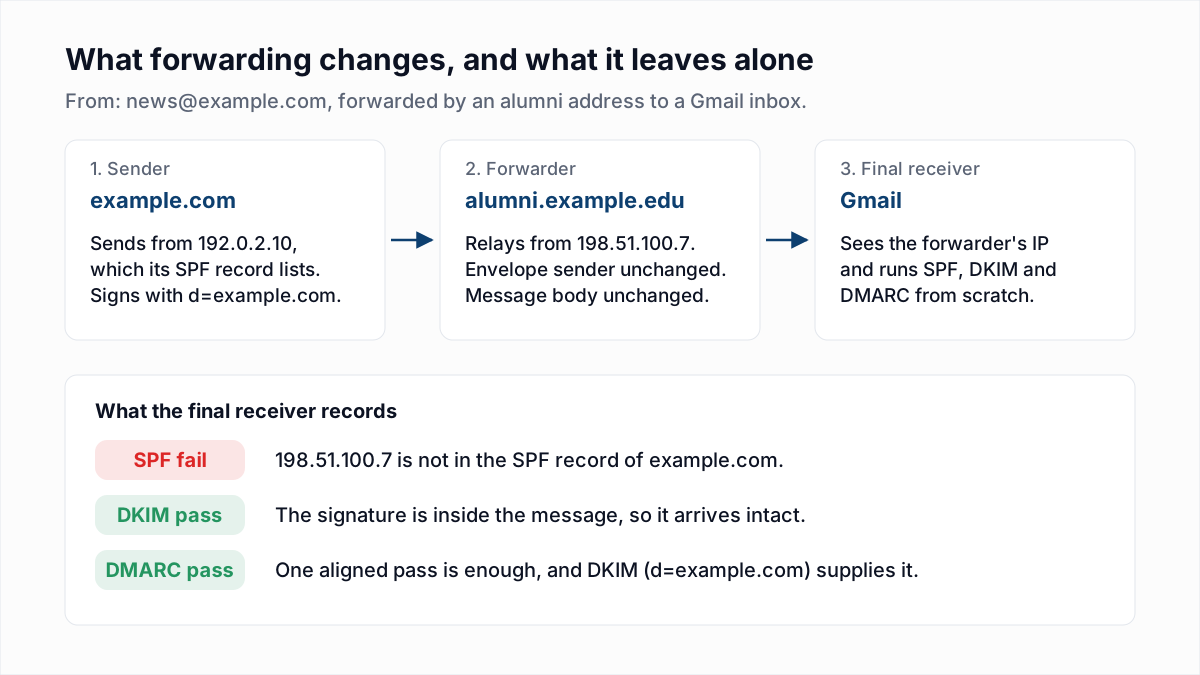
With ~all, the receiver accepts the message, checks DKIM, and DMARC passes. With -all, a receiver that acts on SPF first can refuse the message before DKIM is ever looked at. RFC 9989 section 7.1, the DMARC standard that replaced RFC 7489 in May 2026 (see what DMARC is), warns about exactly this: a -all could cause rejection "before any DMARC processing takes place." Which receivers do this is not published. The mechanics of forwarding, SRS and ARC are in why email forwarding breaks SPF and DMARC.
What do ?all and +all do?
SPF ?all returns neutral, which RFC 7208 section 8.2 says must be treated exactly like having no SPF record, and SPF +all returns pass for every server on the internet.
- ?all authorises your listed servers and says nothing about the rest. Microsoft's guide calls it a testing value and does not recommend it in production.
- +all lets anyone pass SPF as your domain. There is no legitimate use for it. A record with no
alland noredirectends in neutral by default, the same as?all.
What do SPF softfail and fail look like in email headers?
SPF softfail and fail appear in the Received-SPF header and in the spf= field of Authentication-Results, both added by the receiving server. The examples below are illustrative, written in the format Gmail uses.
A softfail from a forwarder, rescued by DKIM:
Received-SPF: softfail (google.com: domain of transitioning news@example.com
        does not designate 198.51.100.7 as permitted sender) client-ip=198.51.100.7;
Authentication-Results: mx.google.com;
        dkim=pass header.i=@example.com;
        spf=softfail smtp.mailfrom=news@example.com;
        dmarc=pass (p=REJECT) header.from=example.com
The same message when the record ends in -all and the receiver still accepts it:
Received-SPF: fail (google.com: domain of news@example.com
        does not designate 198.51.100.7 as permitted sender) client-ip=198.51.100.7;
Authentication-Results: mx.google.com;
        dkim=pass header.i=@example.com;
        spf=fail smtp.mailfrom=news@example.com;
        dmarc=pass (p=REJECT) header.from=example.com
When a receiver rejects on fail instead, there are no headers to read. The sender gets a bounce, and RFC 7208 section 8.4 gives this as the model reply:
550 5.7.1 SPF MAIL FROM check failed:To find these lines in a real message, see how to read email headers or paste the header into the email header analyzer.
When is -all the right choice?
SPF -all is the right choice for a domain that sends no email at all. The whole record is v=spf1 -all, and nothing legitimate can be caught by it because nothing legitimate is sent.
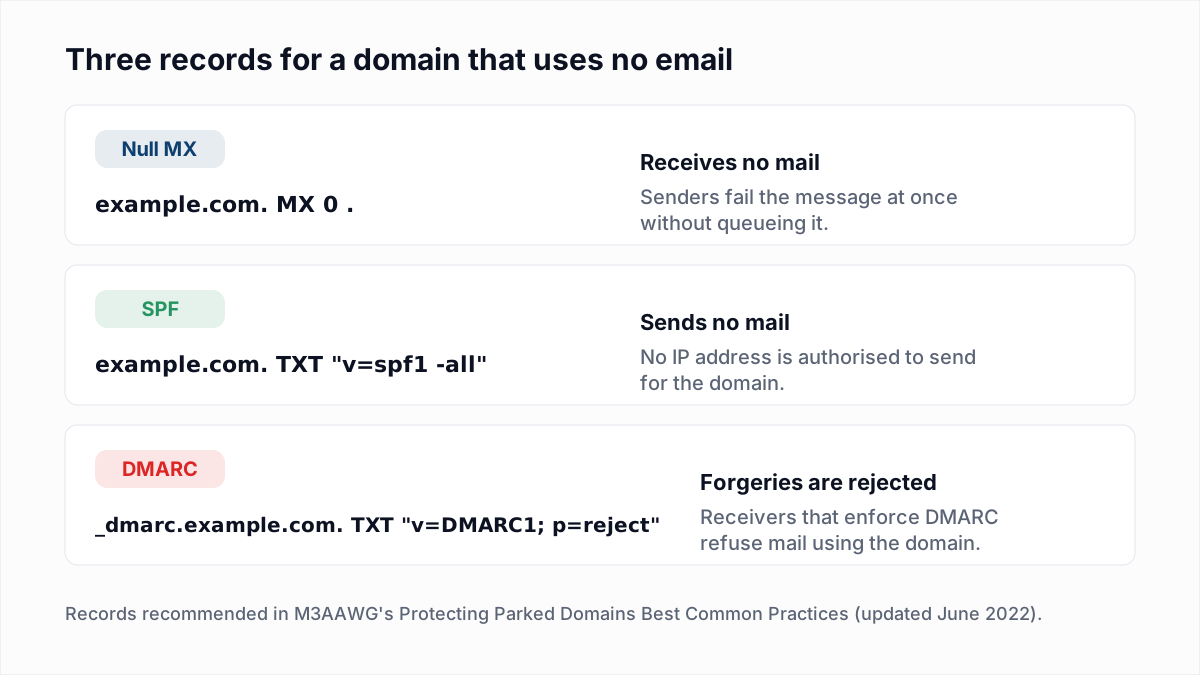
M3AAWG and Microsoft both give v=spf1 -all for parked domains, and M3AAWG tells receivers they may act on that exact record without waiting for DMARC. Add a DMARC record with p=reject, and a null MX if the domain receives nothing either (see null MX records). Subdomains do not inherit SPF, so DMARC is what covers names you never created.
-all is also defensible on a sending domain when every source is inventoried, every stream is DKIM-signed with an aligned domain, and the reports show nothing legitimate failing. Microsoft.com publishes -all. Google.com publishes ~all. Both were checked with dig on 13 November 2026.
Should I use ~all or -all?
Use ~all on any domain that sends mail and has DKIM and DMARC, and use -all on domains that send nothing. The table covers the cases in between.
| Your situation | Use | Why |
|---|---|---|
| The domain sends no email. | v=spf1 -all | Nothing legitimate can fail. Receivers may reject forgeries at once. |
| The domain sends mail, with DKIM and DMARC at quarantine or reject. | ~all | DMARC already blocks forgeries. Softfail lets forwarded mail reach the DKIM check. |
| The domain sends mail and DMARC is at p=none or missing. | ~all | You do not yet know every sender. A hard fail risks your own mail. |
| You are still adding or changing sending services. | ~all | A forgotten vendor softfails and is still delivered, where a hard fail may bounce it. |
| A security policy or auditor requires a hard fail. | -all | Acceptable once every stream is DKIM-signed and reports are clean. |
| The record ends in ?all, +all or has no all term. | Change to ~all | Neutral and pass-all give receivers nothing to act on. |
How do you move from ~all to -all safely?
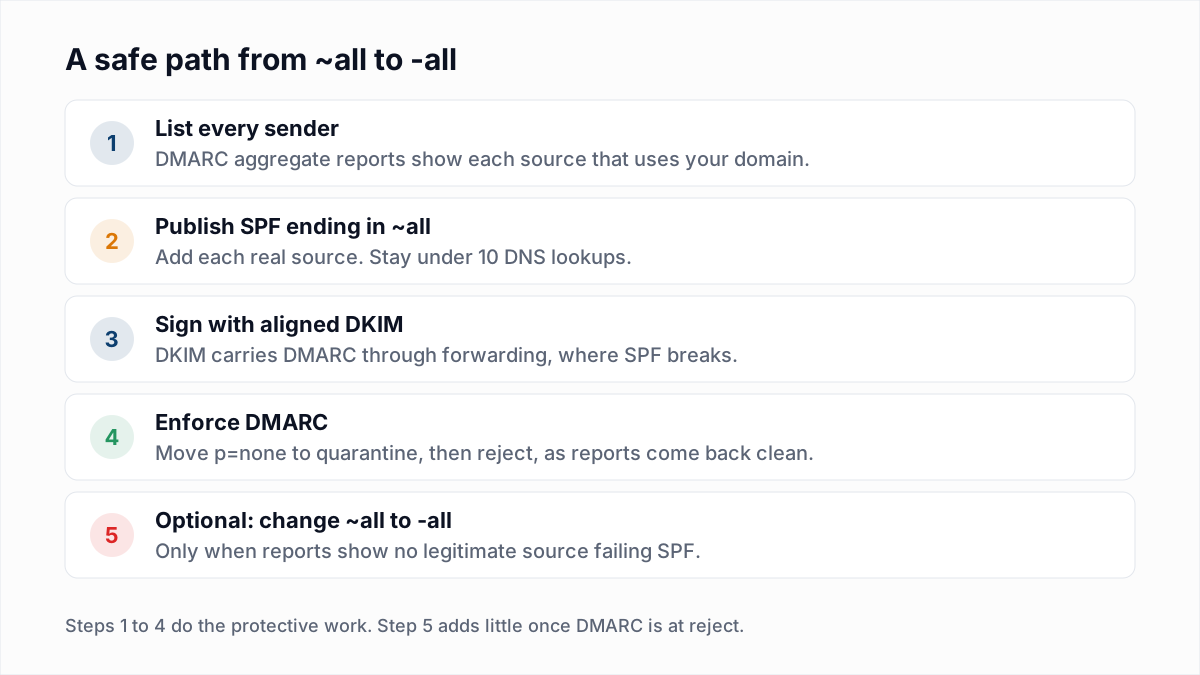
Move from ~all to -all only after DMARC reports show that every legitimate source passes SPF or DKIM. The order matters more than the final character.
- Publish DMARC at p=none with a reporting address. The DMARC generator writes the record.
- Read the aggregate reports for a few weeks. Every IP sending as your domain shows up with its SPF and DKIM results. How to read DMARC reports explains the format.
- Add each real source to the SPF record, still ending in ~all. Check the lookup count with the SPF checker, or rebuild the record with the SPF generator.
- Turn on aligned DKIM for every stream. DKIM is what keeps forwarded mail passing. Fixes for broken signatures are in DKIM fail: causes and fixes.
- Raise DMARC to quarantine, then reject. This step stops forgeries.
- Optionally change ~all to -all. Watch bounces and reports for two weeks. If forwarded mail starts bouncing with SPF errors, change it back. The change takes effect as fast as your DNS TTL.
What the SPF ending cannot fix
Neither ending improves inbox placement for mail that already passes. Receivers also weigh complaints, engagement and bounces, and a tidy SPF record does nothing for a list with dead addresses in it. That part is list quality. InboxSure checks syntax, MX records and the mailbox over SMTP without sending, and flags catch-all domains, role accounts and known disposable providers. Some providers refuse the check, and those addresses come back Unknown. The bulk email verifier takes a CSV, and the Free plan covers lists of up to 50 addresses with no card.
Frequently asked questions
Related reading
Ready to clean your email list?
Upload a CSV or XLSX and get every address marked deliverable, risky, undeliverable or unknown, with the reason. Free for lists of up to 50, no card. Nothing is sent to your contacts.