DKIM Fail: Causes and Fixes (Body Hash, Key, Alignment)
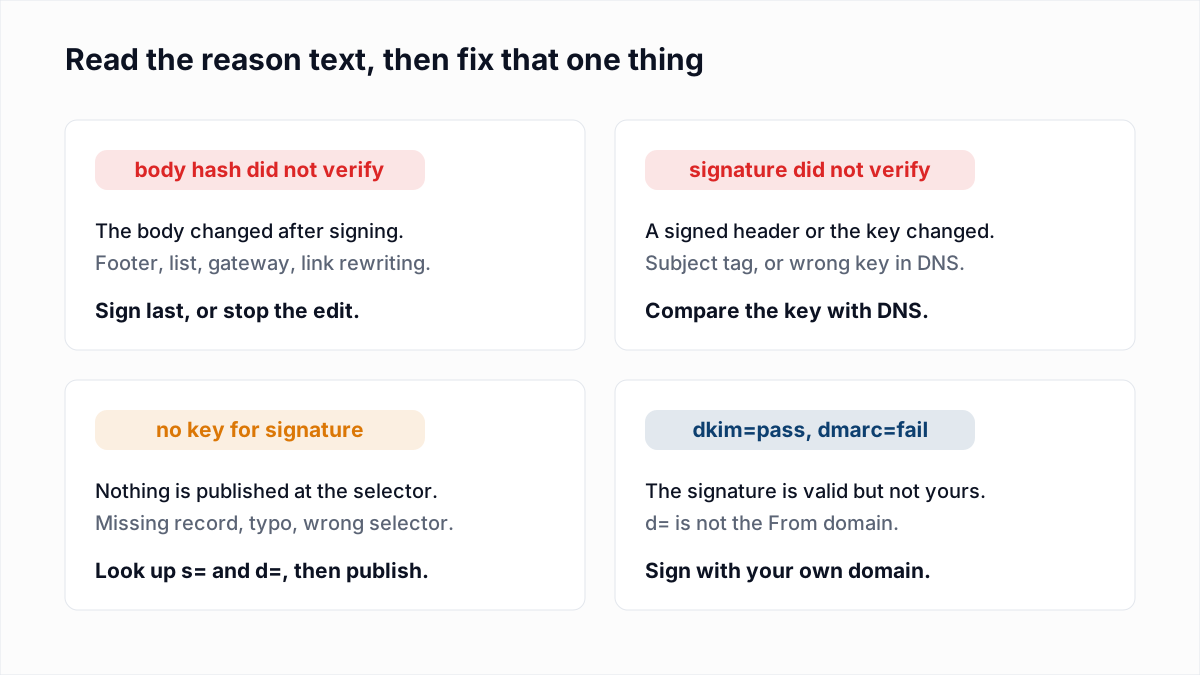
A DKIM fail is a verdict written by the receiving server: it found a DKIM-Signature header on your message and could not confirm it. The verdict sits in the Authentication-Results header, and the few words in brackets after it are the diagnosis. dkim=fail (body hash did not verify) and dkim=permerror (no key for signature) are different faults with different fixes, and neither one is fixed by regenerating keys at random.
This guide assumes you know what a signature and a selector are. If not, start with what DKIM is and how to set it up, then come back with a failing header in hand.
What do the DKIM results in Authentication-Results mean?
The DKIM result in Authentication-Results is one of seven values defined in section 2.7.1 of RFC 8601: none, pass, fail, policy, neutral, temperror and permerror. Only pass can count toward DMARC.
| Result | RFC 8601 meaning | What it usually points to |
|---|---|---|
dkim=pass | The message was signed and the signature passed verification. | Nothing is broken. Check that the signing domain is yours (see the last section). |
dkim=fail | The message was signed, but the signature failed the verification tests. | The body or a signed header changed, or DNS holds a different key. |
dkim=neutral | The signature had syntax errors or could not be processed. Also used for failures not covered elsewhere. | A malformed signature, or a receiver that reports ordinary failures this way. |
dkim=none | The message was not signed. | DKIM signing is switched off at the sending service, or a relay stripped the header. |
dkim=policy | The message was signed, but the receiver did not accept some aspect of the signature. | A local rule, such as a key the receiver considers too weak. |
dkim=temperror | A transient error, such as a temporary inability to retrieve the public key. | A DNS timeout. A later attempt may give a final result. |
dkim=permerror | An unrecoverable error, such as a required header field being absent. | A missing or unusable key record, or a broken signature header. |
Receivers do not agree on which value to use for the same fault. A missing key can show up as permerror, temperror, fail or neutral depending on who checked it, and a changed body is sometimes reported as neutral. The reason text is more consistent, because most verifiers reuse the strings from section 6.1 of RFC 6376. Diagnose from the reason, not the value.
What does "body hash did not verify" mean?
"Body hash did not verify" means the message body the receiver hashed is not the body your server signed, so the result no longer matches the bh= value in the signature. The key and DNS record are usually fine.
Something edited the message after signing. The usual suspects:
- An outbound gateway or relay that appends a legal disclaimer or signature block. Google's DKIM troubleshooting page names this case: some outbound gateways add a footer to every outgoing message.
- A mailing list that adds an unsubscribe footer.
- A security gateway on the receiving side that rewrites links or inserts an "external sender" banner before the mailbox server checks DKIM.
- A forwarder that converts the encoding or re-wraps lines. See how forwarding affects SPF, DKIM and ARC.
Simple versus relaxed canonicalization
Canonicalization is the normalization applied before hashing, set in the c= tag as header/body. RFC 6376 section 3.4 defines two modes. Simple body canonicalization ignores trailing empty lines and nothing else. Relaxed also strips whitespace at line ends and collapses runs of whitespace to one space. If c= is absent, both default to simple, which is why a signer with no c= setting fails on harmless whitespace changes.
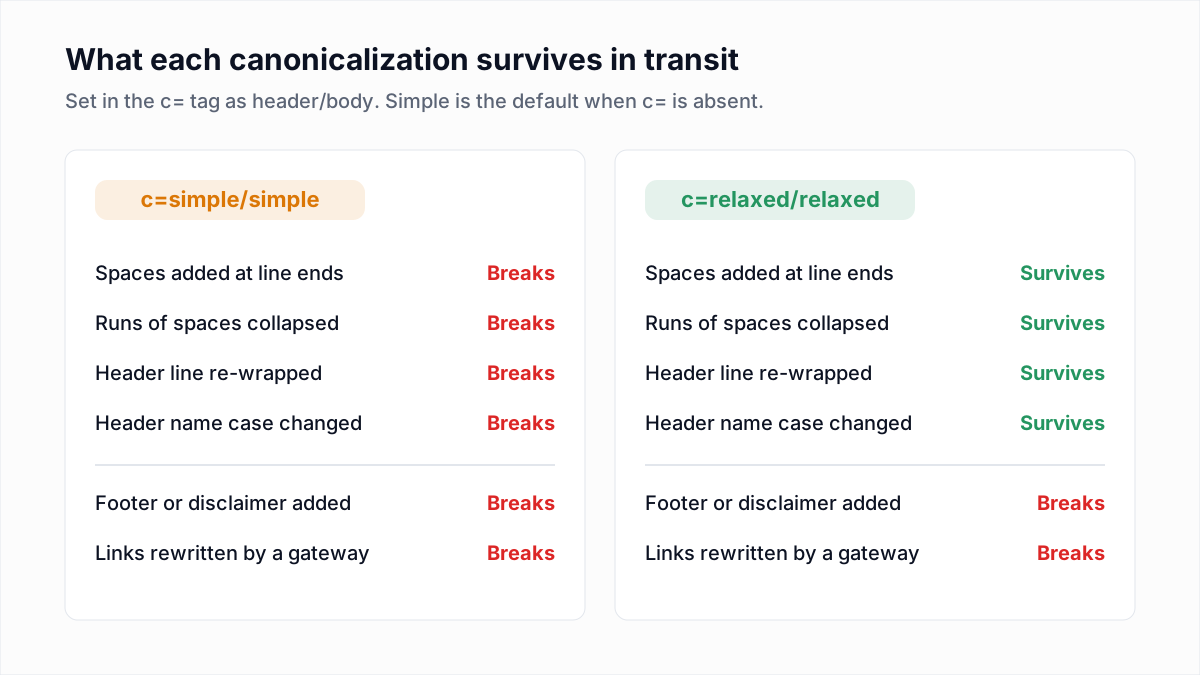
Fix: set c=relaxed/relaxed, then find the step that edits content. If it is yours, sign after it: have the gateway sign, or sign on the last server before the internet. If it is a list or forwarder you do not control, nothing on your side fixes that copy.
What does "signature did not verify" mean?
"Signature did not verify" means the body hash matched but the signature in b= does not check out against the signed headers and the public key in DNS. Either a signed header changed or the published key is not the pair of the signing key.
- A signed header changed. Every header named in
h=is covered. A list that prefixes the Subject with[list-name], a gateway that tags it[EXTERNAL], or a relay that rewrites From or re-encodes a non-ASCII Subject breaks the signature while leaving the body hash intact. - The wrong key is in DNS. Typical after a rotation where the signer moved to a new private key under the same selector, or when a key pasted into a DNS panel lost a character. The record is found and parses, but it does not match.
- Two TXT records exist at one selector, and the receiver picked the stale one.
Fix: compare the p= value from DNS, character for character, with the public key your sending service shows, and republish if they differ. Keep one record per selector. If only copies that went through a list or gateway fail, the cause is the header edit.
What does "no key for signature" mean?
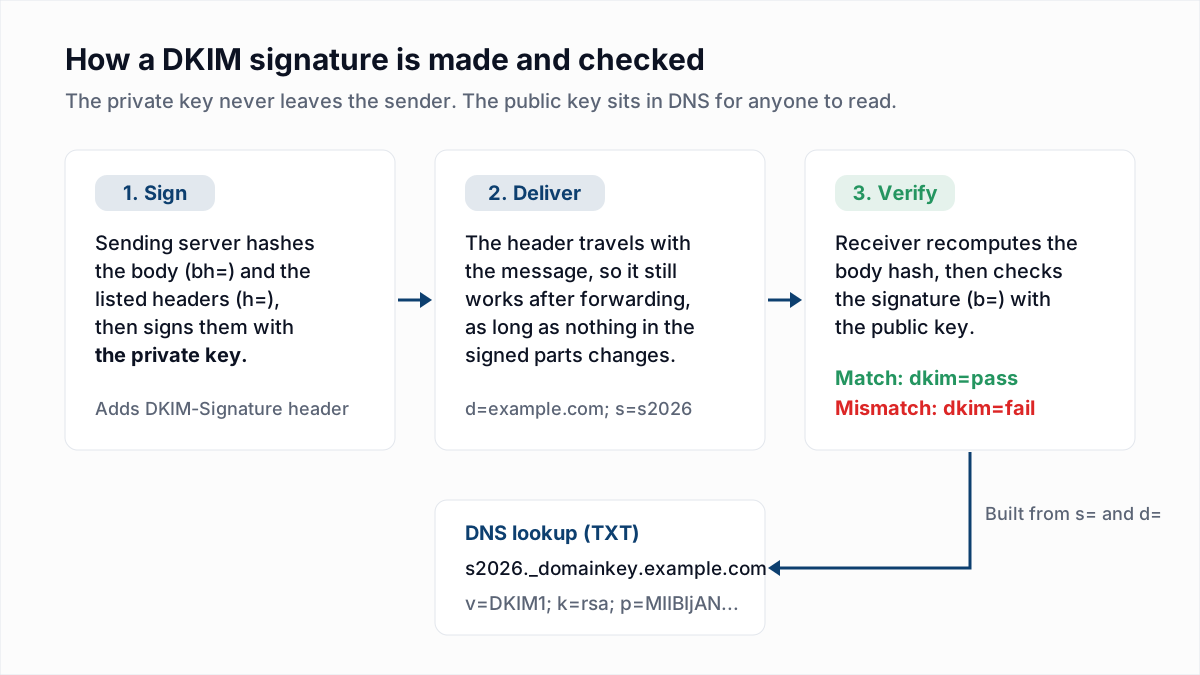
"No key for signature" means the receiver queried selector._domainkey.domain, built from the s= and d= tags, and DNS returned no record. RFC 6376 section 6.1.2 makes that a permanent failure.
The record was never published, was published under a different selector than the one the signer uses, or has a typo in its name. A common typo is a DNS panel that appends the domain to a name you already typed in full, producing s1._domainkey.example.com.example.com. A CNAME that points at a target the provider has not created yet ends the same way. The other key-related reasons are neighbours of this one:
| Reason text | Cause | Fix |
|---|---|---|
no key for signature | No record exists at the selector name. | Look up the exact name with the DKIM checker. Publish the record, or correct the host name or selector. |
key syntax error | The record exists but does not parse. A 2048-bit key is longer than the 255 characters one DNS string can hold, and Google's troubleshooting page warns the key "might be truncated" when entered as one string. | Split the value into quoted strings of 255 characters or fewer. Verifiers join them with no space between, so no character may be lost or added. |
key revoked | The record has an empty p=, which RFC 6376 defines as a revoked key. | Point the signer at a live selector, or publish a new key. |
key unavailable | The DNS query got no response. A temporary failure. | Usually clears on retry. If it repeats, check your DNS host. |
Key too short, or rsa-sha1 | RFC 8301 says verifiers must not treat signatures from RSA keys under 1024 bits as valid, and bans rsa-sha1. | Generate a 2048-bit key and sign with a=rsa-sha256. |
signature expired | The verification time is past the x= timestamp. | See the next section. |
Can a DKIM signature expire?
Yes, a DKIM signature can expire if it carries an x= tag. RFC 6376 says a signature may be considered invalid once the verification time is past that timestamp, and section 6.1.1 names the result "signature expired".
Expiry catches mail that was delivered late: held in a retry queue after a greylisting deferral, released from a quarantine days later, or signed by a server whose clock is wrong. If you see it, widen the expiry window to several days or stop setting x=, and check the signer's clock is synced.
Why is the l= tag a problem?
The l= tag tells the verifier to hash only the first N bytes of the body, so anything appended after that point is not covered by the signature. A footer no longer breaks DKIM, and neither does content added by an attacker.
Section 8.2 of RFC 6376 warns that signers should be "extremely wary" of the tag and that receivers may ignore signatures that use it. Google's troubleshooting page tells senders not to use it. It also causes plain failures: the value must not exceed the real body length, so a relay that shortens the body breaks the hash. Remove l= from your signer.
How do you diagnose a DKIM failure from the headers?
You diagnose a DKIM failure by reading two headers on a delivered copy: Authentication-Results for the verdict and DKIM-Signature for the selector, domain and options. Getting the raw headers is covered in how to read email headers.
Authentication-Results: mx.receiver.example;
  dkim=fail (body hash did not verify) header.d=example.com header.s=s2026;
  spf=pass smtp.mailfrom=bounce.example.com;
dmarc=pass header.from=example.com- Send a test from the affected system to a mailbox you control and open the raw headers, or paste them into the email header analyzer.
- Find the Authentication-Results header written by the receiving provider and read the
dkim=value and the reason in brackets. - Note
header.d=andheader.s=. Look up that selector and confirm a key is published and parses. - Count the DKIM-Signature headers. A message can carry several, each with its own result, and Google's page says Gmail checks only the first five.
- In the failing signature, read
c=,x=andl=. Simple canonicalization, a short expiry and a body length tag each explain a class of failure. - Send the same message direct, with no list or gateway in the path. If the direct copy passes, the signature is fine and something on the route edits the message.
- Check the scale. One failing recipient points at their gateway; every recipient failing points at your signer or DNS. DMARC aggregate reports show this per sending source.
Why does DMARC fail when DKIM passes?
DMARC fails despite dkim=pass when the domain in the signature's d= tag does not align with the domain in the From header. DKIM proves that some domain signed the message. DMARC asks whether it was yours.
Many email platforms sign with their own domain until you complete their domain authentication, so the header reads dkim=pass header.d=esp-vendor.com next to dmarc=fail header.from=example.com. The fix is to publish the platform's DKIM records under your domain so it signs as you (for two platforms, see authenticating your domain in Mailchimp and setting up a branded sending domain in Klaviyo). The alignment rules, relaxed and strict modes, and the SPF side are in why DMARC fails when SPF and DKIM pass, and the DMARC checker shows which mode your record asks for.
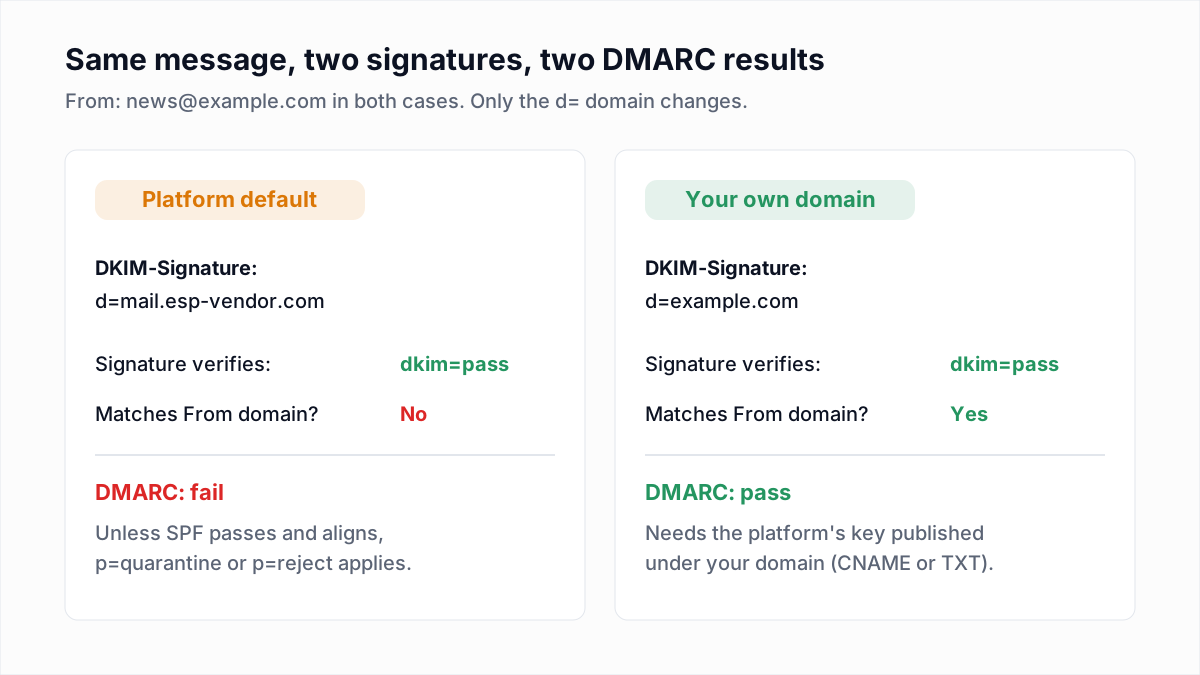
The reverse case is harmless. A message with one failing signature and one passing, aligned signature passes DMARC, because any single aligned pass is enough. The same holds for an aligned SPF pass, as in the header above.
What a DKIM fix does not cover
A clean dkim=pass proves who signed the message and that it arrived unaltered. It says nothing about whether the address you sent to exists. Hard bounces from dead mailboxes hurt sender reputation whatever the signature says, and that is a list problem. The InboxSure bulk email verifier checks syntax, MX records and each mailbox over SMTP without sending, and marks every address Deliverable, Risky, Undeliverable or Unknown. It does not test or repair authentication; the DKIM and DMARC checkers above do that part.
Frequently asked questions
Related reading
Ready to clean your email list?
Upload a CSV or XLSX and get every address marked deliverable, risky, undeliverable or unknown, with the reason. Free for lists of up to 50, no card. Nothing is sent to your contacts.