550 5.7.509 Access Denied: DMARC Reject at Microsoft 365
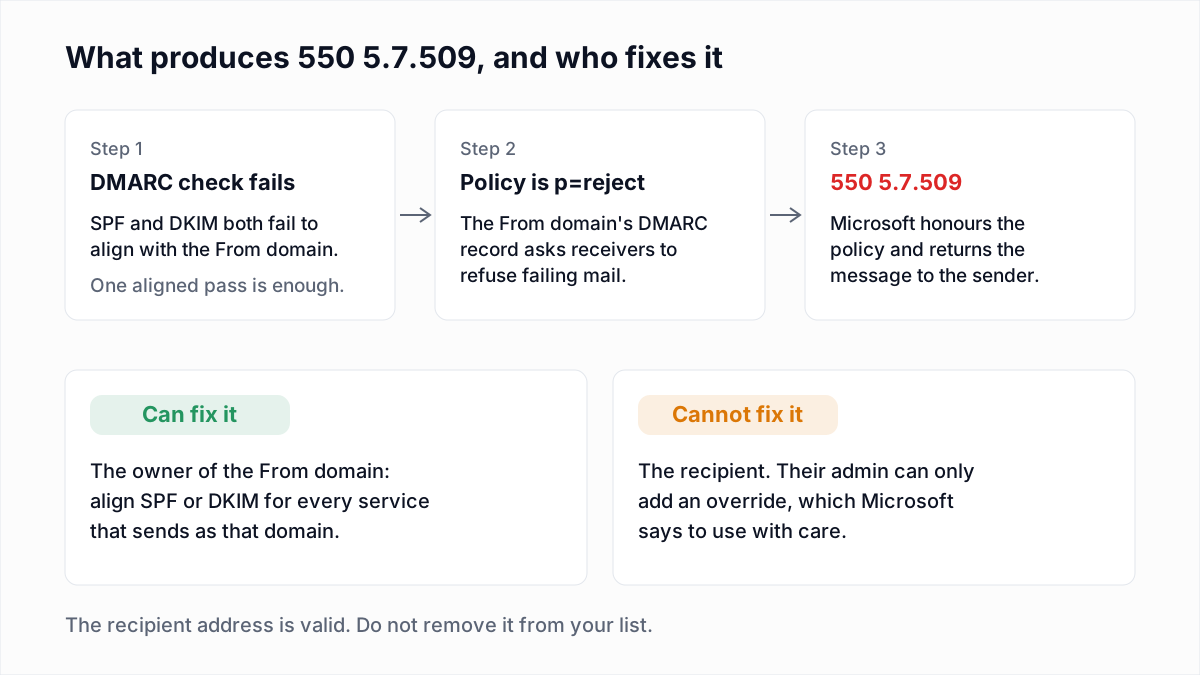
The recipient's address is fine. A 5.7.509 bounce is about the domain in your From line: Microsoft checked that domain's DMARC record, found p=reject, and did what the record asks. DMARC is a DNS record in which a domain owner tells receiving servers what to do with mail that uses the domain in the From address but cannot be tied to it through SPF or DKIM.
That makes this one of the few bounces where the receiver is following the sender's own instruction. This guide uses Microsoft's wording, as read on 13 November 2026. Other codes are in the email bounce codes hub.
What does 550 5.7.509 mean?
550 5.7.509 means Microsoft refused a message because the domain in its From address failed DMARC and that domain's DMARC policy is p=reject. Microsoft's Exchange Online NDR reference gives the text:
550 5.7.509 Access denied, sending domain [$SenderDomain] does not pass DMARC verification and has a DMARC policy of reject.The same reference describes the cause as "The sender's domain in the 5322.From address doesn't pass DMARC", and adds that the bounce arrives "because it failed DMARC, and the DMARC policy is set to reject all failures". The 5322.From address is the From header that people see, not the envelope sender; the difference is explained in Return-Path explained.
One inconsistency to know about: the summary table in Microsoft's DMARC configuration article lists the p=reject outcome as "Rejected during SMTP (550 5.7.1)", while the NDR reference and Microsoft's announcement both give 5.7.509. Match on the words "does not pass DMARC verification" as well as the code.
When did Microsoft start rejecting mail that fails DMARC with p=reject?
Microsoft announced the change on 19 July 2023, in the Exchange Team post Announcing New DMARC Policy Handling Defaults for Enhanced Email Security, last updated 26 July 2023. The post covers two services:
- Consumer mailboxes (outlook.com, hotmail.com, live.com): Microsoft says it now honours the sender's DMARC policy and rejects mail that fails with
p=rejectorp=quarantine. - Microsoft 365 tenants: the default is to honour the sender's policy, rejecting or quarantining as the domain owner specified. Admins can change the action in the anti-phishing policy. Message Center post MC640228 gave customers until mid-August 2023 to adjust before enforcement.
The post does not describe how p=reject was handled before, so we do not characterise the earlier behaviour here. It does state one condition: the default applies when the recipient domain's MX record points to Microsoft 365. If another filtering service sits in front, the policy is honoured only when Enhanced Filtering for Connectors is enabled.
Who has to fix 550 5.7.509?
The owner of the sending domain has to fix 550 5.7.509, because the failed check and the reject policy both belong to the domain in the From address. The recipient did nothing and can change nothing on your side.
If you send from your own domain, that is you or your DNS administrator. If you send as someone else's domain, for example a client's address through your CRM, the client's administrator has to authorise your platform. Microsoft's NDR reference says the same: "The user should contact their email administrator".
How do you tell whether SPF or DKIM alignment failed?
Read the Authentication-Results header that Microsoft includes in the bounce, and compare the smtp.mailfrom and header.d domains with header.from. Microsoft's NDR reference says the headers are included "in the NDR email message that's returned to the original sender". This example is from Microsoft's DMARC article:
Authentication-Results: spf=pass (sender IP is 198.51.100.10)
  smtp.mailfrom=bounces.adatum.com; dkim=pass (signature was verified)
  header.d=adatum.com; dmarc=fail action=oreject
  header.from=contoso.com;compauth=fail reason=000
SPF passed and DKIM passed, yet DMARC failed, because both passes were for adatum.com and the From domain is contoso.com. DMARC needs only one of the two to pass for the From domain. Microsoft documents action=oreject as the value for a sender that published p=reject.
| Header field | What it must match | If it does not |
|---|---|---|
smtp.mailfrom | The From domain, or a subdomain of it under relaxed alignment. | SPF is not aligned, even when spf=pass. |
header.d | The From domain, or a subdomain of it under relaxed alignment. | DKIM is not aligned, even when dkim=pass. |
spf= and dkim= | Each should read pass. | Fix the record itself first: the SPF include or the DKIM key. |
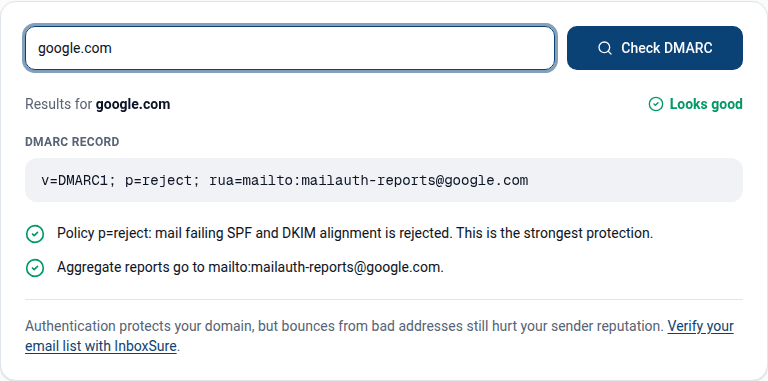
Paste the headers into the email header analyzer to have them split out, confirm the published policy with the DMARC checker, and test the selector from the signature with the DKIM checker.
What causes 550 5.7.509?
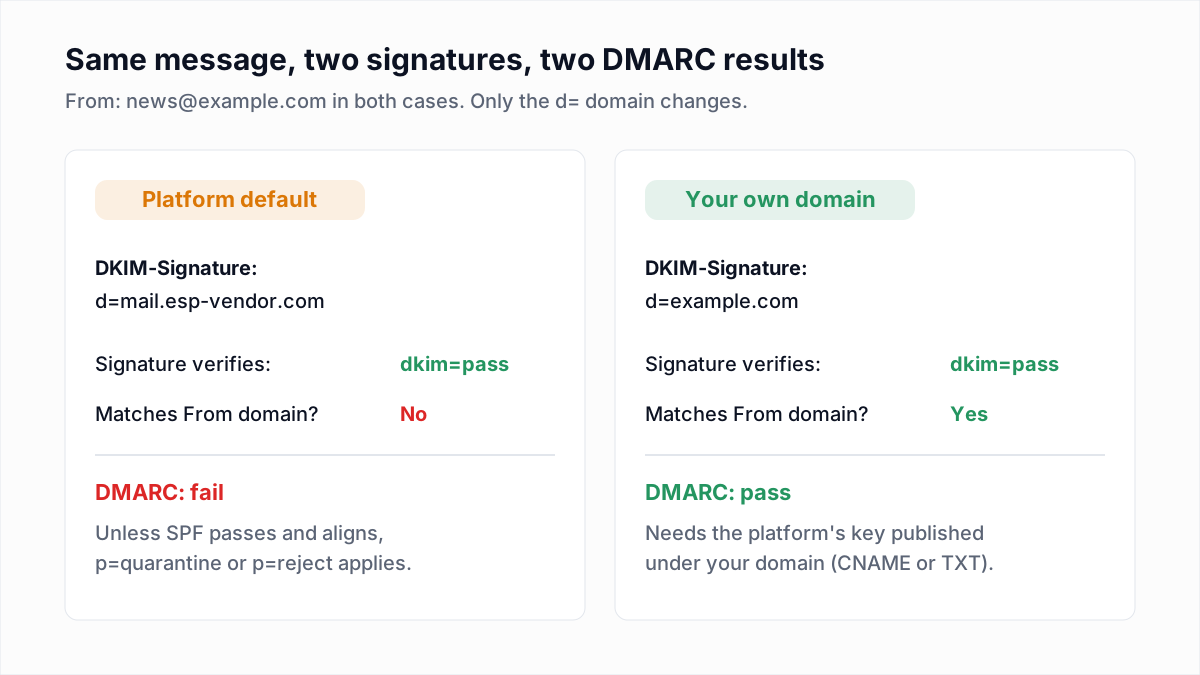
550 5.7.509 is caused by a message whose SPF and DKIM results both fail to align with a From domain that publishes p=reject. The cases below follow the scenarios in Microsoft's DMARC troubleshooting tables.
| Cause | Evidence in the headers | Fix |
|---|---|---|
| A platform sends as your domain with its own MAIL FROM and DKIM domain. | spf=pass and dkim=pass, both for the platform's domain. | Turn on custom DKIM signing with your domain, or a custom MAIL FROM. |
| A sending service is missing from SPF and does not sign. | spf=fail or softfail, dkim=none. | Add the service to SPF and configure DKIM. |
| Custom-domain DKIM is not set up in Microsoft 365, so mail is unsigned or signed for the tenant's onmicrosoft.com domain, and SPF does not cover Microsoft 365. | dkim=none, or header.d ends in onmicrosoft.com, and spf= is not pass. | Enable DKIM signing for the custom domain and add Microsoft 365 to its SPF. |
Strict alignment (aspf=s or adkim=s) with a subdomain sender. | The domains share a parent but are not identical. | Use relaxed alignment, or make the domains match exactly. |
| The message was forwarded or passed through a mailing list. | spf=fail for the forwarder's IP; dkim=fail if the body changed. | Sign with aligned DKIM; the forwarder or recipient handles the rest. |
| Someone is spoofing your domain. | An IP you do not recognise, and no bounce reaches you. | Nothing. The policy is working. |
Fixes for each record type are in DMARC fail: causes and fixes and DKIM fail: causes and fixes.
Why does forwarded or mailing-list mail bounce with 5.7.509?
Forwarded and mailing-list mail bounces with 5.7.509 because the forwarder sends from its own IP, which fails SPF for your domain, and any change to the subject or body breaks the DKIM signature. Microsoft's DMARC article says of forwarding: "Forwarding changes envelope sender; DKIM signature might break", and that DKIM "survives forwarding if body isn't modified".
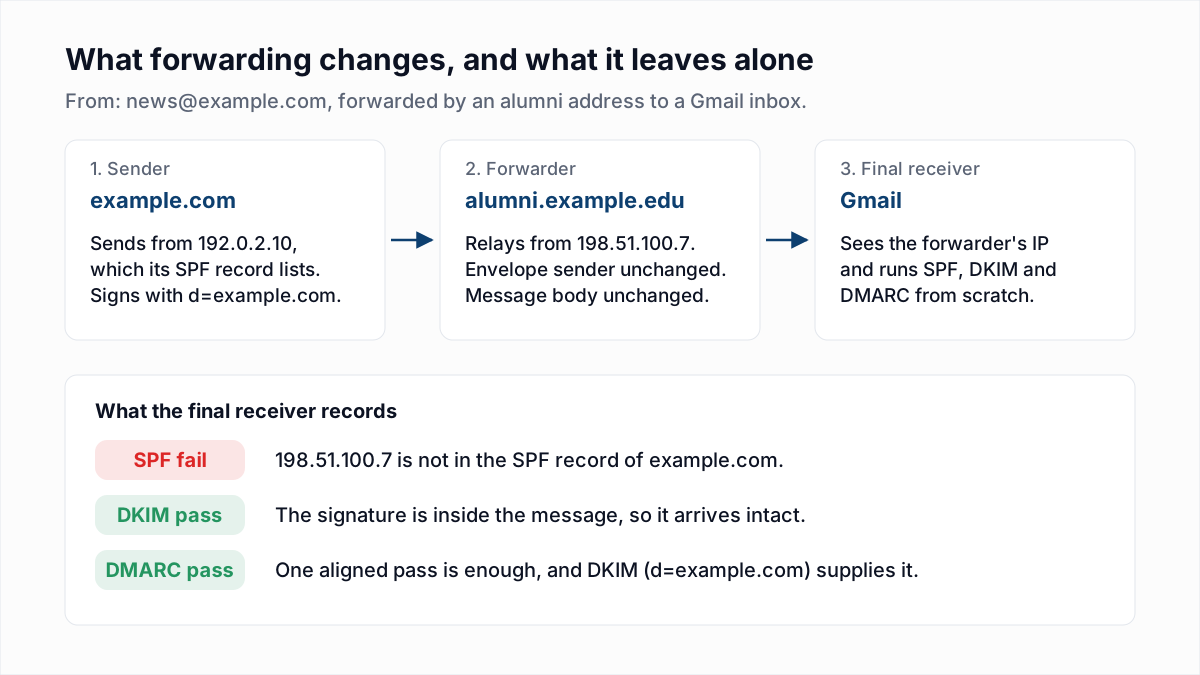
As the sender you control one thing: sign every message with DKIM for the From domain. A list that adds a footer breaks the signature anyway, and Microsoft's article describes those failures as "Normal for forwarded mail". The mechanics are in email forwarding, SPF, DKIM and ARC.
Why do shared mailbox and send-on-behalf messages get 5.7.509?
Shared mailbox and send-on-behalf messages get 5.7.509 when the address in the From header belongs to a domain that the sending system is not authenticated for. DMARC evaluates the From header only, so a Sender header naming the delegate does not help.
- Shared mailbox on a second domain. If the tenant has custom DKIM for its main domain but not for the domain the shared mailbox uses, the signature does not align: Microsoft's alignment table marks
user@contoso.comwithcontoso.onmicrosoft.comas a fail under both relaxed and strict alignment. The message then depends on SPF alone, and fails if that domain's SPF record does not include Microsoft 365. - On behalf of another organisation. An assistant, agency or ticketing tool that puts a client's address in From is sending as the client's domain. Only the client can add that system to SPF or delegate a DKIM key.
- Redirects. Microsoft lists "Shared mailbox or distribution group" as a scenario where "DMARC fails intermittently" because a redirect changes the envelope addresses.
How do you fix 550 5.7.509 as the sender?
Fix 550 5.7.509 by making either SPF or DKIM pass for the exact domain in your From address, on every system that sends as that domain.
- Keep the bounce. Copy the Authentication-Results header and the sending IP.
- Identify the sending system from the IP and the
smtp.mailfromdomain: your mail server, CRM, help desk or invoicing tool. - Set up DKIM for your domain in that system and publish the records it gives you. This is the fix that also survives forwarding.
- Align SPF where the platform allows it with a custom MAIL FROM on a subdomain, and include the platform in that subdomain's SPF record.
- Send a test to a Microsoft 365 mailbox and confirm
dmarc=pass. - Read your aggregate reports for other sources still failing; see how to read DMARC reports.
- Resend. The recipients were never the problem.
If many legitimate sources are failing, moving the record to p=quarantine or p=none stops the rejections while you fix them, at the cost of spoofing protection. The trade-off is in DMARC policy: none, quarantine and reject.
What can the recipient's admin do about 5.7.509?
The recipient's Microsoft 365 admin can override the rejection for a specific sender, but Microsoft advises fixing the sender first. Its DMARC article carries a caution: "Be careful when overriding p=reject for legitimate senders", and lists three approaches:
- Configure the intermediary as a trusted ARC sealer, which Microsoft marks as preferred.
- Create a mail flow rule with specific conditions: sender IP plus sender domain.
- Add an allow entry in the Tenant Allow/Block List, which Microsoft describes as temporary, expiring in 30 days.
Microsoft's anti-phishing policy documentation shows the setting behind the code: "Honor DMARC record policy when the message is detected as spoof", where the action for p=reject can be "Reject the message" or "Quarantine the message". On trusted ARC sealers, Microsoft's ARC article warns that a compromised vendor "could pass spoofed messages through your authentication checks". A recipient admin who declines to add an override is following that advice.
How is 5.7.509 different from 5.7.515 and 5.7.26?
550 5.7.509 is a DMARC failure against a p=reject policy at any volume, 550 5.7.515 is Outlook.com's rejection of high-volume senders that do not meet its authentication requirements, and 550 5.7.26 is Gmail's code for unauthenticated mail.
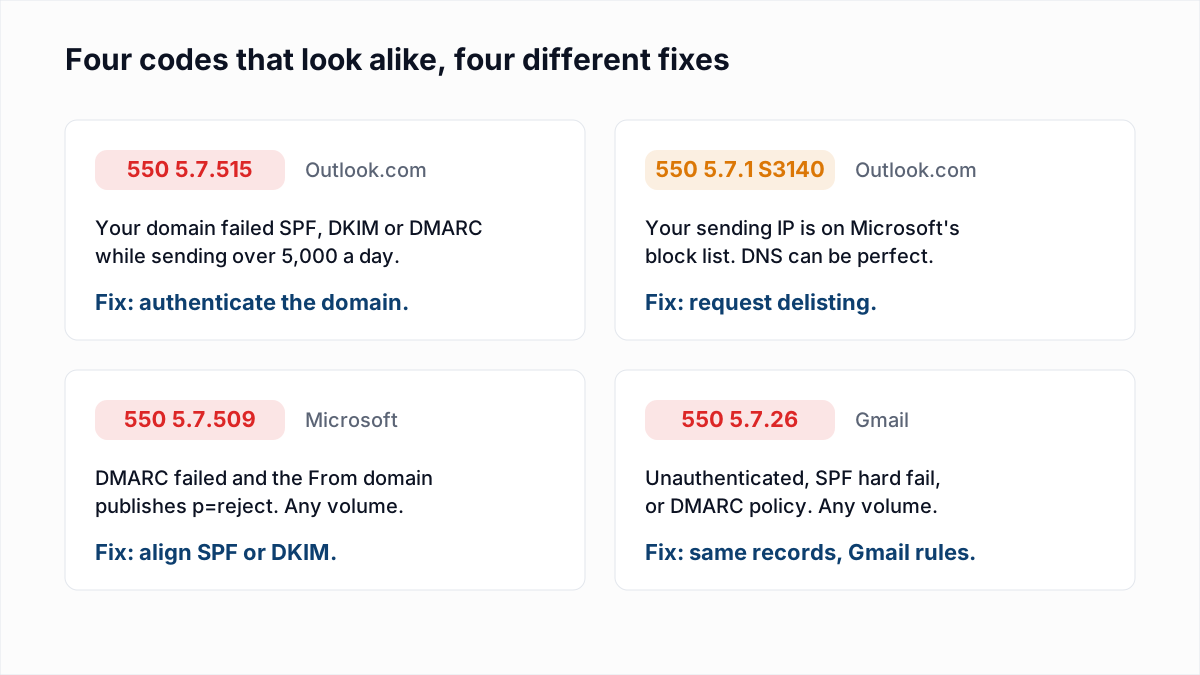
- 5.7.515 can hit a domain whose policy is only
p=none, because Outlook.com's rule for domains sending over 5,000 messages a day is about passing SPF and DKIM and publishing DMARC, not the policy chosen. See 550 5.7.515 explained. - 5.7.26 is Gmail's equivalent. Google's SMTP error reference words the DMARC variant as "Unauthenticated email from domain-name is not accepted due to domain's DMARC policy". The same alignment fix clears both; see 550 5.7.26 explained.
- 5.7.1 with an S-code is an IP block, covered in Outlook 550 5.7.1.
Email verification does not fix or predict 550 5.7.509. InboxSure checks whether a mailbox exists; this bounce is about your domain's authentication, and the addresses that returned it should stay on your list. Use the free DMARC checker to confirm your record, then resend once a test message shows dmarc=pass.
Frequently asked questions
Related reading
Ready to clean your email list?
Upload a CSV or XLSX and get every address marked deliverable, risky, undeliverable or unknown, with the reason. Free for lists of up to 50, no card. Nothing is sent to your contacts.