How to Clean Your SendGrid Contacts and Suppressions
SendGrid keeps two separate things that people call "the list". Suppressions are addresses Twilio SendGrid will not send to, and they apply to every email the account sends. Contacts are the people stored in Marketing Campaigns, and they are what the Marketing Campaigns plan is sized on. A suppression stops the send. It does not delete the contact.
A suppression is a sending platform's decision to stop sending to an address (more in email suppression list). Every menu name below was checked against the Twilio SendGrid docs and support site on 13 November 2026, and each page is named and linked next to the step.
What are the suppression types in SendGrid?
Twilio SendGrid has six suppression types: blocks, bounces, invalid emails, spam reports, global unsubscribes and group unsubscribes. The table in Twilio's Suppressions doc says who rejected the message and whether SendGrid keeps suppressing the address.
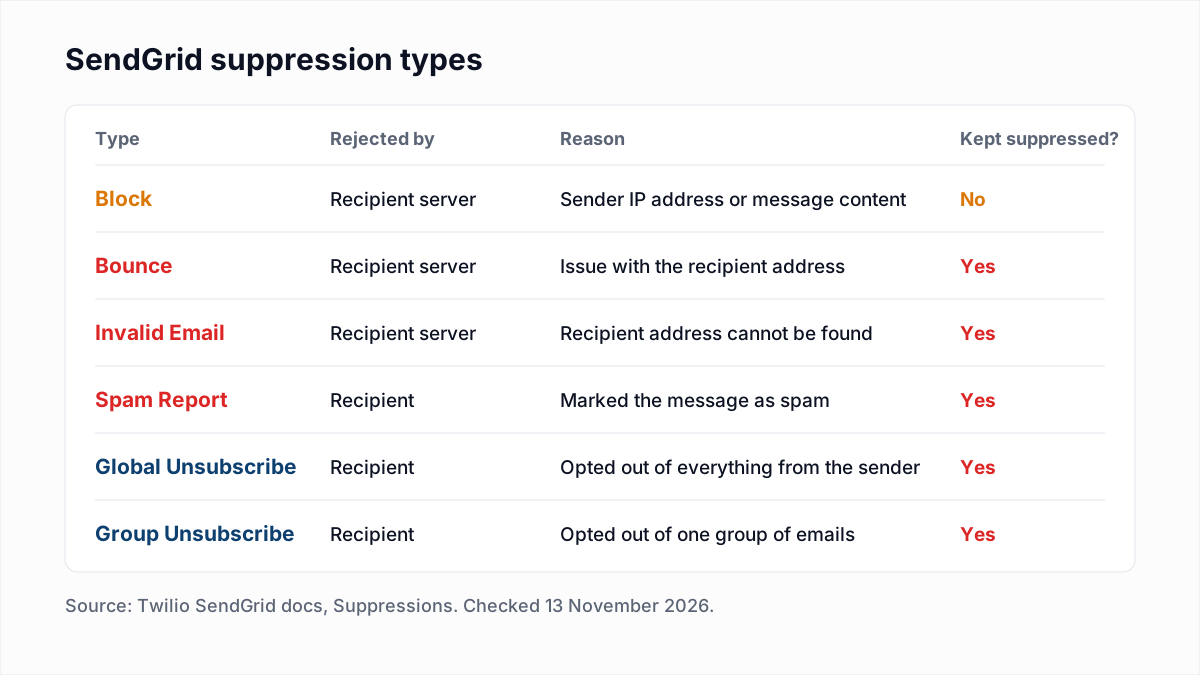
| Suppression | What Twilio's docs say it means | What to do |
|---|---|---|
| Bounce | The receiving mail server rejected the message. Common causes are "a misspelled or nonexistent email address". | Delete the contact, or fix the address in your own database. |
| Invalid email | The address syntax is wrong, or the address "doesn't exist at the recipient's mail server." | Delete the contact. Fix typos at the source. |
| Block | The provider rejected the message because of the sending IP address or the content. The address is not added to a suppression list. | Keep the contact. Read the block reason and fix the sender-side cause. |
| Spam report | The recipient marked the message as spam. | Delete the contact and never re-add it. |
| Global unsubscribe | The recipient opted out of everything the sender sends. | Leave the suppression in place. Delete the contact. |
| Group unsubscribe | The recipient opted out of one group of emails. | Keep the contact for the groups it still wants. |
The same page warns: "Each email you attempt to send to a suppressed address consumes one credit from your account."
What is the difference between a bounce, a block and an invalid email in SendGrid?
In SendGrid, a bounce and an invalid email both mean a problem with the recipient address and both stay suppressed, while a block means a problem with the sender's IP address or content and is not suppressed.
- Twilio's Manage bounced messages doc: "When the receiving mail server rejects a sent message, a bounce occurs." If you ask SendGrid to send to an address on the bounce list again, it suppresses the message.
- Twilio's Invalid email addresses doc says a destination that cannot find the address returns
550: Requested action not taken: mailbox unavailable, and that Twilio keeps reports of invalid addresses for 30 days. - Twilio's Manage blocked messages doc lists three causes: your IP address is on a deny list, an ISP blocked your IP address, or a filter flagged the content. It adds: "A block event will not result in the recipient address being added to a suppression list."
So a block is a sender problem, and the place to start is a blacklist check. Deleting an entry from the bounce list does not repair the address either: the bounces doc says that after removal "Twilio allows you to send email to that recipient" again, and the next send bounces again. The SMTP codes behind all of this are in our email bounce codes reference.
How does contact count affect a SendGrid Marketing Campaigns plan?
A SendGrid Marketing Campaigns plan includes a monthly contact allotment, and both contacts stored and contacts uploaded count toward it. The rules are in SendGrid support's Marketing Campaigns (New) Contact Storage article, updated 12 October 2026:
- Counts reset on the first day of the month at midnight UTC. Any contacts stored at that moment count toward the new month.
- Deleting contacts during a month does not lower that month's count. In the article's example, deleting all 200 contacts in the third month still counts 200.
- "If you delete a contact and re-add them, that is counted as a new add."
- Updating or adding data on a contact that already exists "will not count as a new add."
Two things follow. Delete dead contacts before the month turns over, not after. And do not clean by deleting everyone and re-uploading the good ones, because the re-upload counts as new adds. Twilio's Billing doc adds that Email API sending "doesn't impact your Marketing Campaigns package plan", so transactional-only accounts have no contact count to manage.
How do you clean SendGrid Marketing Campaigns contacts step by step?
Cleaning SendGrid Marketing Campaigns contacts means exporting a contact list, verifying the file outside SendGrid, uploading the results into a custom field, and building a segment for each result. The click paths come from Twilio's Manage contacts doc.
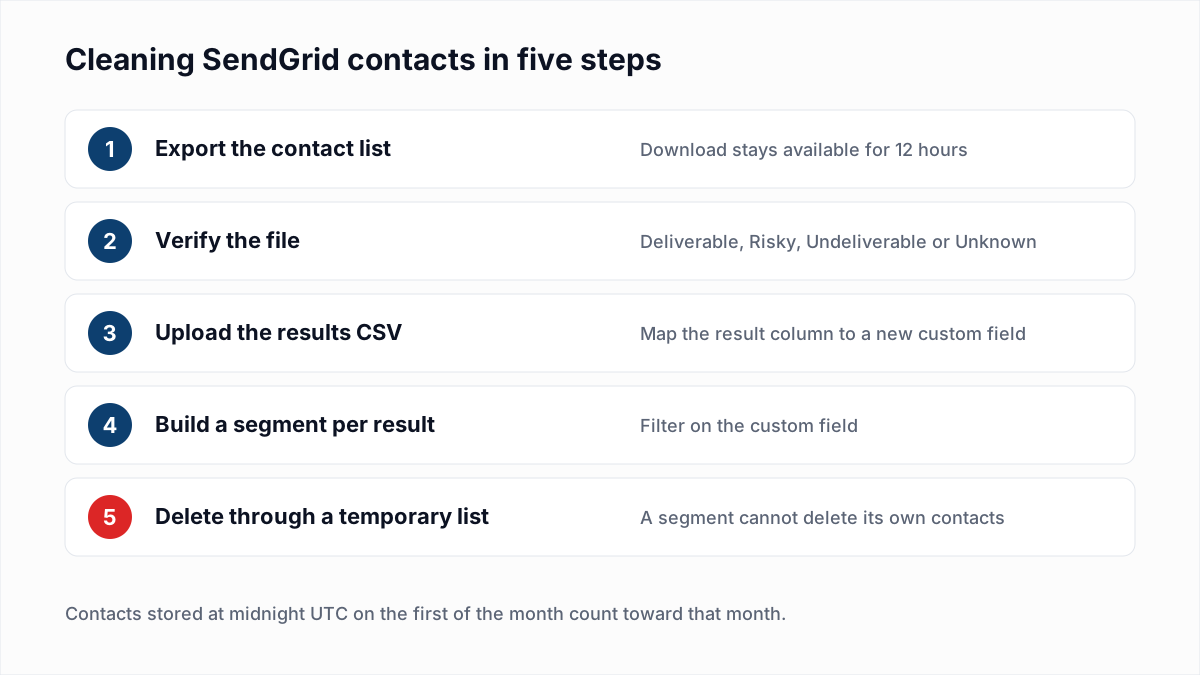
- Export the contacts. Go to Marketing, then Contacts, click the Action menu next to the list and click Export. SendGrid emails you when the file is ready; click Download CSV on the Active Exports page. The doc says the file can be downloaded for 12 hours.
- Verify the file. Upload the CSV to a verifier such as the InboxSure bulk email verifier. InboxSure checks syntax, DNS and MX records and the mailbox itself over SMTP without sending an email, then returns a CSV with a result for every address. The Pro plan takes lists of up to 10,000 addresses each, so split a larger export into several files.
- Upload the results. Trim the results file to two columns, email and result. Go to Marketing, then Contacts, and from the Add Contacts menu select Upload CSV. Choose All Contacts, upload the file and click Next: Review CSV Upload. For the result column click Create New Custom Field and name it
verification_resultas a Text field (Twilio's Custom fields doc allows only letters, numbers and underscores in field names). Click Next: Add Contacts. SendGrid de-duplicates contacts that already exist, so each row updates the stored contact. - Build a segment per result. Following Twilio's Segmenting your Contacts doc: in Marketing, then Contacts, click the Create dropdown, then New Segment. Name it, choose Segment all contacts, pick
verification_resultas the field, is as the operator andUndeliverableas the value, then click Save Segment. Use the Risky and Unknown segments as exclusions on sends where you want to be careful. - Delete the undeliverable contacts. SendGrid support's Deleting Contacts in a Segment article confirms a segment only offers to delete itself, not its contacts. The documented workaround: upload the Undeliverable rows again, this time choosing Add Contacts to a new list with an obvious name such as "contacts to delete". Then open that list's Action menu, select Delete This List and pick the option that begins Delete this list and permanently delete all.
Test steps 3 and 5 with a five-row file first.
What should you do with each verification result in SendGrid?
Each verification result maps to one SendGrid action: keep Deliverable contacts, delete Undeliverable ones, exclude Risky ones from cold or bulk sends, and re-check Unknown ones.
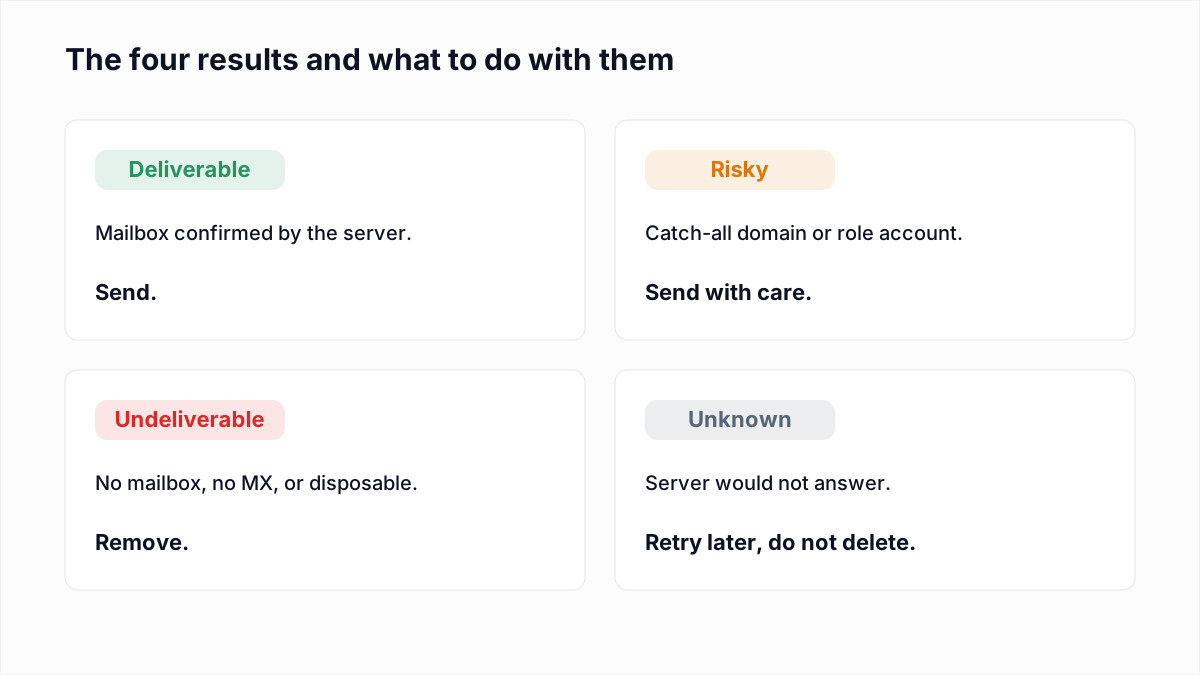
| InboxSure result | What it means | What to do in SendGrid |
|---|---|---|
| Deliverable | The mail server confirmed the mailbox exists. | Keep. No action. |
| Undeliverable | The mailbox does not exist, the domain has no MX record, the syntax is bad or the domain is disposable. | Delete through a temporary list (step 5), before the first of the month. For transactional mail, flag the address in your own database. |
| Risky (catch-all) | The domain accepts every address, so the mailbox cannot be confirmed. | Keep in a segment. Send to contacts with a recent open or click; exclude the rest from large Single Sends. |
| Risky (role account) | A shared mailbox such as info@ or sales@. | Keep for receipts and account email. Exclude from marketing unless it signed up. |
| Unknown | The server would not give a clear answer. | Keep, re-verify in a few days, and do not delete on an Unknown. |
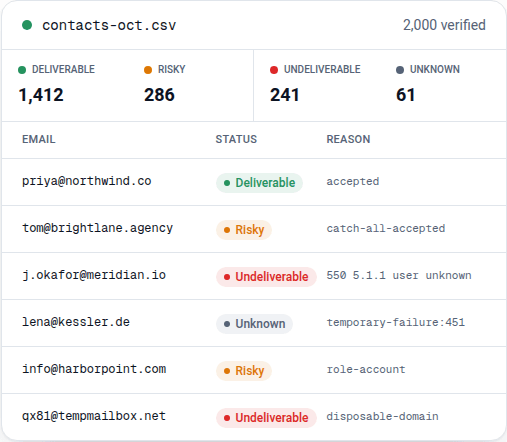
One honest limit: Yahoo, AOL, Outlook.com and Hotmail addresses come back Unknown from InboxSure today, because in our tests on 4 November 2026 those providers refused the check before the mailbox could be tested (full results here). On a consumer list, expect a large Unknown group.
How do you delete suppressed contacts in SendGrid?
Suppressed contacts in SendGrid are deleted by exporting every suppression list, uploading the merged file as a new contact list, and deleting that list with its contacts. The Manage contacts doc says of suppressed addresses: "You can and should delete these email addresses from your lists."
Its procedure: click Suppressions, and for every link under it click the gear-wheel Action menu and select Export CSV. Merge the files outside SendGrid, then upload and delete the merged file the same way as step 5 above, choosing Skip Column for extra columns such as reason. Leave the blocks file out of the merge: those addresses are not dead.
How do transactional senders clean a list in SendGrid?
Transactional senders on the SendGrid Email API clean the source database, because the recipient addresses live in their own application and not in SendGrid. There is no contact list to export. What SendGrid holds is the suppression lists.
- Export the Bounces and Invalid Emails lists as CSV and mark those users in your database, so your app stops asking SendGrid to send to them. Each suppressed attempt still consumes a credit.
- Export the users you have not emailed recently, verify the file, and flag the Undeliverable ones before the next announcement to all users.
- Prompt flagged users for a new address at their next login. Do not delete an account over an email result.
Does SendGrid have its own email validation?
Yes, Twilio SendGrid sells an Email Address Validation API, and it is available to Email API Pro and Premier accounts only. Twilio's Email Address Validation Overview describes two modes: a real-time API that validates one address per request, and a bulk API that takes a CSV of up to one million addresses and emails the results.
The real-time overview says each response carries a verdict of Valid, Risky or Invalid, a score from 0 to 1, and a list of checks: address syntax, MX or A record, suspected disposable address, suspected role address, known bounces through a SendGrid account, and suspected bounces from a machine learning model. It also suggests fixes for domain typos.
How that compares, stated plainly. SendGrid's validation is an API, so it can sit behind a signup form; InboxSure has no API today and works on uploaded lists only. SendGrid's documented checks include its own bounce history and a prediction model; InboxSure asks the recipient's mail server about the mailbox at the time of the check, and does not correct typos. For checks at signup on Pro or Premier, use SendGrid's API. To check a file without writing code, a list verifier fits better. The difference between the two terms is in email verification vs validation.
Keep SendGrid contacts clean
Run the clean before the month turns over and before any large Single Send; the schedule by list type is in how often to clean your email list, and what to do with people who exist but never open is in our email sunset policy guide.
InboxSure is a flat price, so repeat passes cost nothing extra: the Free plan verifies lists of up to 50 addresses with no card, and Pro is $49 a month for any number of lists of up to 10,000 addresses each, with no credits. The export and upload steps are summarised on the SendGrid integration page. There is no native sync: you export a CSV, verify it, and upload the results as shown above.
Frequently asked questions
Related reading
Ready to clean your email list?
Upload a CSV or XLSX and get every address marked deliverable, risky, undeliverable or unknown, with the reason. Free for lists of up to 50, no card. Nothing is sent to your contacts.