550 5.2.1 Error: Mailbox Disabled or Inactive
One caveat before anything else: the digits 5.2.1 do not always mean a disabled mailbox. Gmail uses the same code for a mailbox that is receiving mail too fast, which is a reason to wait, not a reason to delete the contact. The words after the code decide what you do, so this guide goes through each wording, where it comes from and the action it calls for.
550 5.2.1 is an SMTP rejection that says the mailbox exists but is not accepting messages. All the other codes are in the email bounce codes reference.
What does 550 5.2.1 mean?
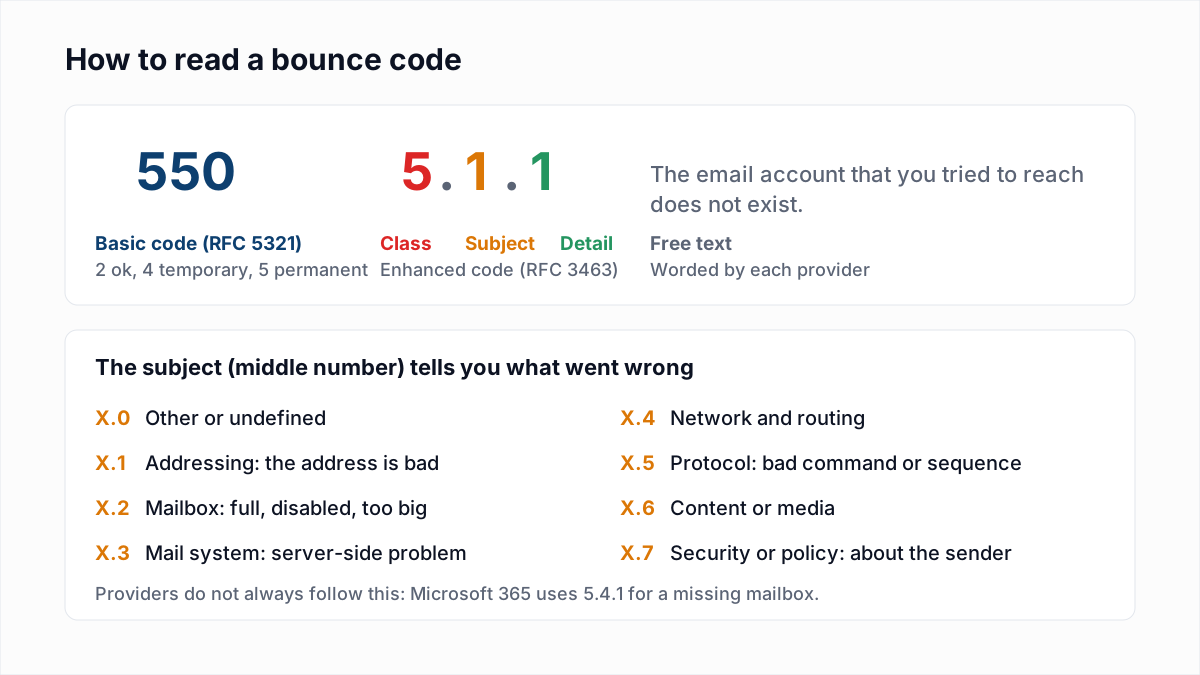
550 5.2.1 means the receiving server recognised the address and refused the message because the mailbox behind it is switched off, suspended or inactive. The reply has three parts.
- 550 is the basic SMTP code for a permanent refusal. Your mail server stops trying and sends you a bounce.
- 5.2.1 is the enhanced status code: class 5 (permanent), subject 2 (mailbox), detail 1. RFC 3463 names X.2.1 "Mailbox disabled, not accepting messages" and defines it as: "The mailbox exists, but is not accepting messages. This may be a permanent error if the mailbox will never be re-enabled or a transient error if the mailbox is only temporarily disabled."
- The text is written by each provider and is the part to read.
What do Gmail, Microsoft and Yahoo say for 5.2.1?
Gmail is the only one of the three whose public error reference documents a 5.2.1 for a closed mailbox. The rows marked "verbatim" are copied from the provider's own page, read on 13 November 2026. Rows marked "typical wording" are replies senders commonly report that the provider does not document.
| Provider | Reply | Status of the wording |
|---|---|---|
| Gmail / Google Workspace | 550 5.2.1 The email account that you tried to reach is inactive. | Verbatim from Google's SMTP error reference. |
| Gmail / Google Workspace | 550 5.2.1 The email account that you tried to reach is disabled. | Typical wording. Google's reference does not list it as of November 2026, though the "inactive" row links to a help page tagged DisabledUser. |
| Gmail / Google Workspace | 550 5.2.1 The user you are trying to contact is receiving email at a rate that prevents additional messages from being delivered. | Verbatim from Google's reference. A rate limit, not a closed mailbox. |
| Gmail / Google Workspace | 450 4.2.1 The user you are trying to contact is receiving email too quickly. Please resend your message at a later time. | Verbatim from Google's reference. The temporary form uses class 4. |
| Microsoft 365 (Exchange Online) | No 5.2.1 entry | Microsoft's Exchange Online NDR reference has no 5.2.1 row. Its nearest entries are receive limits: 5.2.121 and 5.2.122, "Recipient's per hour message receive limit exceeded". |
| Exchange Server (on-premises) | 5.2.1 Content Filter agent quarantined this message | Verbatim from Microsoft's Exchange Server NDR list. A content verdict, not a disabled mailbox. |
| Yahoo Mail | 554 delivery error: ... This account has been disabled or discontinued | Typical wording. Yahoo's Sender Hub lists no 5.2.1 and documents only 553 and 554 as permanent errors. |
| Other mail servers | 550 5.2.1 Mailbox disabled, not accepting messages or 550 5.2.1 Mailbox unavailable | Typical wording. Each server's administrator can change the text. |
Sources: Google's SMTP error reference, Microsoft's Exchange Online NDR reference and DSNs and NDRs in Exchange Server, and Yahoo's SMTP error codes. The table shows three unrelated meanings behind one code: a closed mailbox, a busy mailbox and a quarantined message. A bounce rule that matches on "5.2.1" alone will get two of them wrong.
Is 550 5.2.1 a permanent error?
550 5.2.1 is permanent for the message you sent, because a 5xx reply ends delivery and your server will not retry. Whether the mailbox is closed for good is a separate question, and RFC 3463 says openly that it can go either way.
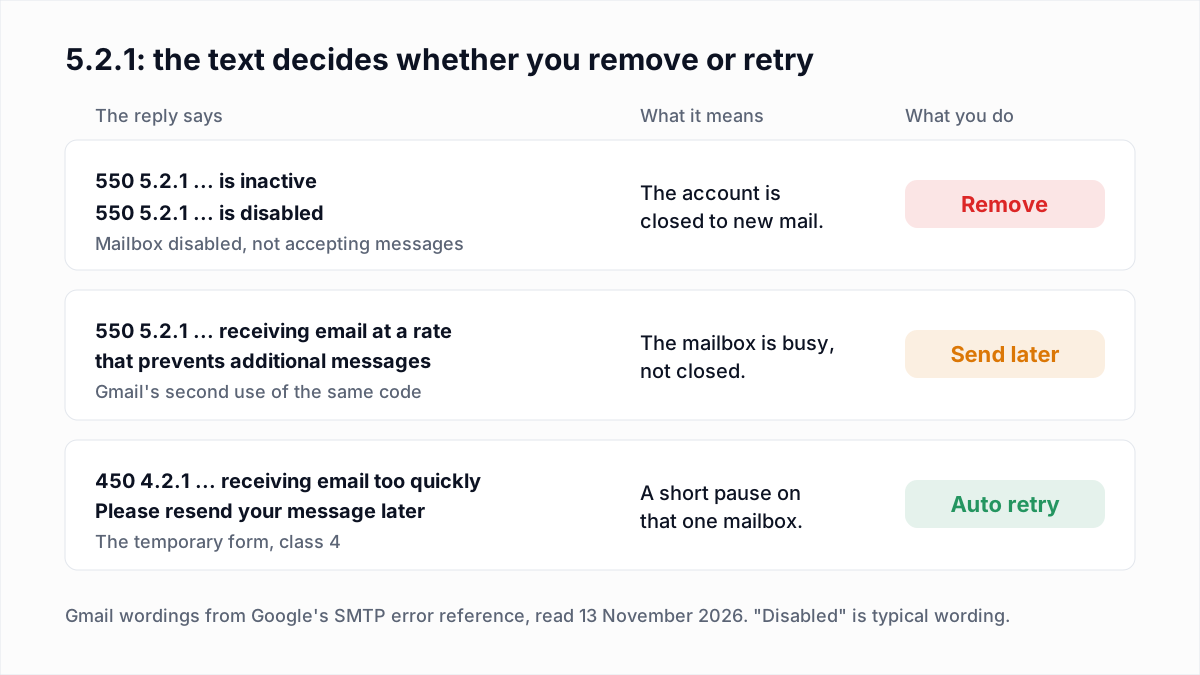
For a mailing list, work through it in this order.
- Read the text. "Inactive", "disabled", "suspended" or "not accepting messages" means a closed mailbox. A sentence about a receiving rate means a busy one.
- Closed mailbox: stop sending. Suppress the address from campaigns after the first bounce. Nobody is reading the mailbox, and each further attempt is one more hard bounce on your record.
- Busy mailbox: send again later. Wait a day before resending. If you are the one sending many messages to that single address, such as automated alerts, slow them down.
- If the person matters, use another channel. A suspended account can be restored, so ask a customer or colleague for their current address before you write them off.
- Keep the suppression record. Deleting the row lets the same address come back in with the next import.
The broader rules for sorting bounces are in soft bounce vs hard bounce. 5.2.1 with closed-mailbox wording belongs on the hard side.
Why is a mailbox disabled or inactive?
A mailbox returns 5.2.1 when the account still exists in the provider's directory but someone, or some policy, has turned mail delivery off. The usual reasons are these.
- An administrator suspended the user. Google's Workspace help page on suspending a user says that for a suspended account "New email and calendar invitations are blocked", that the data is not deleted, and that the admin "can restore the account at any time". The page does not name the SMTP code senders receive.
- The person left the company. Many organisations suspend a leaver's account first and delete it weeks or months later. On B2B lists this is the common story: 5.2.1 now,
5.1.1once the account is removed. - The provider closed the account. Accounts are disabled for abuse, unpaid subscriptions or terms violations. Google notes that when it suspends an account itself, "email might still be delivered, depending on the context of the suspension".
- The owner stopped using it. Consumer providers can deactivate accounts after long inactivity. Google's two-year policy for personal accounts is covered in our 552 5.2.2 mailbox full guide.
None of these is caused by your sending. A 5.2.1 says nothing about your authentication, your IP or your content, unlike the 5.7.x family.
What is the difference between 5.2.1, 5.1.1 and 5.2.2?
5.1.1 means the mailbox does not exist, 5.2.1 means the mailbox exists but is closed to mail, and 5.2.2 means the mailbox exists and is in use but has run out of storage. The first two end the same way for a marketer; the third does not.
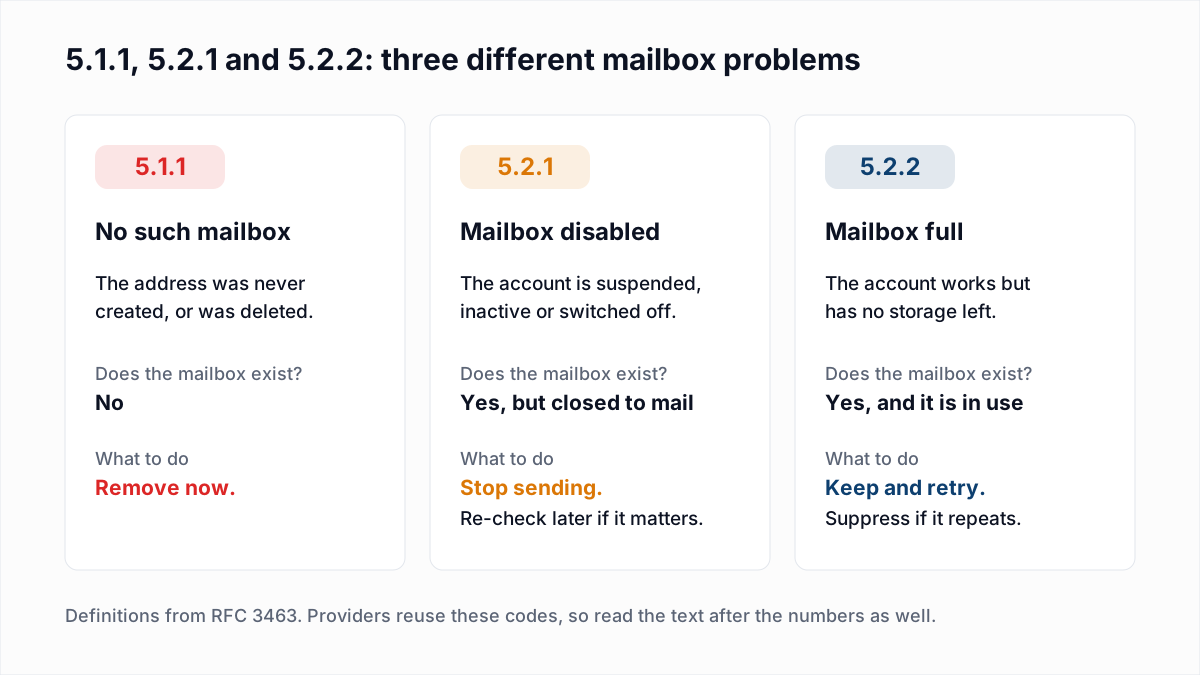
| Code | RFC 3463 name | Can the address work again? | List action |
|---|---|---|---|
| 550 5.1.1 | Bad destination mailbox address | No, unless someone creates the mailbox again. | Remove at the first bounce. |
| 550 5.2.1 | Mailbox disabled, not accepting messages | Sometimes. An admin or the provider can re-enable the account. | Suppress at the first bounce; re-verify later if the contact is valuable. |
| 552 5.2.2 | Mailbox full | Yes, as soon as the owner frees space. | Keep; suppress only when the bounce repeats for weeks. |
Microsoft 365 does not fit this table: it answers a missing mailbox with 550 5.4.1, and its error reference has no entry for a disabled one.
Can an email verifier see 550 5.2.1 before you send?
An email verifier can see 550 5.2.1 before you send whenever the mail server returns it at RCPT TO, because that is the last step a verifier performs before disconnecting. No message is sent. How that step works is explained in how email verification works without sending an email.
Here is what InboxSure's verifier does with these replies. It classifies on the basic code and the wording, not on the digits 5.2.1.
- A
550atRCPT TOwith closed-mailbox wording is reported as Undeliverable, with the server's reply as the reason. - A temporary
450or451, including Gmail's450 4.2.1, is reported as Unknown, because the server did not give a clear yes or no. - Gmail's permanent rate reply is also a
550, so it would be reported the same way as a closed mailbox. Read the reason column: if a 550 talks about a receiving rate, check that address again the next day.
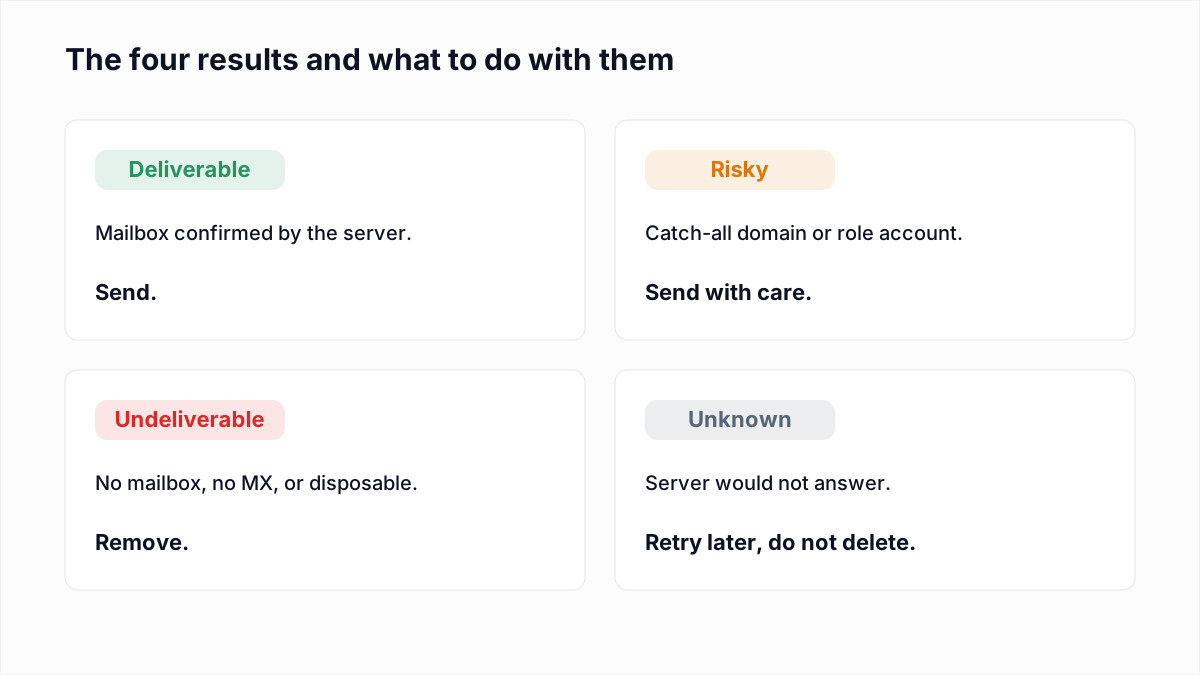
Two limits apply. Yahoo, AOL, Outlook.com and Hotmail refused InboxSure's check before RCPT TO in our 4 November 2026 research, so addresses there come back Unknown whatever state the mailbox is in. And a result is a snapshot: an account suspended the day after you verify will still bounce, which is one of the cases in why a verified email bounced.
What should you do for each 5.2.1 wording?
Match the wording in your bounce to a row below and take the action in the last column. Google's reference gives the wording but no explanation, so the meanings and actions here are our reading and guidance.
| Wording in the bounce | Meaning | Action |
|---|---|---|
550 5.2.1 The email account that you tried to reach is inactive | The Google account exists but is no longer active. | Suppress the address now. Do not retry. |
550 5.2.1 ... is disabled (typical wording) | The account was suspended by an admin or closed by the provider. | Suppress now. For a valued contact, ask for a new address another way. |
550 5.2.1 ... receiving email at a rate that prevents additional messages | The Gmail mailbox is over its receiving rate. The mailbox is open. | Keep the address. Resend the next day and reduce how often you mail it. |
450 4.2.1 ... receiving email too quickly | A temporary version of the same receiving limit. | Do nothing. Your mail server or sending platform retries on its own. |
550 5.2.1 Mailbox disabled, not accepting messages or Mailbox unavailable (typical wording) | A self-hosted or smaller provider has switched the mailbox off. | Suppress now. Re-verify in a few months if the contact matters. |
5.2.1 Content Filter agent quarantined this message | An on-premises Exchange server quarantined the message for its content. | Keep the address. Review the message and ask the recipient's admin. |
| The same 5.2.1 for every address at one company | Probably an outage, migration or licensing lapse on their side. | Wait a few days and re-verify before removing anyone. |
Find closed mailboxes before your next send
A disabled mailbox costs you a hard bounce every time you mail it, and where the server answers at RCPT TO, a check before sending catches it. InboxSure checks syntax, MX records and the mailbox over SMTP without sending an email, and returns Deliverable, Risky, Undeliverable or Unknown for each address as a CSV. The Free plan covers lists of up to 50 addresses with no card, and Pro is $49 a month for lists of up to 10,000. Check one address in the free email verifier, or run a whole list through the bulk email verifier.
Frequently asked questions
Related reading
Ready to clean your email list?
Upload a CSV or XLSX and get every address marked deliverable, risky, undeliverable or unknown, with the reason. Free for lists of up to 50, no card. Nothing is sent to your contacts.